
How to Fix LangChain AgentExecutor Not Calling Tools
AgentExecutor's verbose trace shows it choosing a tool, then the chain just finishes - no error, no tool result. Here's why, and the five-check fix.
TL;DR: AgentExecutor "reasons" about a tool but never calls it when the model was never given tool-calling capability (missing bind_tools()) or the emitted tool name doesn't exactly match a registered tool - no exception is raised in either case.
This failure is easy to miss because nothing crashes. The verbose=True trace shows an Action: line, the chain prints Finished chain, and the response is either empty or a hallucinated answer that never touched the tool. Most existing write-ups on "AgentExecutor not calling tools" actually describe a different bug - a parsing exception from the legacy ReAct loop - which is a separate output parsing error with its own fix. As of LangChain's 2026 agents documentation, AgentExecutor and create_tool_calling_agent remain supported alongside the newer LangGraph-based agent runtime, so this fix still applies to current versions.
Why does AgentExecutor decide on a tool but never run it?
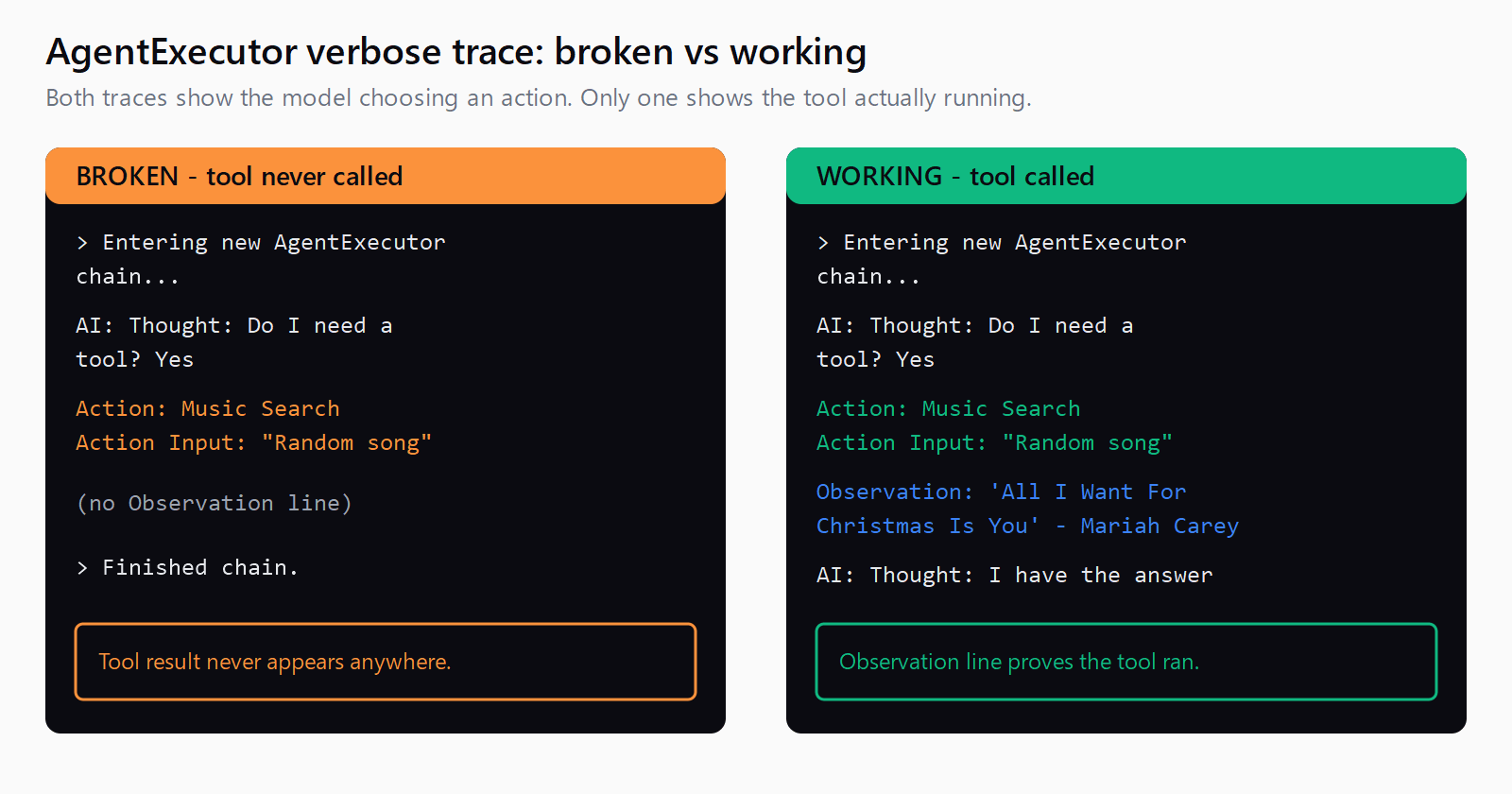
A closed GitHub issue from the LangChain repo reproduces the exact shape of this bug: the trace shows the model choosing an action and an input, then the chain simply finishes without a tool result.
> Entering new AgentExecutor chain...
AI: Thought: Do I need to use a tool? Yes
Action: Music Search
Action Input: "Random song"
> Finished chain.
Two root causes produce this pattern. First, per LangChain's current agents documentation, create_tool_calling_agent() only works when the underlying chat model has been given native tool-calling capability through .bind_tools(). If the model was constructed without that step - or a completion-style model was passed in by mistake - the model can only emit plain assistant text, so AIMessage.tool_calls is always empty and AgentExecutor has nothing to invoke. Second, the tool name the model emits has to match a registered tool's name exactly; a case mismatch or trailing whitespace in a dynamically generated tool name means AgentExecutor can't resolve the action to a callable, and it falls through to returning the raw text instead of raising.
How do you confirm the model is actually tool-calling capable?
Call the chat model directly, outside the agent wrapper, and inspect the raw response before assuming the fault is in AgentExecutor:
response = model.bind_tools(tools).invoke(messages)
print(response.tool_calls)
An empty list here means the model never attempted a tool call - the agent framework isn't the problem. A populated list with a name field that doesn't match any string in your tools list confirms the second cause: a name mismatch between what the model emits and what got registered.
How do you fix AgentExecutor when it stops without calling the tool?
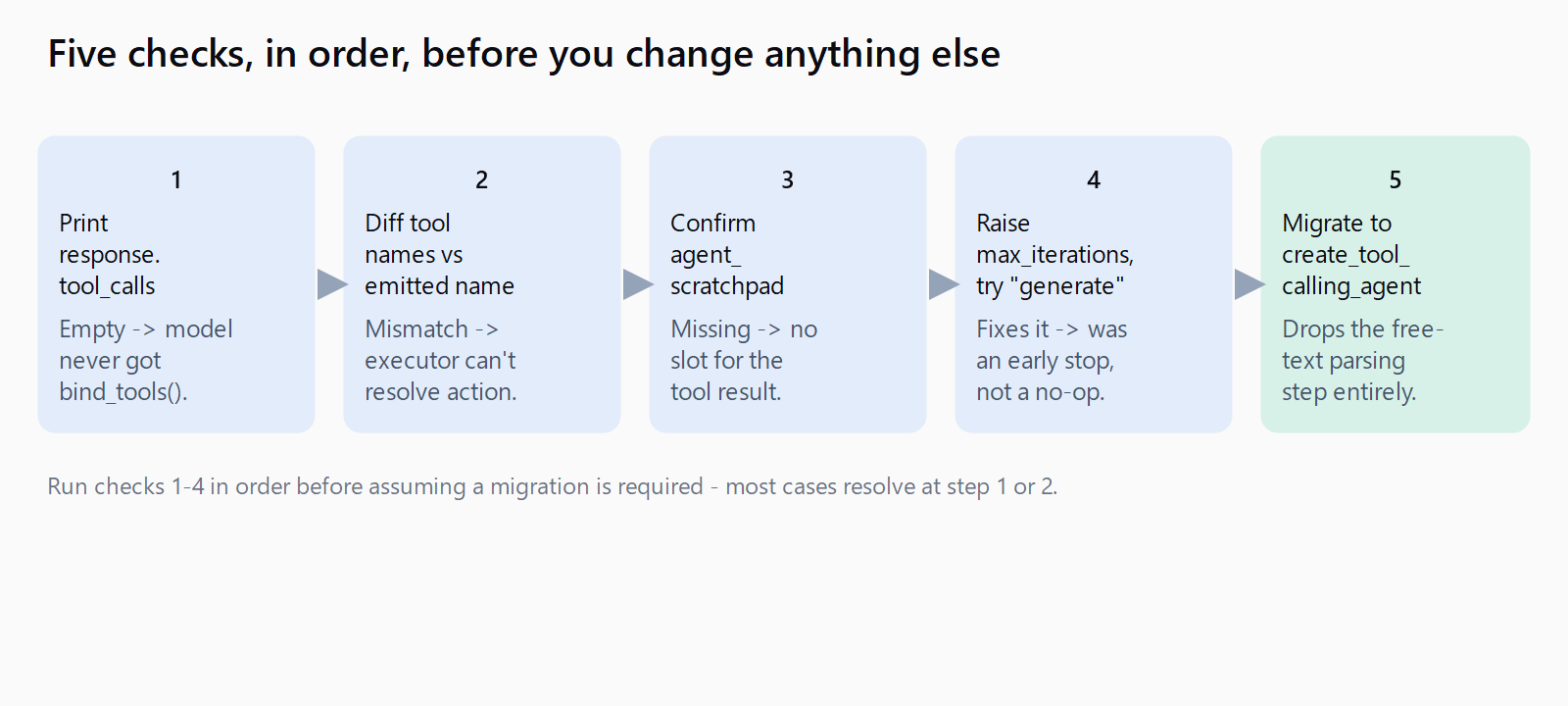
- Bind tools before building the agent. Confirm the model instance passed to
create_tool_calling_agent(llm, tools, prompt)supports.bind_tools()- most current OpenAI, Anthropic, and Google chat models do; older completion endpoints and some local model wrappers don't. - Match tool names exactly. Print
[t.name for t in tools]and compare it character-for-character against thenamefield inresponse.tool_calls. Dynamically generated tool names (built from a class or a loop) are the usual source of a silent mismatch. - Check the prompt has an
agent_scratchpadplaceholder. WithoutMessagesPlaceholder("agent_scratchpad")in the prompt, the executor has nowhere to insert the tool call and result before the next model turn, and some model/prompt combinations respond by dropping the call rather than erroring. - Rule out an early stop.
early_stopping_methoddefaults to"force", which returns a constant string instead of running a final model pass - a lowmax_iterationscombined with"force"can look identical to a tool that was never called. Raisemax_iterationsor switch to"generate"to confirm this isn't the real cause before debugging further. - Migrate to a tool-calling constructor if you're still on a text-parsing agent type. Legacy types like
CONVERSATIONAL_REACT_DESCRIPTIONparse free text into actions;create_tool_calling_agentreads the model's nativetool_callsfield instead, which removes the parsing step this bug depends on.
How do you verify the fix worked?
Re-run the same prompt with verbose=True. A working tool call shows the tool's actual return value as an Observation line between the Action Input and the model's next Thought - not a jump straight to Finished chain. In code, response["intermediate_steps"] should contain at least one (AgentAction, observation) tuple; an empty list means the tool still never ran.
What if the fix didn't work?
Check whether the tool's own input schema is rejecting the call before it prints anything - a Pydantic validation error inside the tool can look like a silent skip if handle_parsing_errors=True is swallowing it. Also confirm you're not hitting the unrelated iteration-limit failure, where the loop ends on a step budget rather than a missing tool call; that has its own iteration limit fix. For a catalog of adjacent LangChain and framework errors, the Automation Error Index tracks fixes by exact error string.
How do you check all five causes in one pass?
- Print
response.tool_callsfrom a direct, non-agent model call to confirm tool-calling capability. - Diff the tool names in your tools list against the
namefield the model emits. - Confirm
agent_scratchpadis present as aMessagesPlaceholderin the prompt. - Temporarily raise
max_iterationsand switchearly_stopping_methodto"generate"to rule out early termination. - Migrate off a text-parsing agent type to
create_tool_calling_agentif the model supports it.
FAQ
Does handle_parsing_errors fix AgentExecutor not calling tools?
No. handle_parsing_errors only catches an OutputParserException raised while parsing free text into an action. The silent no-op this post covers raises no exception at all, so there's nothing for the flag to catch.
Why does tool name case sensitivity break AgentExecutor?
AgentExecutor matches the model's emitted action name against tool names with an exact string comparison. If a tool's name is generated dynamically and differs by even one character or trailing space from what the model outputs, the match fails and the executor returns the raw text instead of erroring.
What does verbose=True show when the agent skips a tool silently?
The trace prints the Thought and Action lines as usual, then jumps straight to Finished chain with no Observation line in between - the tool's return value never appears anywhere in the output.
Should I migrate from AgentExecutor to LangGraph to fix this?
LangGraph's agent runtime reads native tool calls directly from the model response rather than parsing free text, which removes the failure classes tied to text parsing. It's worth the move for a new agent, though it's a separate project from patching an existing AgentExecutor setup.
Is this the same bug as the create_react_agent "unexpected keyword argument" error?
No. That error is a construction-time TypeError raised the moment you call create_react_agent() with a mismatched argument - it stops the program immediately with a traceback. This post covers a runtime failure with no traceback: the agent runs, decides on an action, and quietly returns without ever invoking the tool.