
How to Fix Cursor waitForProviderRegistration Timeout
Fix Cursor's waitForProviderRegistration timeout by locating the failing extension host, then repairing the remote server or desktop install with evidence.
TL;DR: Cursor's waitForProviderRegistration timeout means cursor-agent-exec never registered with the extension host; restart, compare local and remote workspaces, then inspect the correct host log.
This error can leave file browsing, terminal commands, and Git working while every Agent chat fails before the prompt starts. The missing piece is the Agent execution provider, not necessarily the whole remote connection. The fix depends on where that provider should run.
Start by comparing the failing workspace with a trusted local folder. If local Agent works, read the Remote SSH branch below. If both fail, treat the Windows or desktop installation as the first suspect. The broader Cursor agent execution provider guide explains the related timeout without the provider-registration stack frame.
What does waitForProviderRegistration mean in Cursor?
When a new Agent chat starts, Cursor waits for its execution provider to register with the extension host. The provider is commonly represented by the cursor-agent-exec extension. If it does not activate before the client-side deadline, the UI reports ERROR_EXTENSION_HOST_TIMEOUT, Agent Execution Timed Out [deadline_exceeded], and a stack containing waitForProviderRegistration.
That sequence happens before normal Agent work begins. A Request ID may not reveal much because the request can fail before it reaches Cursor's backend. Repeated failures in every new chat usually mean the host is still in the bad state, not that every prompt is invalid.
How do you find the host that failed to register?
| Test | Result | Likely failing layer |
|---|---|---|
| Agent works in a trusted local folder | Remote SSH workspace fails | Remote extension host or remote Agent extension. |
| Agent fails locally and remotely | Every new chat times out | Desktop extension host or Cursor installation. |
| Terminal, files, and Git work remotely | cursor-agent-exec is absent from running extensions | Provider activation on the remote host. |
exthost.log shows a hash mismatch | dist/main.js fails verification | Corrupted local install files. |
How do you fix provider registration in a local Cursor window?
- Run the restart test. Open a trusted empty folder and send a trivial Agent prompt. If the error disappears there, the original workspace or one of its extensions is involved. If it remains, continue with the host checks.
- Reload the extension host. Use Command Palette and run
Developer: Restart Extension Host. Then open a new Agent chat. Do not deleteglobalStorage\state.vscdbas a first move because it removes useful local state without proving that the provider is the problem. - Read the Extension Host output. Run
Output: Focus on Output View, chooseExtension Host, and reproduce the failure. Look for activation errors, missing files, verification failures, or a host log that stops before Agent extensions load. - Repair a damaged install. If the log contains a hash mismatch for
anysphere.cursor-agent-execor an activation failure fordist/main.js, close Cursor and reinstall the current stable build. Keep the user-data directory unless support asks for a full reset. The error is in the install bundle, not in your chats.
Fully quit Cursor. Close every window and confirm that no Cursor process remains. A normal window reload can help, but a stuck extension host often needs a complete application restart.
cursor --disable-extensions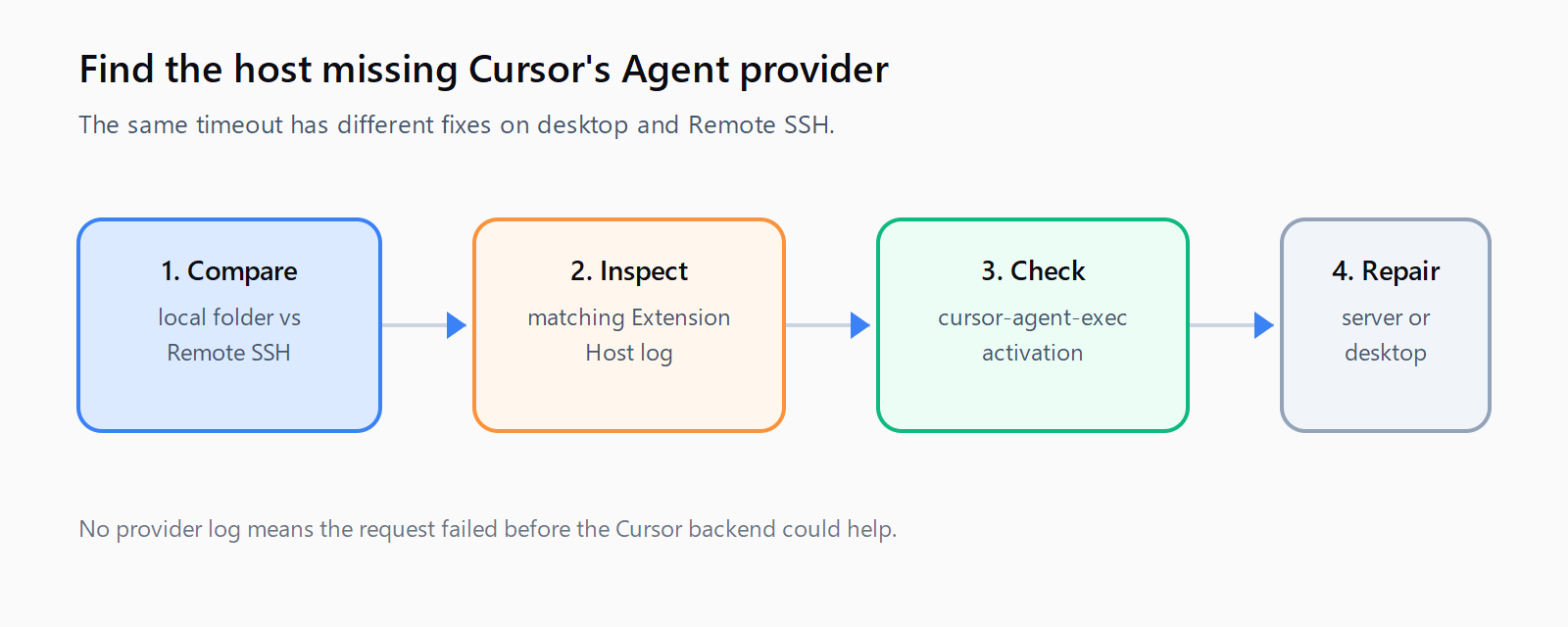
How do you fix provider registration in Remote SSH?
Remote SSH has its own extension host on the remote machine. A healthy SSH connection does not prove that cursor-agent-exec activated there. If the local folder works, use the connected window to run Developer: Reload with Extensions Disabled, then start a new chat. If Agent works, enable remote extensions in small groups to identify the blocker.
Check the remote running extensions. If cursor-socket appears but cursor-agent-exec does not, the provider never activated. Read the remote log at:
~/.cursor-server/data/logs/<latest date>/exthost*/remoteexthost.logSearch for cursor-agent-exec, Eager extensions activated, or Provider registration timed out. If the remote server is stale, rename the server directory instead of deleting it and reconnect so Cursor can install a clean copy.
mv ~/.cursor-server ~/.cursor-server.bakRenaming preserves a rollback path. Remote extensions will download again after reconnect. If the remote machine is short on CPU or memory, allow the host to finish starting before testing Agent again. The remote cursor-agent CLI is a temporary fallback because it does not rely on the IDE extension host.
How do you verify that the provider registered?
Use a short prompt in a new chat, then ask Agent to read one small file and run a harmless command. Repeat once in the local folder and once in the affected remote workspace. The repair is complete when the prompt starts without the registration timeout, cursor-agent-exec appears in the running extensions, and the relevant host log contains activation output.
If only a stale-state symptom remains, use the Cursor extension host recovery guide. For a connection-specific failure after provider registration succeeds, use the Cursor connection error guide. The Automation Error Index lists related Cursor failure strings.
FAQ
Why does Cursor work locally but fail over Remote SSH?
The Remote SSH window runs an extension host on the remote machine. Its cursor-agent-exec extension can be missing, inactive, or blocked even while remote browsing, terminal, and Git work normally.
Which log shows provider registration?
Use the local Extension Host output for a desktop failure. For Remote SSH, read the remote remoteexthost.log and search for cursor-agent-exec activation and provider-registration timeout lines.
Should I delete .cursor-server?
Rename it first, for example to .cursor-server.bak. Reconnecting then gives Cursor a chance to install a fresh remote server while preserving the old directory for rollback.
When is a clean reinstall required?
Reinstall the desktop application when the Extension Host log shows a verification or hash mismatch for anysphere.cursor-agent-exec. Keep user data because the evidence points to the install files, not chat storage.
How do you test both local and remote provider registration?
- Open a trusted local folder and run a trivial Agent prompt.
- Open the failing Remote SSH folder and run the same prompt.
- Reload with extensions disabled if only the remote window fails.
- Inspect the local or remote host log for
cursor-agent-execactivation. - Rename
.cursor-serveror reinstall Cursor only when the matching host evidence supports it.