
Fix Cursor 401 Unauthorized User API Key on Overridden OpenAI Base URL
With Override OpenAI Base URL on, Cursor forwards the OpenAI API Key field's value to your endpoint; the 401 is that endpoint rejecting it. Fix the key pair, plus the two documented cases no key can fix.
TL;DR: Cursor's 401 "Unauthorized User API key" on an overridden OpenAI base URL means your endpoint rejected the key Cursor forwards; put that endpoint's own key in Settings > Models > API Keys.
Users of LiteLLM, vLLM, Azure OpenAI, and OpenRouter hit this right after enabling Override OpenAI Base URL: every chat returns 401 even though the key works fine everywhere else. The usual advice, rotate your OpenAI key, is exactly wrong here, because with the override on, OpenAI never judges that key. Your custom endpoint does. The error is indexed in the Automation Error Index among Cursor's auth failures, and it has one real fix plus two documented cases where no key change helps. Expect more of it: OpenAI is winding down its Cursor contract, and its help center now points Cursor users at API keys and gateways, with a proposed transition period of November 12, 2026.
Why does Cursor return 401 Unauthorized User API key with a custom base URL?
Cursor's BYOK field labels do not change when you flip the override, and that is the trap. The Cursor API keys documentation states that a key "is sent to our backend with every request because all requests are routed through Cursor's servers for final prompt building." With Override OpenAI Base URL enabled, whatever sits in the OpenAI API Key field becomes the Bearer token your endpoint receives on every request. Endpoints such as LiteLLM or vLLM reject any key that is not their own with 401. The override's scope makes it worse: it is one global base URL, which is also how it routes Claude requests to the wrong endpoint for Anthropic key holders.
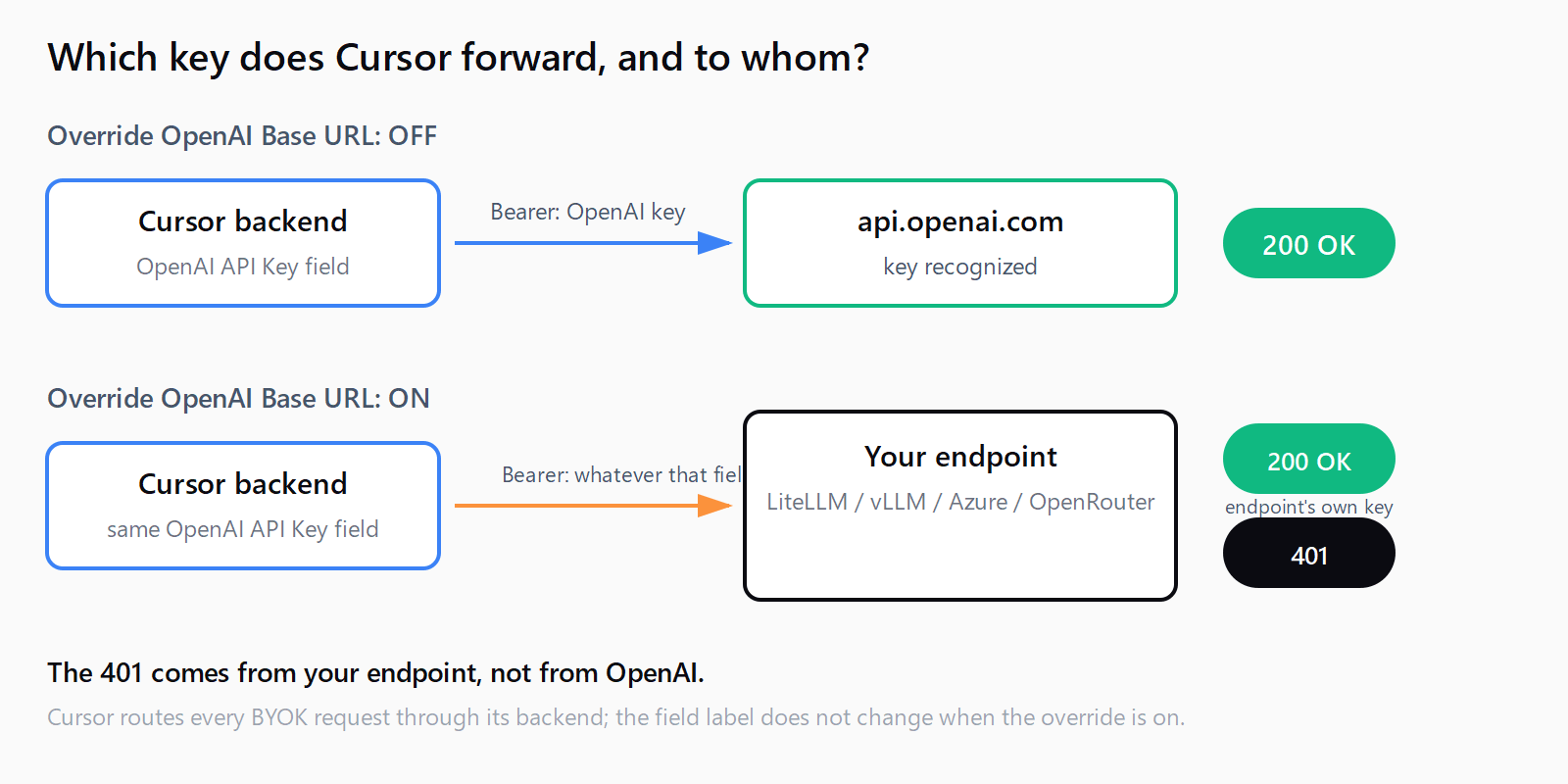
How do you fix the 401 when the endpoint rejects the forwarded key?
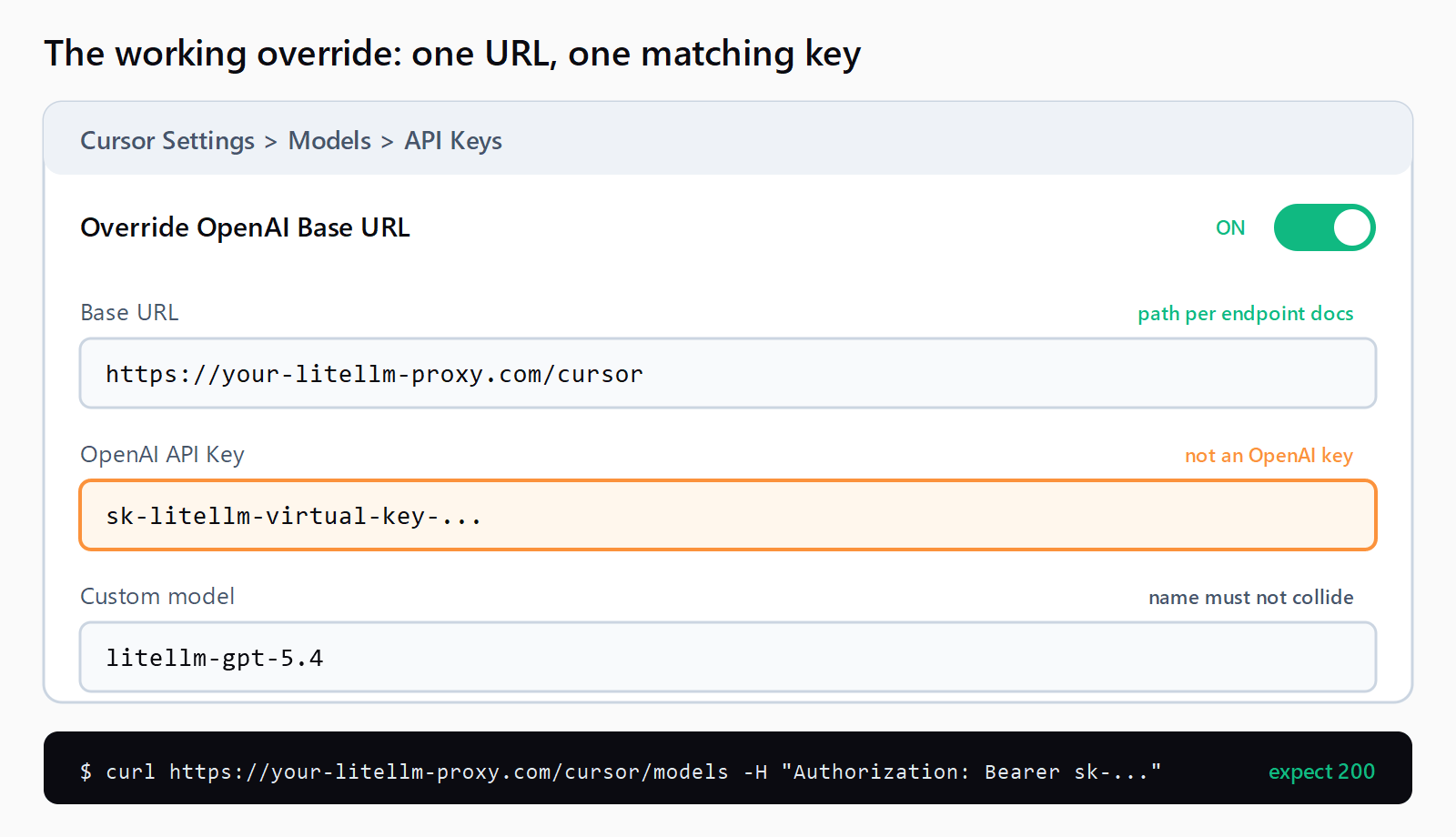
Pair the base URL with a key the endpoint actually issued. Open Settings > Models > API Keys and work through this list:
- Identify what Cursor forwards. With the override on, the OpenAI API Key field is no longer an OpenAI credential in any meaningful sense; it is the credential your endpoint sees.
- Replace it with the endpoint's own key. For LiteLLM that is a virtual key starting with
sk-; for Azure, the deployment's key; for any other OpenAI-compatible gateway, the key its documentation specifies. The LiteLLM Cursor integration guide gives one remedy for auth errors: regenerate the key and confirm it starts withsk-. - Match the base URL byte for byte. LiteLLM expects the proxy URL plus a
/cursorsuffix; most other backends expect/v1. A wrong path returns 401 or 404 before your key is even evaluated. - Add the custom model. Click + Add Custom Model and enter a name your endpoint serves. Cursor blocks names that collide with its built-in models.
- Retest in a new chat. Select the custom model by name, not Auto, and send a plain text message.
How do you verify the fix worked?
Confirm the credential against the endpoint before blaming Cursor:
curl https://your-litellm-proxy.com/cursor/models \
  -H "Authorization: Bearer sk-your-virtual-key"
A 200 with a model list means the key is valid; a 401 here is an endpoint-side key problem, not a Cursor problem. Then send one message in a new chat and check the endpoint's request logs. Two version-sensitive notes: agent mode over the base URL override needs LiteLLM v1.97.0 or later, because Cursor's agent sends Responses API shapes that earlier proxy versions cannot translate, and the proxy must be reachable from Cursor's backend, not only from your own machine.
What if the 401 fires before your endpoint sees anything?
Two documented cases produce this error no matter what key you paste, because the request never reaches your endpoint.
Multimodal requests. If text chats work but attaching an image fails with "Unauthorized User Openai API key", the cause is a hardcoded validation: Cursor checks the key against api.openai.com/v1/models before sending any multimodal request, regardless of the override. Cursor staff confirmed in Cursor bug thread 158460 that the validation "leaves our backend without applying the override, so the user can't work around this on their side." The stopgap is Cursor's built-in models for image work and your custom endpoint for text-only.
Gated features. Custom API keys only work with standard chat models. OpenAI's own Cursor guidance confirms a BYOK key does not apply to Tab, Auto, Cloud or Background Agents, Automations, or the CLI, and users reported Composer 2.5 requests blocked in August 2026 whenever an OpenAI BYOK key was active. A 401 from one of these surfaces is a product limitation, not a bad credential.
How do you fix the Cursor 401 in under five minutes?
- Open Settings > Models > API Keys and confirm Override OpenAI Base URL points at your endpoint.
- Replace the OpenAI API Key field's contents with a key issued by that endpoint.
- Match the base URL to the endpoint's documentation, including the
/v1or/cursorsuffix. - Curl the endpoint's models route with the new key and expect a 200.
- Send a text-only message in a new chat with the custom model selected, then check the endpoint's logs.
If text passes and images still fail with 401, the multimodal validation bug above is the cause, and built-in models for vision work is the only workaround until Cursor ships a fix.
FAQ
Does this 401 mean my OpenAI API key is invalid?
Not when Override OpenAI Base URL is on. Your endpoint judges the forwarded key, so rotating the OpenAI key changes nothing; the fix is a credential the endpoint itself issued.
Why do text requests work but image requests fail with the same error?
Text requests honor the base URL override, while multimodal requests run a hardcoded check against api.openai.com first. Cursor staff confirmed this as a bug with no user-side workaround as of June 2026.
Do custom API keys work with every Cursor feature?
No. They cover standard chat models in local Chat and Agent requests; Tab completion, Auto routing, cloud agents, and the CLI keep using Cursor's own models.
My key works in curl but Cursor still returns 401 - what else?
Check three things: LiteLLM virtual keys must start with sk-, agent mode needs LiteLLM v1.97.0 or later, and the base URL must be reachable from Cursor's backend rather than only from your machine. If every model fails regardless of key, that is the separate Cursor Provider Error instead.
Does the same override break Claude keys too?
It breaks them differently: Claude requests get routed to whatever URL the override field holds and fail with a different error string. That failure surface, including the toggle's silent re-enable bug, is covered in the guide to Cursor's Override OpenAI Base URL breaking Anthropic keys.
How is this different from the generic Cursor Connection Error?
A 401 is an auth verdict from an endpoint that received your request; the Cursor Connection Error means the request never completed. Generic connection failures have their own causes and fixes.