
How to Fix Cursor Extension Host Timeout (deadline_exceeded)
A code-specific fix for Cursor's ERROR_EXTENSION_HOST_TIMEOUT and deadline_exceeded message, with extension isolation, process checks, and repair steps.
TL;DR: Cursor's ERROR_EXTENSION_HOST_TIMEOUT with deadline_exceeded means the local extension host missed provider registration; restart it, test without extensions, then repair the install path.
The timeout can look like an outage because Agent stops at "Planning next moves" or "Reconnecting" while the Cursor editor and ordinary terminal still work. The useful question is not whether the internet is reachable. It is whether the local extension host started the Agent execution provider in time.
That distinction separates this error from a model failure. If you can ping a host and Cursor's network diagnostic passes, but Agent tools still time out, follow the extension-host checks below. The Cursor agent execution provider guide covers the broader provider symptom; this post is for the `deadline_exceeded` code path.
What does deadline_exceeded mean in Cursor?
Cursor's Agent execution provider is a local component that registers with the extension host. The host must become ready before Agent can send tool requests. With ERROR_EXTENSION_HOST_TIMEOUT, the host does not respond before the deadline, so the provider never registers and the Agent request disconnects.
Cursor support has described cases where the local extension host takes more than 60 seconds to send its ready message. That is why the error can appear even when the request never reaches Cursor's service. A slow or blocked extension, a damaged installation, a moved extension directory, or endpoint security scanning can delay the host long enough to trigger the same message.
How do you tell an extension-host timeout from a network outage?
Run the smallest useful comparison before reinstalling anything.
| Observation | What it suggests | Next check |
|---|---|---|
| Ping and Network Diagnostics pass, Agent times out | Local extension host or provider registration | Reload the host and inspect Process Explorer. |
Agent works with --disable-extensions | An installed extension is blocking startup | Re-enable extensions in small groups. |
| Agent fails after an install move or update | Path resolution or damaged files | Restore the default install path or reinstall Cursor. |
| Several machines fail at once | Possible service or account issue | Check Cursor status and support channels. |
How do you fix ERROR_EXTENSION_HOST_TIMEOUT?
- Reload the window once. Use the reload button in the error, or run
Developer: Reload Windowfrom Command Palette. If the host is only stuck, this can restore Agent without touching chats or settings. - Inspect the extension host. Open Command Palette and run
Developer: Open Process Explorer. When the timeout is active, look for anextensionHostprocess using sustained CPU or failing to become ready. Also check the Extension Host output channel and the Developer Tools Console for red errors mentioningextensionHostorcursor-socket. - Restore the default installation path. If the Cursor app or extension was moved into a custom directory, put it back in its normal install location. Cursor support has linked custom extension paths with provider registration failures because the host cannot resolve the expected files.
- Repair the installation. If the error survives a clean restart and the disabled-extension test, close every Cursor process and reinstall the current stable build. A community investigation traced one Windows case to a damaged
cursor-agent-execextension file. Keep the user-data directory unless support specifically asks for it to be removed.
Test with extensions disabled. Quit Cursor fully, then start it from a terminal with the extension isolation flag.
cursor --disable-extensionsSubmit a short Agent prompt in an empty folder. If it works, the core Agent path is healthy and an installed extension is the likely blocker. Use the normal launch next, then disable or remove extensions in batches until the timeout returns.
Restart the extension host. Run Developer: Restart Extension Host. This targets the process that must register the provider and is less disruptive than deleting Cursor's user data.
Ctrl+Shift+P
Developer: Restart Extension Host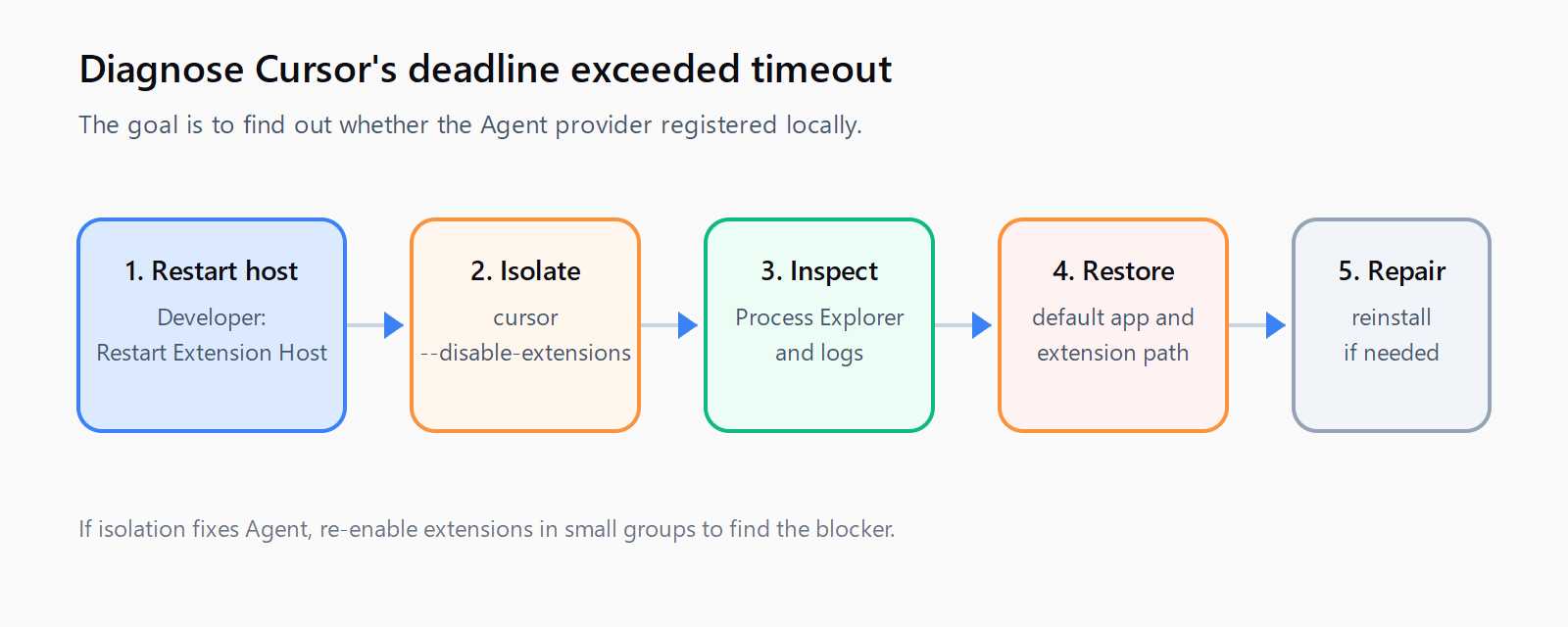
When should you add antivirus or EDR exclusions?
Add exclusions only after the basic isolation test points to local startup interference, and follow your organization's security process. Cursor support has recommended checking the Cursor program directory, the user .cursor directory, and the project folder where the timeout occurs.
Temporarily turning off antivirus protection can give a misleading result if an enterprise policy turns it back on. Ask the administrator to review the policy-level exclusions and then reproduce the timeout while collecting the Extension Host output. Do not exclude a broad drive when three specific folders are enough.
How do you verify the fix?
Open a new Agent window in an empty folder and send a prompt that requires one file read and one harmless terminal command. Then repeat in the affected project. The fix is credible when both sessions register quickly, the Agent can run tools, and the Extension Host output contains no new startup error.
If the timeout returns only in one project, compare that project's extensions, workspace settings, and security policy. If it returns everywhere after reinstalling, save the Request ID, Cursor version, operating system build, and Extension Host log. The Cursor cache cleanup guide is the next targeted step when the failure follows stale local state.
For other Cursor failure strings, use the Cursor extension host recovery guide and the Automation Error Index to avoid treating every timeout as a model or network problem.
FAQ
Is Cursor down when deadline_exceeded appears?
Not necessarily. The error can occur before the local extension host registers the Agent provider, so the request may never reach Cursor's servers. A passing network diagnostic makes the local process the stronger suspect.
Does cursor --disable-extensions delete my settings?
No. It starts Cursor with installed extensions disabled for that session. Use it as an isolation test, then restart normally and re-enable extensions in batches.
Should I delete Cursor's user-data directory?
Not as a first step. Reload the host, test with extensions disabled, inspect logs, restore the default install path, and reinstall the app before deleting chats or settings.
What log proves that the provider missed its deadline?
The Extension Host output or log can show that the local host took too long to become ready or that cursor-agent-exec failed to activate. Include the Request ID and the Cursor version in a support report.
How do you test the repair in five minutes?
- Run
Developer: Restart Extension Hostand retry one short Agent prompt. - Start Cursor with
cursor --disable-extensionsand repeat the prompt in an empty folder. - Inspect Process Explorer and Extension Host output for startup errors.
- Restore Cursor and its extension to the default install path.
- Reinstall the current stable build and review AV/EDR exclusions if the timeout persists.