
Cursor MCP server connection failed: 6 fixes for stdio and SSE errors
Cursor's MCP panel hides the real error behind "Client closed". Read MCP Logs, reproduce the command by hand, fix the config, restart Cursor.
TL;DR: A Cursor MCP server shows "Client closed" or "Failed to connect" when the stdio command cannot spawn (Windows npx needs cmd /c) or the remote URL is unreachable; read MCP Logs, fix mcp.json, then restart Cursor.
The failure bites right after adding a server to ~/.cursor/mcp.json or .cursor/mcp.json: the panel lists the server with a red status and no tools load into chat. Cursor never prints the server's own error output, so the fix starts by reproducing the failure outside Cursor. This fix is also cataloged in the Automation Error Index.
Why does Cursor fail to connect to MCP servers?
Cursor connects to an MCP server over one of three transports from the Model Context Protocol: a local stdio server spawned from a shell command, or a remote SSE / Streamable HTTP server reached by URL, per Cursor's MCP documentation. For stdio, Cursor starts the command from your config and waits for a JSON-RPC handshake. Any failure at spawn or handshake time, from a missing binary to a bad flag, collapses into the same generic status strings: "Client closed for command", "MCP error -32000: Connection closed", or "No server info found".
The panel never tells you which link broke, because Cursor does not redirect the spawned process's stderr into its own log output, as documented in a troubleshooting write-up on Cursor's MCP logging. An npm error sitting right there in the terminal never reaches the panel.
How to surface the real error behind "Client closed"?
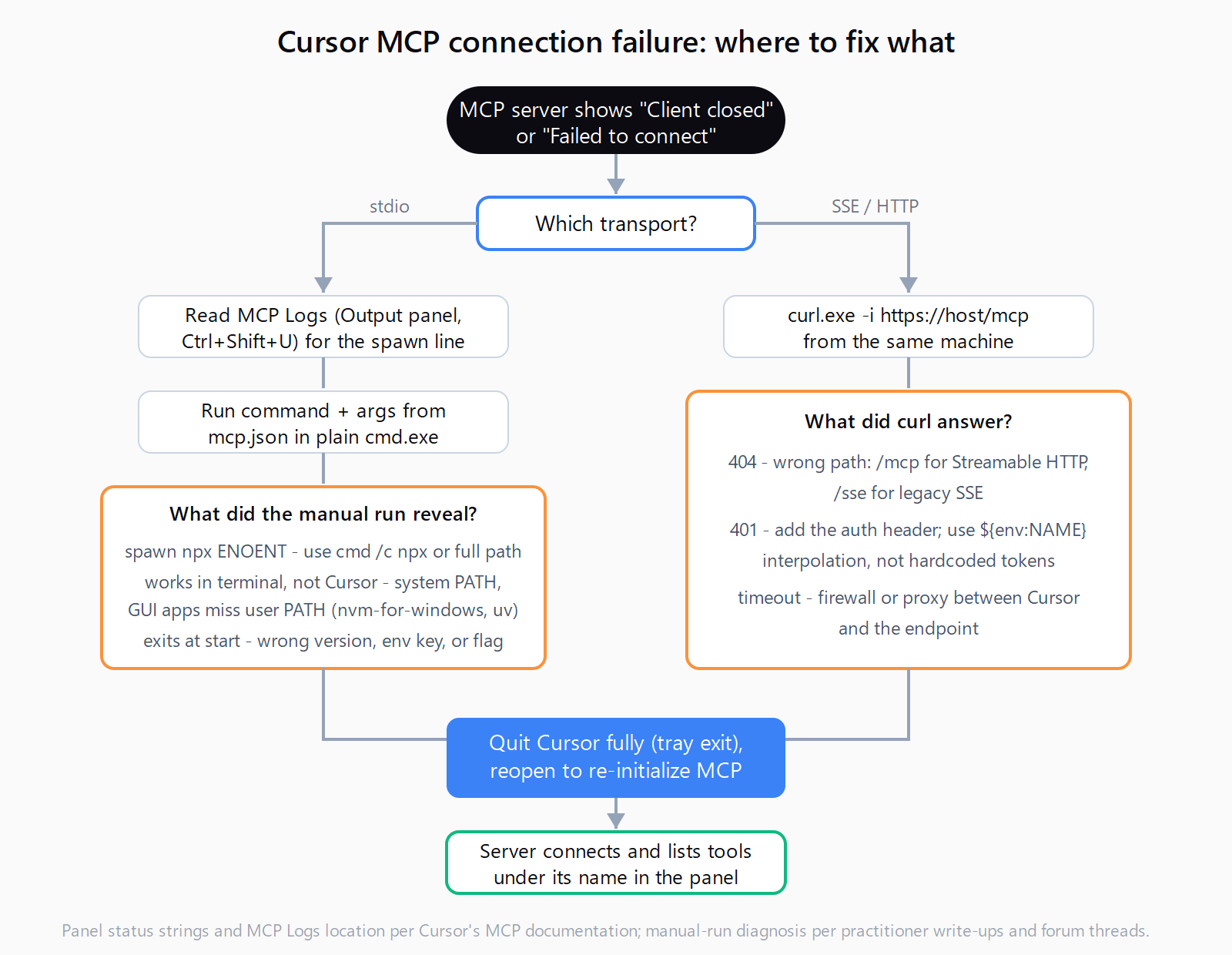
- Read the MCP Logs. Open the Output panel (
Ctrl+Shift+U) and pick "MCP Logs". You will see the spawn line, "Starting new stdio process with command: ...", followed by "Client closed for command" a second later. - Run the command yourself. Copy
commandandargsfrommcp.jsoninto a plain terminal -cmd.exeon Windows, not an IDE shell. If npm printsETARGETor404 Not Found, that is the real cause the panel hid. - Compare environments. If the command works in the terminal but the panel still fails, the difference is environment, not config: Cursor launches as a GUI process and does not inherit everything your shell profile sets.
- Capture the exact invocation. On Windows, Process Explorer shows Cursor actually runs
cmd.exe /d /s /c "npx ..."- run that wrapped form by hand.
How to fix the four stdio connection failures?
1. "spawn npx ENOENT" on Windows
Symptom: MCP Logs shows "A system error occurred (spawn npx ENOENT)" and the panel shows no tools.
Diagnostic: On Windows, npx is a batch script (npx.cmd), and Node's process spawning cannot resolve .cmd shims directly - the same resolution semantics bug is still open in VS Code as of March 2026.
Fix: Wrap the command so a shell resolves it:
{
  "mcpServers": {
    "my-server": {
      "command": "cmd",
      "args": ["/c", "npx", "-y", "@modelcontextprotocol/server-filesystem", "C:\\projects"]
    }
  }
}
An absolute path from where npx works too. The same spawn family breaks spawn npx ENOENT in Claude Code.
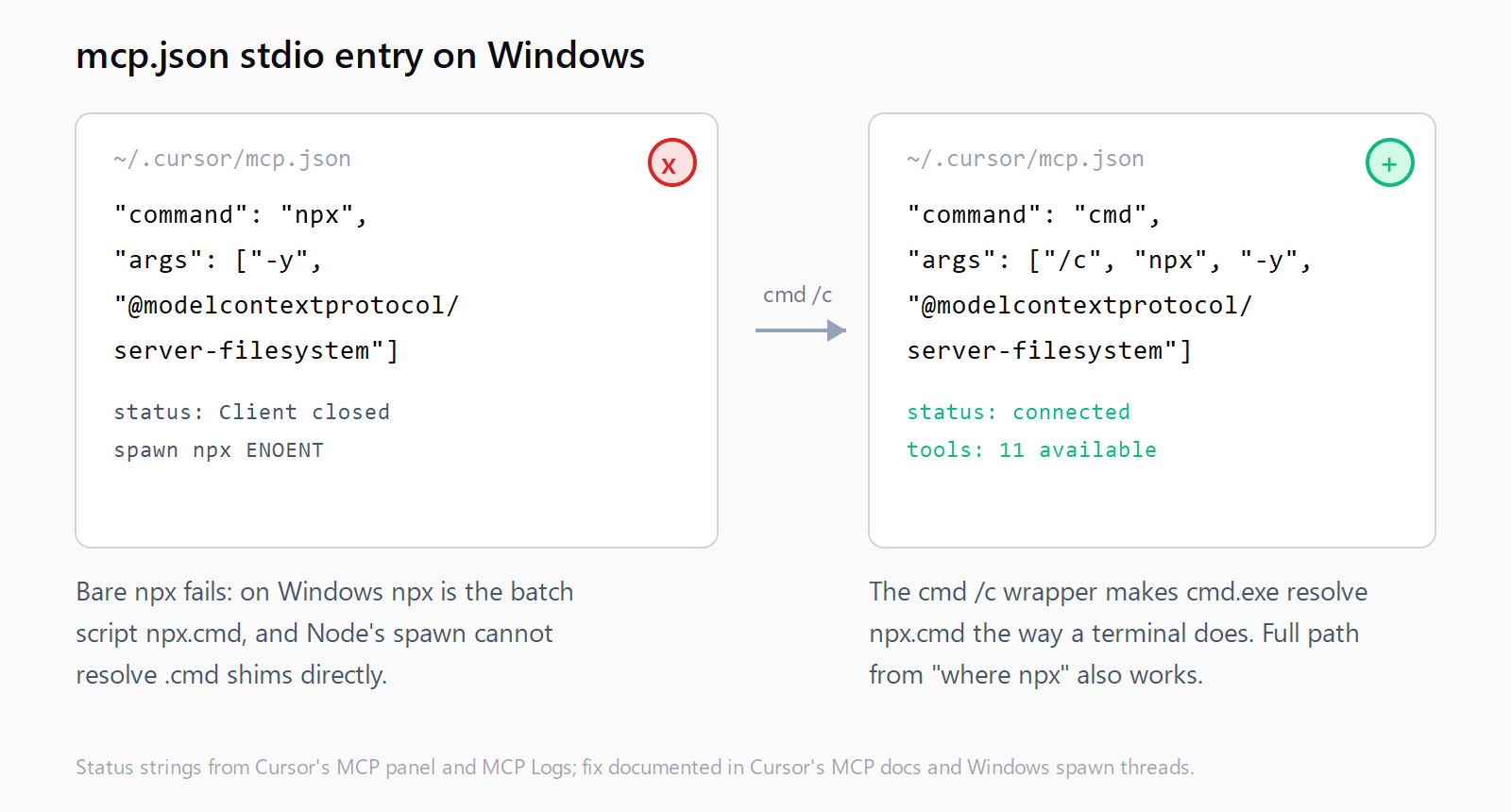
cmd /c so cmd.exe resolves npx.cmd.2. Works in the terminal, fails in Cursor
Symptom: The command runs fine in PowerShell or cmd, but the panel shows "Client closed" seconds after "Starting new stdio process".
Diagnostic: A GUI-launched app inherits the system PATH, not user-PATH additions. Node installed per-user (nvm-for-windows is the common case) is invisible to Cursor; the same applies to tools like uv.
Fix: Use the full executable path (C:\Program Files\nodejs\npx.cmd) or install Node system-wide, then restart Cursor. On macOS, GUI apps skip .zshrc too.
3. The process starts and immediately dies
Symptom: "Client closed for command", then "MCP error -32000: Connection closed".
Diagnostic: The command launched but exited - a nonexistent package version, a missing env block, or a bad argument. The manual run from the last section surfaces the npm error verbatim.
Fix: Pin a version that exists, add the required env keys, and drop unsupported flags. A server that needs GITHUB_PERSONAL_ACCESS_TOKEN will not negotiate without it.
4. Relative paths that resolve to nowhere
Symptom: A server that works with absolute paths fails with a relative script path.
Diagnostic: Cursor's stdio schema accepts type, command, args, env, and envFile - there is no working-directory field, so a bare ./server.py resolves against whatever Cursor's CWD happens to be.
Fix: Use absolute paths, or the ${workspaceFolder} and ${userHome} variables Cursor resolves in args.
Why does a remote SSE or HTTP MCP server fail to connect?
Remote servers use url plus optional headers instead of command, and a failed connection here is usually the endpoint, not Cursor. Test the URL with curl.exe -i https://your-host/mcp: a 404 means the path is wrong (/mcp for Streamable HTTP, /sse for legacy SSE), a 401 means the auth header is missing, and a timeout means a firewall or proxy is in the way. Pass tokens through headers with ${env:NAME} interpolation, then toggle the server off and on under Customize.
How to restart and verify the fix?
Cursor reads mcp.json when it initializes MCP, so edits require a full restart: quit Cursor completely (the tray exit, not a window close) and reopen it. The server should flip from red to a connected state with its tools listed underneath. A connected status with zero tools listed points at the server's own code. When updating an npm server, remove it, run npm cache clean --force, and re-add it.
How do you fix a Cursor MCP server that won't connect in five minutes?
- Open the Output panel and select "MCP Logs"; note the spawn line and status string.
- Run the
commandandargsfrommcp.jsonin a plain terminal. - Fix what the manual run reveals: version, env key, or flag.
- On Windows, wrap npx as
cmd /c npx ...or use the full path fromwhere npx. - For remote servers, curl the URL and correct the path, auth header, or proxy.
- Quit Cursor fully and reopen it; confirm the server lists tools under its name.
FAQ
Why does my MCP server work in Claude Code but not in Cursor?
Each client reads its own config files and spawns processes its own way, so a server that loads in one can fail in the other. The walkthrough for setting up an MCP server in Claude Code on Windows covers the equivalent config and the same cmd /c wrapper.
Why did all my MCP servers stop working after a Cursor update?
Version regressions happen - Cursor 0.47.5 and 0.48.x both shipped releases where previously-working servers showed "Client closed" for everyone. Check the forum for your version and roll back if the panel stays red.
Can one broken MCP server break Cursor's AI features?
Cursor isolates server failures, but a misbehaving server can still interfere elsewhere: a conflicting MCP server is a documented trigger of the "trouble connecting to the model provider" error.