
Cursor: fix 'Waiting for extension host' hang
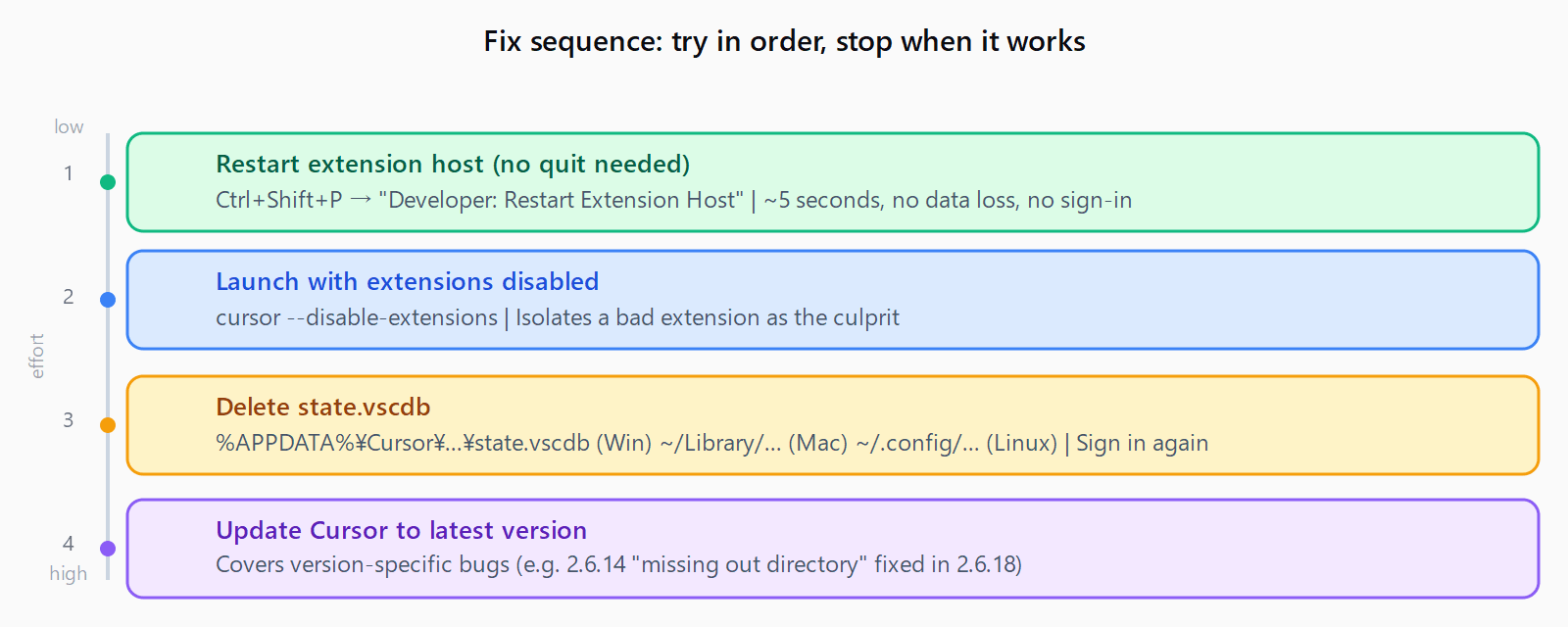
The 'Waiting for extension host' hang blocks Cursor's AI agent and extensions. Four fixes in order of effort: restart the host, disable extensions, wipe the state database, or update Cursor.
TL;DR: Cursor's "Waiting for extension host" hang clears fastest with Ctrl+Shift+P → "Developer: Restart Extension Host"; if that fails, launch with --disable-extensions, delete the state database, or update to the latest Cursor version.
The hang blocks the AI agent panel, source control, and any extension-powered feature. It appears most often after a Cursor update, after switching to a WSL or Remote-SSH project, or when a single bad extension corrupts the host at startup. The Automation Error Index tracks it alongside other Cursor IDE failures.
What does "Waiting for extension host" mean in Cursor?
The extension host is a separate Node.js process that Cursor (and VS Code) spawns to run extensions in isolation from the main UI process. "Waiting for extension host" means Cursor's UI started but the extension host process either hasn't launched yet, timed out, or crashed before signalling it was ready.
When it hangs, extensions stop responding, the AI agent panel shows a spinner indefinitely, and Git/language server features go dark. The fix always involves restarting or resetting that child process - not the full Cursor window.
How do you fix the "Waiting for extension host" hang immediately?
Start with the fastest option first:
- Restart the extension host without quitting Cursor. Open the command palette (
Ctrl+Shift+Pon Windows/Linux,Cmd+Shift+Pon macOS) and run Developer: Restart Extension Host. This kills and relaunches the host process without closing your open files. It resolves transient startup failures in most cases. - Launch Cursor with extensions disabled. Quit Cursor, then start it from the terminal with
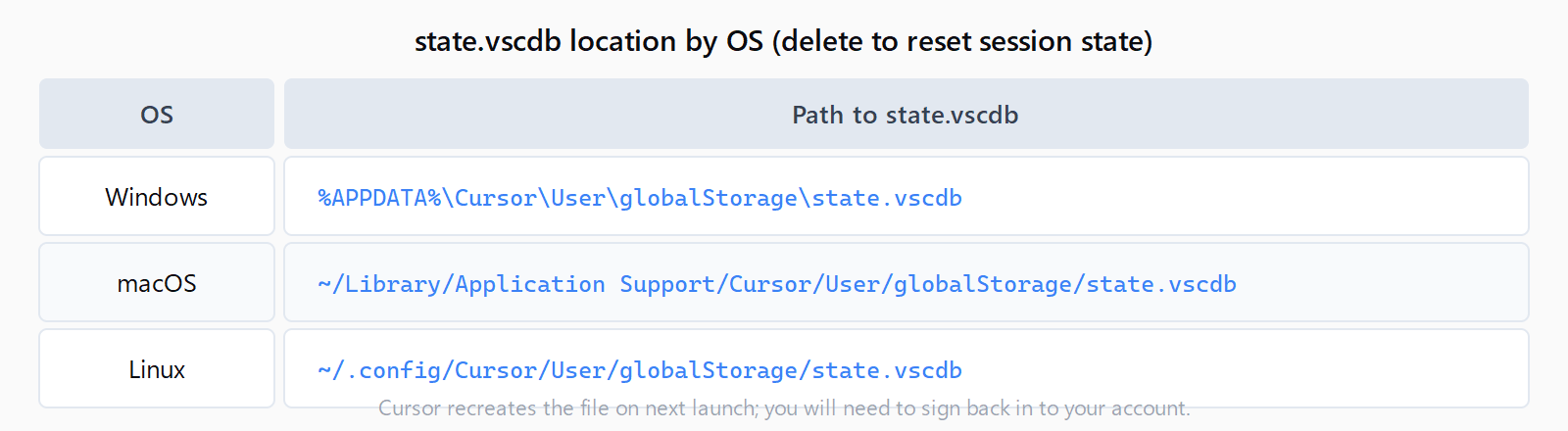
cursor --disable-extensions. If the hang disappears, one of your installed extensions is the culprit. Re-enable extensions one at a time to find it: go to the Extensions panel, disable all, then enable them in batches until the hang returns. - Delete the global state database. Cursor stores session state in a SQLite file. A corrupt entry here blocks the extension host from loading its stored context. Delete or rename the file and restart Cursor:Cursor recreates the file on next launch. You'll need to sign back in.
- Windows:
%APPDATA%\Cursor\User\globalStorage\state.vscdb - macOS:
~/Library/Application Support/Cursor/User/globalStorage/state.vscdb - Linux:
~/.config/Cursor/User/globalStorage/state.vscdb
- Windows:
- Update Cursor. Versions 2.6.14 shipped with a missing
outdirectory in thecursor-socketextension, causing the extension host to hang at startup every time. This was patched in 2.6.18. Check your version under Help → About and download the latest from cursor.com if you're behind.
How do you fix "Waiting for extension host" in Cursor on WSL or Remote-SSH?
WSL and Remote-SSH projects use a remote extension host that runs inside the target environment. Cursor versions 2.4.x introduced regressions where the remote host would hang when connecting to a jailed Linux server or a WSL distribution.
Two fixes cover most WSL cases:
- Use the Cursor WSL Extension, not the VS Code one. If you're using the generic "Remote - WSL" extension from VS Code's marketplace, uninstall it and install Cursor's own WSL extension instead. Cursor's remote stack expects its own protocol; the VS Code extension conflicts.
- Delete the server-side Cursor data. Inside WSL, run
rm -rf ~/.cursor-server/. This forces Cursor to re-download the server components on the next connection. Afterward, reconnect from Cursor on Windows - the remote extension host initializes cleanly.
For Remote-SSH, the same approach applies: remove ~/.cursor-server/ on the remote host and reconnect. The Cursor SSH tunnel re-installs the server on demand.
How do you turn off aggressive indexing in Cursor to prevent the hang?
Large codebases can push the extension host into a resource-saturated state at startup. Cursor's experimental Instant Grep indexing runs in the extension host process and can cause it to timeout before other extensions have initialized.
To disable it: open Settings (Ctrl+,), search for "indexing", and turn off any beta or experimental indexing paths. Restart Cursor. If the hang stops, the indexing feature was competing for resources at startup. This is a known pattern on repositories with hundreds of thousands of files.
For a comparison of Cursor's reliability vs. other AI coding tools in terms of IDE integration, see Cursor vs Claude Code in 2026. For related Cursor bugs, Cursor "Agent Execution Timed Out" fix covers a separate timeout failure in the same agent panel.
FAQ
Why does Cursor get stuck on "Waiting for extension host"?
The extension host process failed to start, timed out, or crashed before signalling it was ready. Common triggers: a Cursor update that shipped with a broken extension file (2.6.14), a corrupt state database, a misbehaving installed extension, or resource contention from aggressive indexing on a large codebase.
How do I restart the extension host in Cursor without closing the window?
Open the command palette (Ctrl+Shift+P / Cmd+Shift+P) and run "Developer: Restart Extension Host". This sends a signal to kill and relaunch the child process without closing your files or losing editor state.
Will deleting state.vscdb cause me to lose data?
Deleting state.vscdb removes Cursor's session state: recent file history, workspace settings cache, and login tokens. You'll need to sign back into your Cursor account. Open files, code, and project files are not touched - they live in your project folder, not the state database.
Is the "Waiting for extension host" hang specific to Cursor or does it happen in VS Code too?
Both editors use the same extension host architecture from VS Code's core. The hang occurs in VS Code under similar conditions - bad extensions, corrupt state, resource pressure. Cursor adds its own extension host process for AI features, which creates an additional surface where this timeout can appear.
How do I identify which extension is causing the hang?
Launch Cursor with cursor --disable-extensions. If it loads cleanly, one extension is responsible. Re-enable them from the Extensions panel in batches of four or five, restarting after each batch, until the hang returns. The batch that triggered it contains the culprit; disable one at a time in that batch to isolate it.