
Why Is Your Site Not Showing in Google AI Overviews?
A site can rank in regular Search yet stay absent from AI Overviews. The cause is almost always one of five eligibility blockers, and one is a Search Console toggle most guides never mention.
TL;DR: A site that ranks in regular Search can still miss AI Overviews, which only cite pages that are indexed, crawlable, snippet-displayable, and not excluded from "Search generative AI features", so clear those five blockers and request a recrawl.
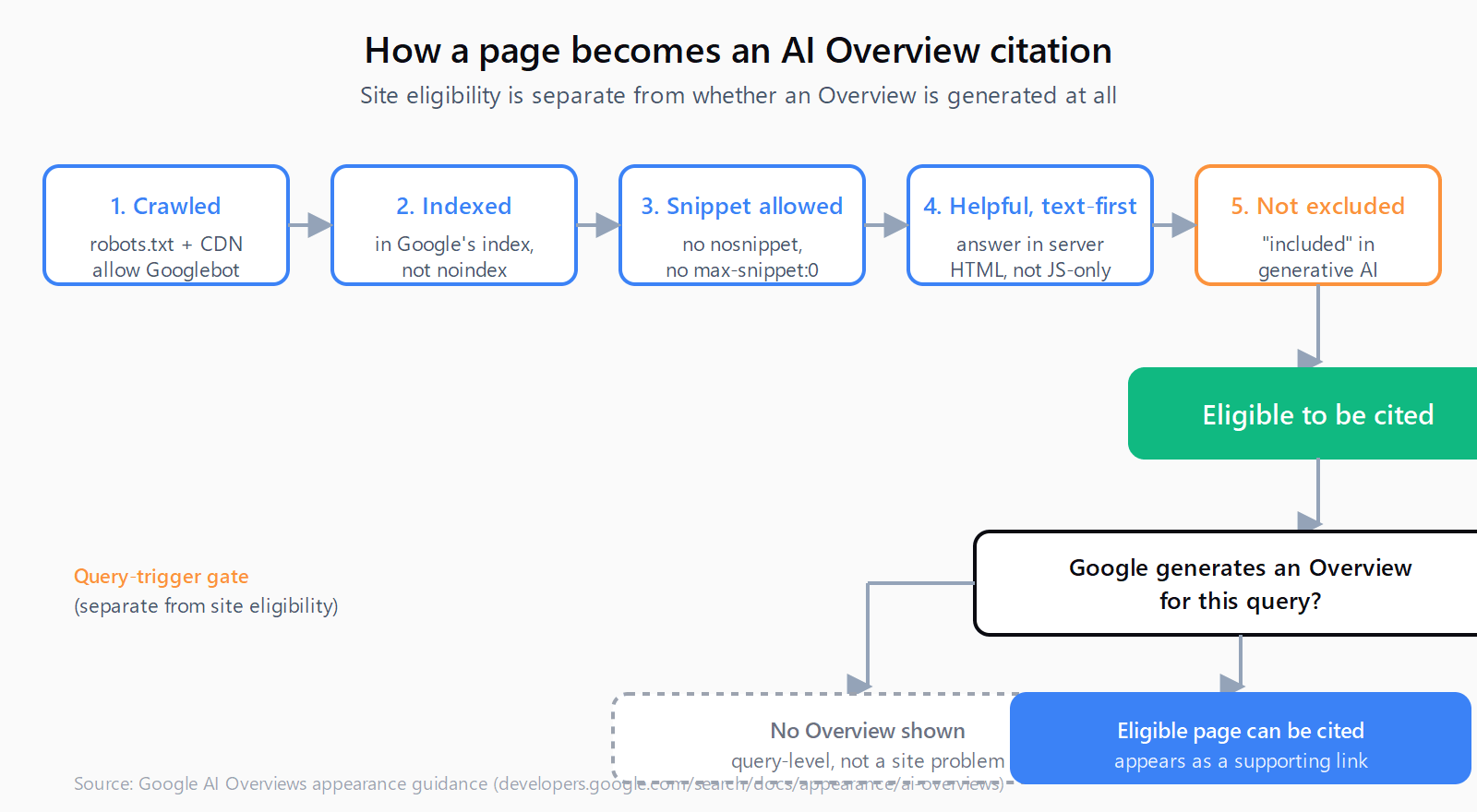
AI Overviews are not a separate index. They pull from the same pages Google already crawls, so a page that ranks but never shows up as a cited link is failing one of five eligibility checks. The blocker most guides skip is a property-level toggle in Search Console that can exclude an entire site from generative AI features without changing anything on the page itself.
Why does your site rank in regular search but not in AI Overviews?
To appear as a supporting link in an AI Overview, a page has to be indexed, displayable in Search with a snippet, and compliant with Google's technical requirements - there is no special AI Overviews markup to add, and indexing is not guaranteed even then. Overviews only render when Google's systems decide they add value beyond the standard results, so they do not appear for most queries. "Not showing" splits into two cases: the Overview was never generated for that query, or it was generated and your page was not eligible. If competitors are being cited for the same query, you are in the second case, and the rest of this post is the diagnostic.
If you are also missing from ChatGPT and Perplexity, the broader reasons a site goes uncited across AI search overlap but are not identical, because each engine crawls and ranks on different signals.
What blocks your site from appearing in AI Overviews?
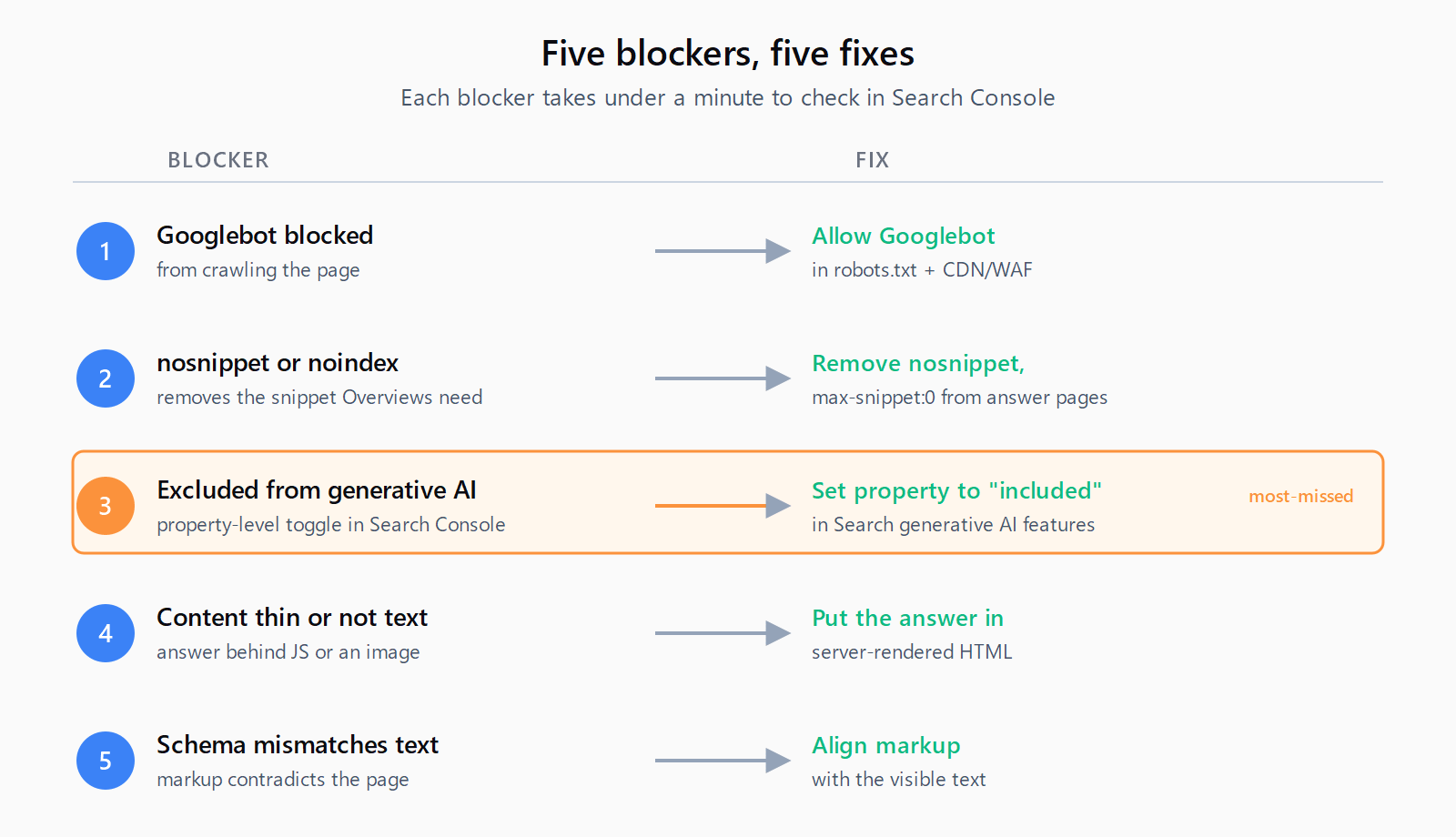
If an Overview is being generated for your target query and your page still is not cited, work through these five blockers. Each takes under a minute to check with Search Console or a single curl.
1. Is Googlebot blocked from crawling your pages?
Symptom: URL Inspection in Search Console returns "Crawled but not indexed" or a blocked status, and the page is absent from the index.
Diagnostic: Run URL Inspection on a representative URL and read the "Last crawl" and "Indexing" sections. Check robots.txt and any CDN or WAF rule that filters by user-agent for a Googlebot block.
Fix: Allow Googlebot in robots.txt and in your CDN or WAF rules, make the page reachable through internal links, then request indexing from URL Inspection. Google's AI Overviews appearance guidance lists crawl access as the first eligibility requirement.
2. Are nosnippet or noindex directives hiding your pages?
Symptom: Pages are indexed, but the Search result shows no description, just a bare title and URL, and they never appear in Overviews.
Diagnostic: Check the page's meta robots tag and robots.txt for nosnippet, max-snippet:0, or noindex. URL Inspection's "Live URL" test shows the directives Googlebot receives.
Fix: Remove nosnippet and max-snippet:0 from answer pages, and keep noindex off any page you want cited. Overviews need a displayable snippet to lift, so nosnippet removes you from Overviews even though the page stays indexed - the over-blocking trap that catches sites trying to protect their content from regular snippets.
3. Has your site been excluded from Search generative AI features?
Symptom: The pages are indexed, crawlable, snippet-displayable, and genuinely helpful, yet the generative AI performance report is missing from Search Console and you never appear in Overviews.
Diagnostic: In Search Console, confirm the property is set to be included in Search generative AI features. Google's generative AI performance report documentation states the report's absence can mean the site has been "excluded from Search generative AI features."
Fix: Set the property to "included in Search generative AI features." This is a single property-level toggle that controls both the report and eligibility for display in Overviews and AI Mode, and it is the one blocker nothing else in this list will surface.
4. Is your content thin or not available as text?
Symptom: Googlebot reaches the page and it is indexed, but the answer is rendered by client-side JavaScript or locked inside an image, so the indexer sees little extractable text.
Diagnostic: View the page with JavaScript disabled, or open URL Inspection's rendered HTML, and confirm the answer paragraph is present in the initial server HTML.
Fix: Put the answer in text in the server-rendered HTML rather than gating it behind a click, a canvas, or an image. Google's guidance is explicit that important content must be available in textual form.
5. Does your structured data mismatch the visible text?
Symptom: You added FAQ or Article markup, but the schema describes content that is not on the page or contradicts what a reader sees.
Diagnostic: Run the URL through Google's Rich Results test and compare the detected structured data against the visible text field by field.
Fix: Align the markup with the visible text. Schema is not required for Overviews eligibility, but mismatched schema is a negative signal, and structured data that matches the page lifts extraction confidence - FAQPage schema is the highest-ROI example because it hands Overviews pre-formed question-and-answer pairs.
How do you check all five blockers in 15 minutes?
- Run URL Inspection on a representative URL and confirm it is indexed with a snippet.
- Check the meta robots tag and robots.txt for nosnippet, max-snippet:0, or noindex, and remove them from answer pages.
- Confirm the Search Console property is set to "included in Search generative AI features."
- View the page with JavaScript disabled and verify the answer text is in the server-rendered HTML.
- Run the Rich Results test, align any structured data with the visible text, then request a recrawl.
For a wider pass, run a free AI SEO checker over the page to catch the extraction-signal gaps this checklist does not cover.
How long does it take for changes to appear in AI Overviews?
Recrawl timing is the slow part. Google's documentation warns that reprocessing a changed directive can take days to months, and requesting a recrawl in URL Inspection only nudges that queue. The only way to confirm you are appearing is the generative AI performance report in Search Console, rolling out across properties through 2026, which shows impressions for AI Overviews and AI Mode by page, country, and device. It reports impressions only - no clicks, no query strings - caps at 1,000 rows, and excludes Search Labs experiments, so treat it as a yes-or-no eligibility signal rather than a traffic source.
FAQ
How do I know if my site is eligible for AI Overviews?
A page is eligible when it is indexed, displayable in Search with a snippet, and compliant with Google's technical requirements - the same bar as regular Search, with no extra markup. Eligibility alone does not guarantee a citation, because Overviews only appear for queries where Google decides an AI answer adds value.
Why does my site rank in regular search but not in AI Overviews?
Ranking in regular Search proves the page is indexed and relevant, but Overviews add two more gates: the page must have a displayable snippet, and the property must not be excluded from Search generative AI features. A nosnippet directive or an excluded property will keep a ranking page out of Overviews entirely.
Does nosnippet or noindex remove my site from AI Overviews?
Yes. nosnippet and max-snippet:0 remove the snippet Overviews need to display your link, and noindex removes the page from the index altogether. Use data-nosnippet on specific elements if you want to protect a passage without dropping the whole page out of Overviews.
Where is the "include your site in Search generative AI features" setting?
The setting sits in Search Console as a property-level option. Google's generative AI report documentation links it to eligibility: excluding the site removes it from Overviews, AI Mode, and the report itself. When the report is missing on an indexed site, this toggle is the likely cause.
Do I need schema markup to appear in AI Overviews?
No. Google's guidance says no special schema.org markup is required for Overviews. Schema helps only when it matches the visible text; matching FAQPage markup raises extraction confidence, but mismatched markup is a negative signal.