
GA4's new AI Assistant channel: setup, regex fallback, and what it misses in 2026
GA4 added a native AI Assistant channel on 13 May 2026, but it only catches 60-80% of AI-sourced traffic. Here is the full setup: native channel, custom regex group (above Referral), and the UTM short-link that recovers the Direct slice.
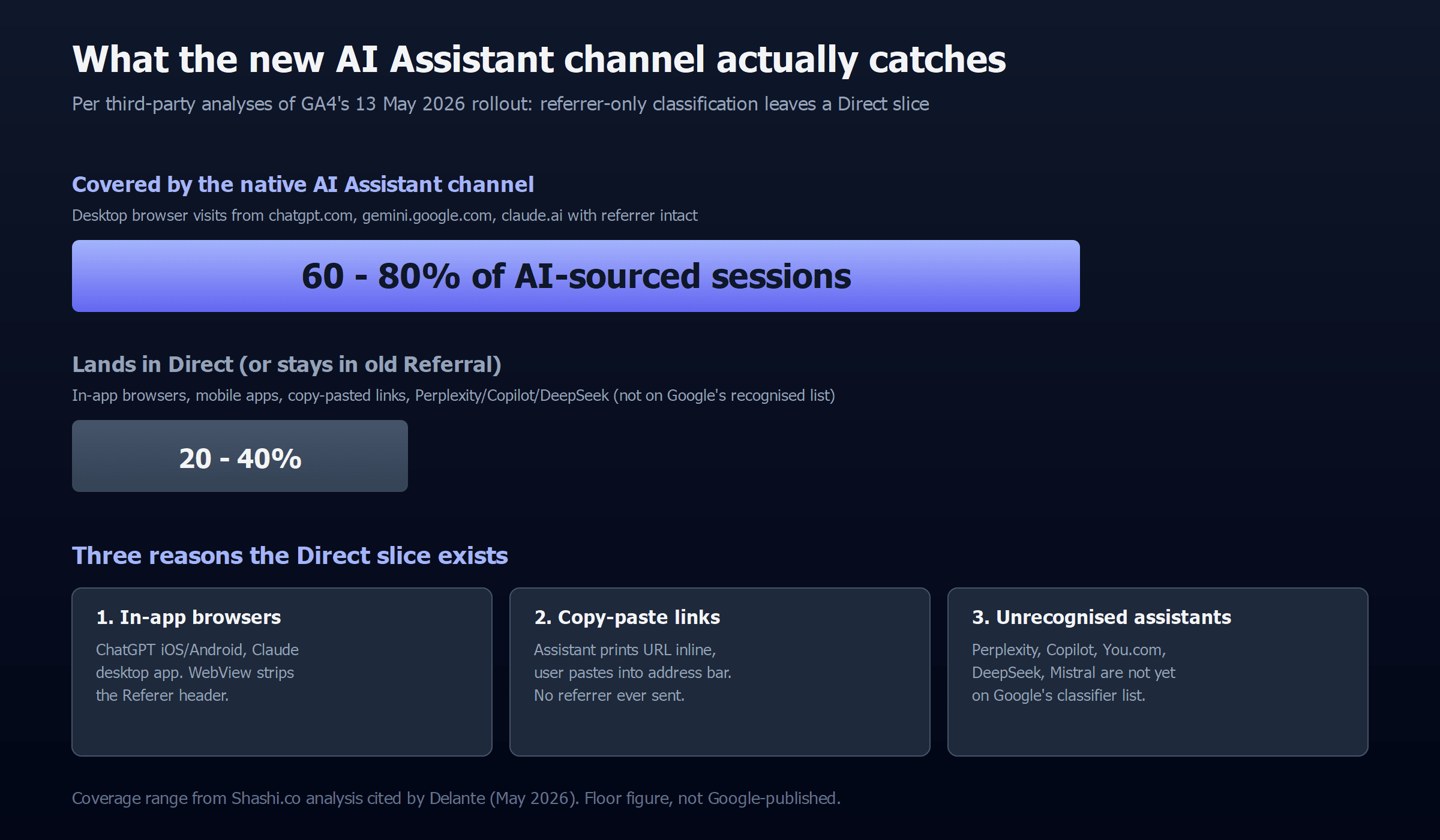
TL;DR: GA4 quietly added a native "AI Assistant" channel on 13 May 2026 that catches the 60-80% of AI-sourced visits arriving with a referrer header from ChatGPT, Gemini, and Claude; the other 20-40% land in Direct because in-app browsers and mobile apps strip the referrer, Perplexity and Copilot are not yet in Google's recognised list, and the channel is not retroactive, so the only complete setup is the native channel plus a custom regex group placed above Referral plus a UTM-tagged short link for content that surfaces in AI summaries.
What changed in GA4 on 13 May 2026?
Google rolled an "AI Assistant" channel into GA4's Default Channel Group. Sessions whose session_source referrer matches a recognised assistant now get three things assigned automatically: medium ai-assistant, campaign (ai-assistant), and Default Channel Group AI Assistant. No tagging, no regex, no Tag Manager. It happens at ingest. Google's own framing (quoted in Search Engine Journal) is "monitor how generative AI impacts your business by tracking user clicks, trending AI sources, and how this traffic compares to traditional channels like organic search."
The official rollout names three referrers: chatgpt.com / chat.openai.com, gemini.google.com, and claude.ai. Perplexity, Copilot, DeepSeek, You.com, and Mistral Le Chat are not on Google's recognised list, and the company has not published a full list beyond those three.
Step 1: How do you verify the native AI Assistants channel is firing?
Open GA4 and walk this path: Reports > Acquisition > Traffic acquisition > group by Default channel group. If the rollout has reached your property, an "AI Assistant" row appears with a non-zero session count from 13 May onward. If you don't see the row yet, two things can be true:
- The rollout hasn't reached your property yet. Google staged it over several weeks across regions and tiers. Re-check in 7-10 days.
- You have no qualifying traffic. The classifier is referrer-only, so if your audience reaches you through copy-pasted links from the ChatGPT iOS app, you will have zero sessions in the channel even when you are getting cited.
The native channel is not retroactive. Sessions from before 13 May that landed in Referral or Direct stay where they were. Google's announcement is explicit on this, and so is Delante's analyst breakdown, and there is no backfill button, no recalculation pass, no historical reclassification. If you want trend data going back further than 13 May, you have to build it out of session-level data using a custom channel group (next step).
Step 2: How do you build a custom channel group for the long-tail AI traffic?
The native channel is the easy 60-80%. The custom channel group is everything Google missed: Perplexity, Copilot, You.com, DeepSeek, Grok, Meta AI, and the pre-13-May historical traffic that needs reclassifying. You can run a custom group alongside the Default group with no conflict.
The path: click the Admin gear (bottom left) > Property column > Data display > Channel groups > Create new channel group. Name it something like "AI Search (custom)" so you can tell it apart from the native channel in reports.
The rule: add a single channel called "AI Assistants (custom)" with the condition Session source matches regex and this pattern:
^.*(chatgpt\.com|chat\.openai\.com|openai\.com|perplexity\.ai|claude\.ai|gemini\.google\.com|copilot\.microsoft\.com|bing\.com/chat|deepseek\.com|grok\.com|meta\.ai|you\.com|mistral\.ai).*The pattern intentionally covers more than the native classifier, which is the entire reason you are doing this.
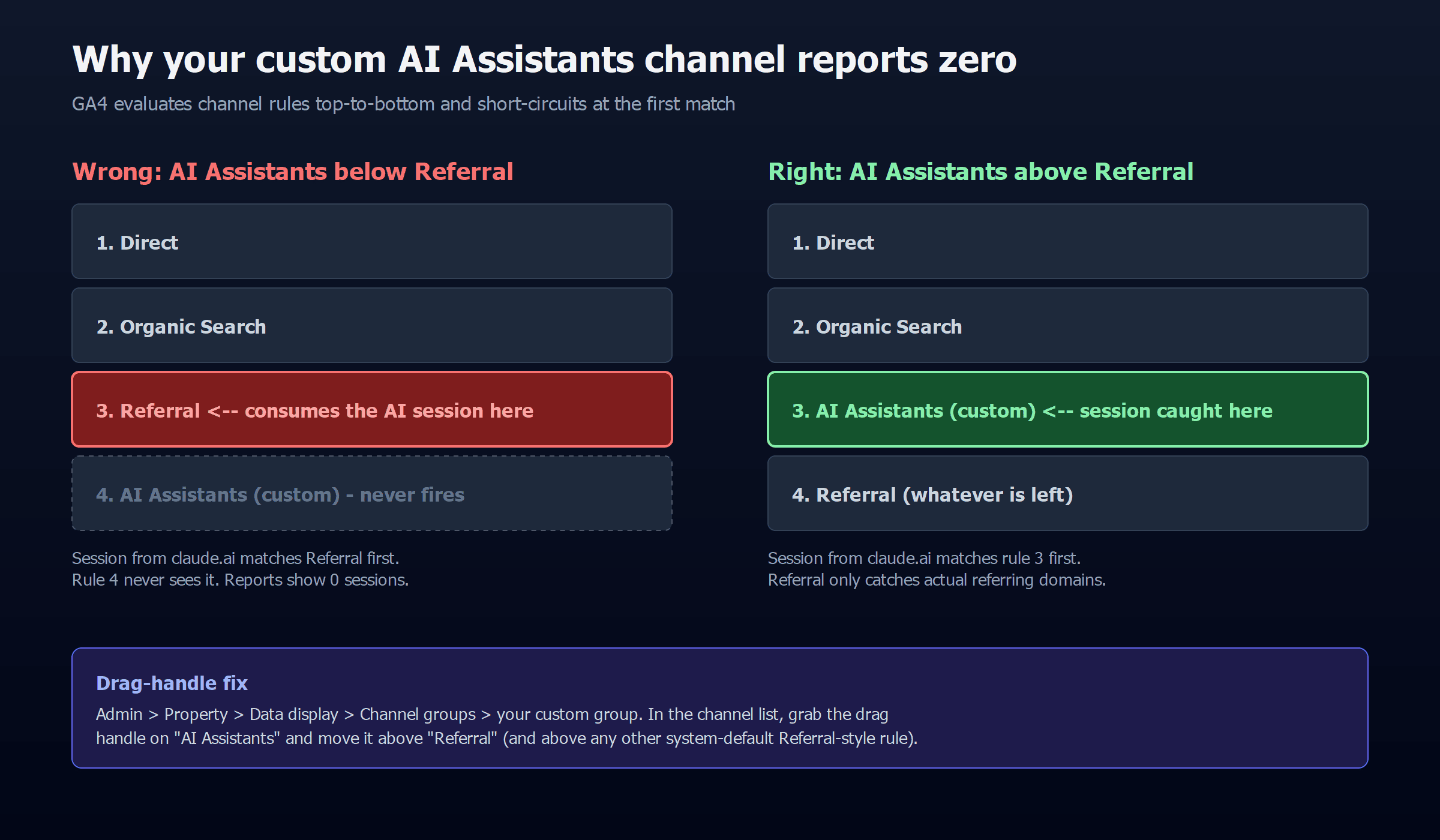
The ordering rule that breaks 90% of setups: GA4 evaluates channel rules top-to-bottom and short-circuits at the first match. If your "AI Assistants (custom)" channel sits below "Referral" (which it will by default, because Referral is one of the system channels and ships near the top), every referring AI session will hit Referral first and never reach your AI rule. The channel will report zero sessions and you will assume the regex is wrong. Drag the AI Assistants channel above Referral. Discovered Labs is explicit on this and so is anyone who has set up a custom channel and watched it stay empty.
Step 3: How do you recover the Direct slice with UTM-tagged short links?
Even with both channels live, you still lose the 20-40% of AI traffic that arrives without any referrer at all. The two big sources of this:
- In-app browsers. The ChatGPT iOS and Android apps and the Claude mobile app open links in an embedded WebView that strips the
Refererheader. Same story for any user who taps "Open in Safari" from the share sheet. - Copy-paste behaviour. When an AI assistant prints a URL inline (rather than as a hyperlink) and the user copy-pastes it into the address bar, the session lands as Direct.
The mitigation: for any page that is likely to surface in AI answers (product comparisons, definitions, troubleshooting guides), add a UTM-tagged short-link redirect on the canonical URL. You can do this with a short-link domain (`go.yourdomain.com/x`) that 301s to `https://yourdomain.com/page/?utm_source=ai-assistant&utm_medium=organic-ai`, then publish the short link in places AI crawlers ingest: author bio, sitemap, structured data citation array. When the assistant cites the short link in its response, the redirected session carries the UTM tags and lands in your custom AI Assistants channel even when the browser would otherwise drop the referrer.
This is a measurement aid, not a ranking aid. It recovers attribution; it does not influence whether you get cited in the first place. For the things that actually drive citations, see the 13 signals AI assistants use to decide what to cite. Measurement happens after the citation, not instead of it.
What does this GA4 setup still miss?
Even with all three layers in place, you are looking at a minimum baseline, not the total AI-driven audience. Three reasons:
- Citations without clicks. If ChatGPT cites your URL in its response but the user reads the summary without clicking through, you have no session, no referrer, and no data point. The only way to see those is server-log analysis of AI-crawler hits (
OAI-SearchBot,PerplexityBot,ClaudeBot) paired with the prompts they are answering. That is a different measurement layer. - Voice and embedded assistants. If Claude is embedded in a Notion doc, a VS Code panel, or an iOS Shortcut, the click that follows often has no recoverable referrer. These look like Direct forever.
- The recognised-referrer set lags. When a new assistant launches (or Perplexity rebrands a hostname), the native channel will not pick it up until Google updates its classifier. Your custom regex will, but only if you remember to add the new pattern.
The honest framing is that GA4 now shows you a defensible floor on AI traffic: bigger than zero, smaller than the truth. That is still better than May 12 2026, when it was zero.
What's the 20-minute setup checklist?
- Reports > Acquisition > Traffic acquisition. Look for a row labelled "AI Assistant" with sessions from 13 May onward. If missing, wait a week.
- Admin > Property > Data display > Channel groups > Create new channel group. Name it "AI Search (custom)".
- Add one channel "AI Assistants (custom)" with the regex above. Drag it above Referral.
- Pick your top 5 pages by AI citation potential (FAQ pages, comparison tables, definitions). For each, set up a UTM-tagged short link as the citation-friendly URL and publish it in your sitemap, your author bio, and your structured data
citationarray. - Build a Looker Studio (or GA4 Explore) report that joins Default Channel Group = "AI Assistant" + Custom Channel Group = "AI Assistants (custom)" + Source/medium containing "ai-assistant". That's your composite AI-search dashboard.
If you are running this on a property where AI traffic is a strategic concern rather than a curiosity, this is what the AutomateLab AI search measurement service ships in week one, alongside an audit against the citation signals catalogued by our AI-SEO MCP that audits citation eligibility.
FAQ
How do I see ChatGPT referrals in GA4?
Reports > Acquisition > Traffic acquisition, then group by Default channel group. After 13 May 2026 a row called "AI Assistant" appears, capturing referrer-tagged sessions from chatgpt.com / chat.openai.com. ChatGPT mobile-app and in-app-browser sessions still land in Direct because the referrer is stripped.
Why does Claude.ai traffic show as Direct?
Three possible causes, in rough order of likelihood: (1) the visit came from the Claude iOS / Android app or the Claude desktop app, both of which strip the referrer; (2) Claude printed the URL inline in its response and the user copy-pasted it; (3) the GA4 AI Assistant rollout has not reached your property yet. The custom regex channel will not help with (1) and (2); the UTM-tagged short link will.
What regex catches all AI assistants in GA4?
As of May 2026: ^.*(chatgpt\.com|chat\.openai\.com|openai\.com|perplexity\.ai|claude\.ai|gemini\.google\.com|copilot\.microsoft\.com|bing\.com/chat|deepseek\.com|grok\.com|meta\.ai|you\.com|mistral\.ai).*. Apply it as Session source matches regex in a custom channel group, and place that channel above Referral or the rule never fires.
Is the GA4 AI Assistant channel accurate?
It is accurate for the slice it covers, which is referrer-tagged sessions from ChatGPT, Gemini, and Claude. It is not complete: third-party analyses peg the referrer-only coverage at 60-80% of true AI-sourced traffic, leaving 20-40% misclassified as Direct.
Does the AI Assistant channel apply retroactively?
No. The classifier runs at session-ingest time and only on traffic from 13 May 2026 onward. Historical sessions stay in whatever channel they originally landed in. If you need pre-13-May AI-traffic trend data, you have to rebuild it from session-level source/medium in a custom channel group.
Can I track Perplexity Comet and ChatGPT Atlas browser traffic?
Partially. Both browsers send a referrer on outbound clicks the same way Chrome and Safari do, so visits from a search or chat panel inside Comet or Atlas should arrive with perplexity.ai or chatgpt.com in the referrer and get classified correctly by the custom regex. The exception is when the user pins a URL or opens it in an isolated tab the browser flags as "private"; those still strip the referrer and land as Direct. There is no clean fix for the private-tab case.