
How to fix Make Maximum execution timeout 40 minutes with error handlers
Make raises ExecutionInterruptedError at the scenario level, so per-module error handlers miss it. The fix is structural - enable Incomplete Executions, set Break with auto-retry, and split high-volume work across chained scenarios.
TL;DR: Make raises ExecutionInterruptedError as a scenario-level warning, so per-module Break or Rollback handlers never catch it; the fix is to enable Incomplete Executions, set Break with auto-retry on the slowest module, and split high-volume work across chained scenarios connected by webhook handoff.
The 40-minute ceiling bites every Make user who runs an iterator over a few hundred items or a sequence of slow API calls. Most guides say "add an error handler" without explaining that the timeout fires at the scenario level, not at any module, so wrapping the slow step in a Break or Rollback handler does nothing on its own.
Why does Make's 40-minute timeout fire?
Make stops a scenario when its wall-clock exceeds the plan's maximum execution time. On Core, Pro, and Teams the cap is 40 minutes with a roughly 5-minute grace period (so the hard kill lands near 45 minutes). On Free it drops to 10 minutes. Only a private White Label instance can raise the ceiling to 60 minutes, configurable up to a higher upper bound. The verbatim message that lands in the execution log is Execution was requested to stop because MAXIMUM EXECUTION TIMEOUT [40 minutes] had elapsed.
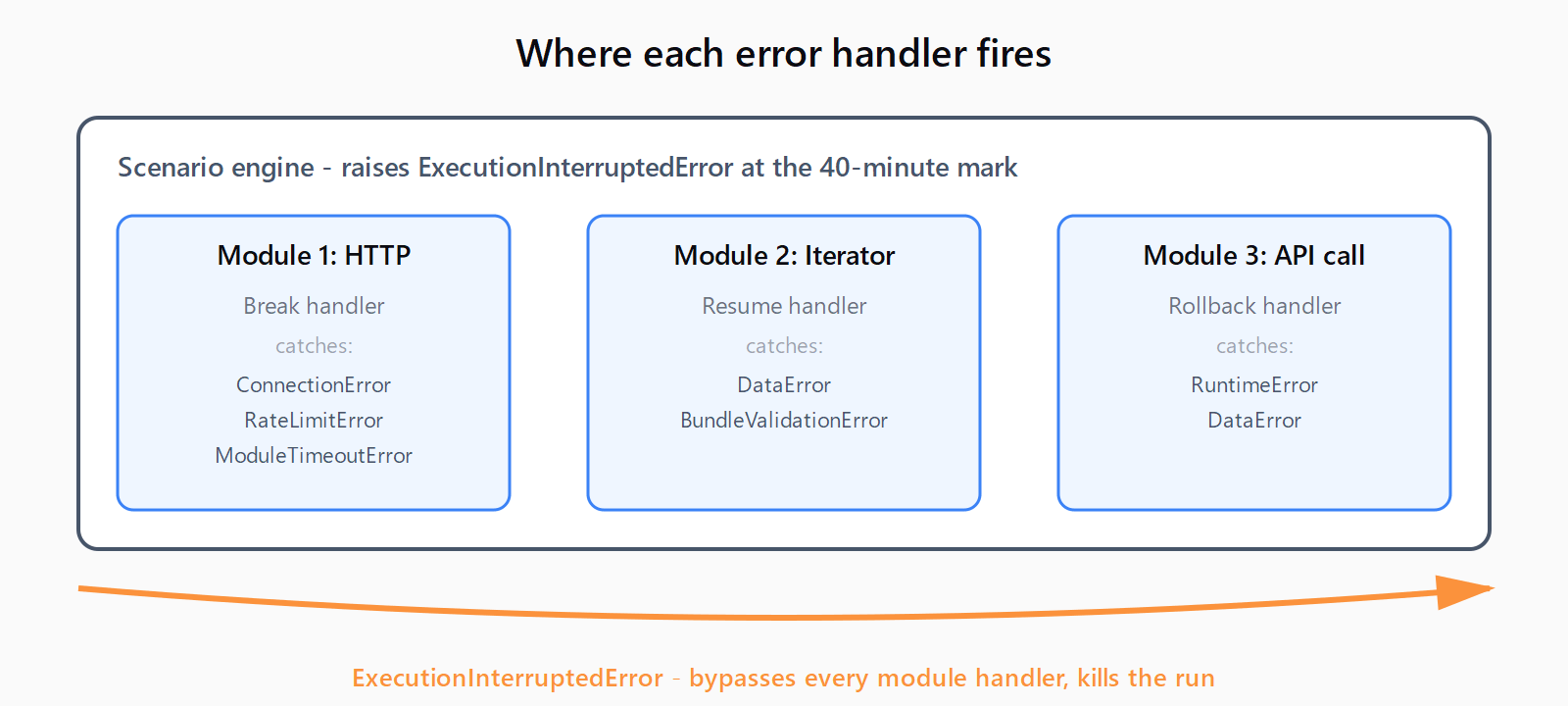
The interrupt fires as ExecutionInterruptedError. Make's canonical error catalog does not list it under module errors; it is classified as a warning raised by the scenario engine itself. Per-module error handlers - Break, Resume, Ignore, Commit, Rollback - only intercept errors a module emits, like ConnectionError, RateLimitError, or ModuleTimeoutError. The platform-level interrupt skips the handler tree entirely and marks the run incomplete (or failed, depending on settings).
This is also why the timeout is distinct from the 40-second HTTP module timeout: that one is a module error and Break can catch it; the 40-minute one is a hard scenario limit and Break cannot.
How do you fix the 40-minute timeout?
- Enable Incomplete Executions in scenario settings. Open the scenario, click the wrench, and turn on Allow storing of incomplete executions. Without this flag, Break has nowhere to queue the unprocessed bundles when the scenario is cut short, so the work is just lost. This is the single most common omission in guides that say "Break handles it."
- Add a Break handler on the slowest module, with auto-completion. Right-click the slow module (typically an HTTP request, OpenAI call, or Google Sheets bulk write), choose Add error handler, then Break. In the Break node, set Automatically complete execution on, Number of attempts to 3-5, and Time between attempts to a value that lets the upstream API recover (60-300 seconds for rate-limited APIs). Make documents that Break "automatically retries the most frequent temporary errors, the ConnectionError and RateLimitError, by default" - but auto-completion is what lets the scenario reach the next bundle after a timeout-cut run.
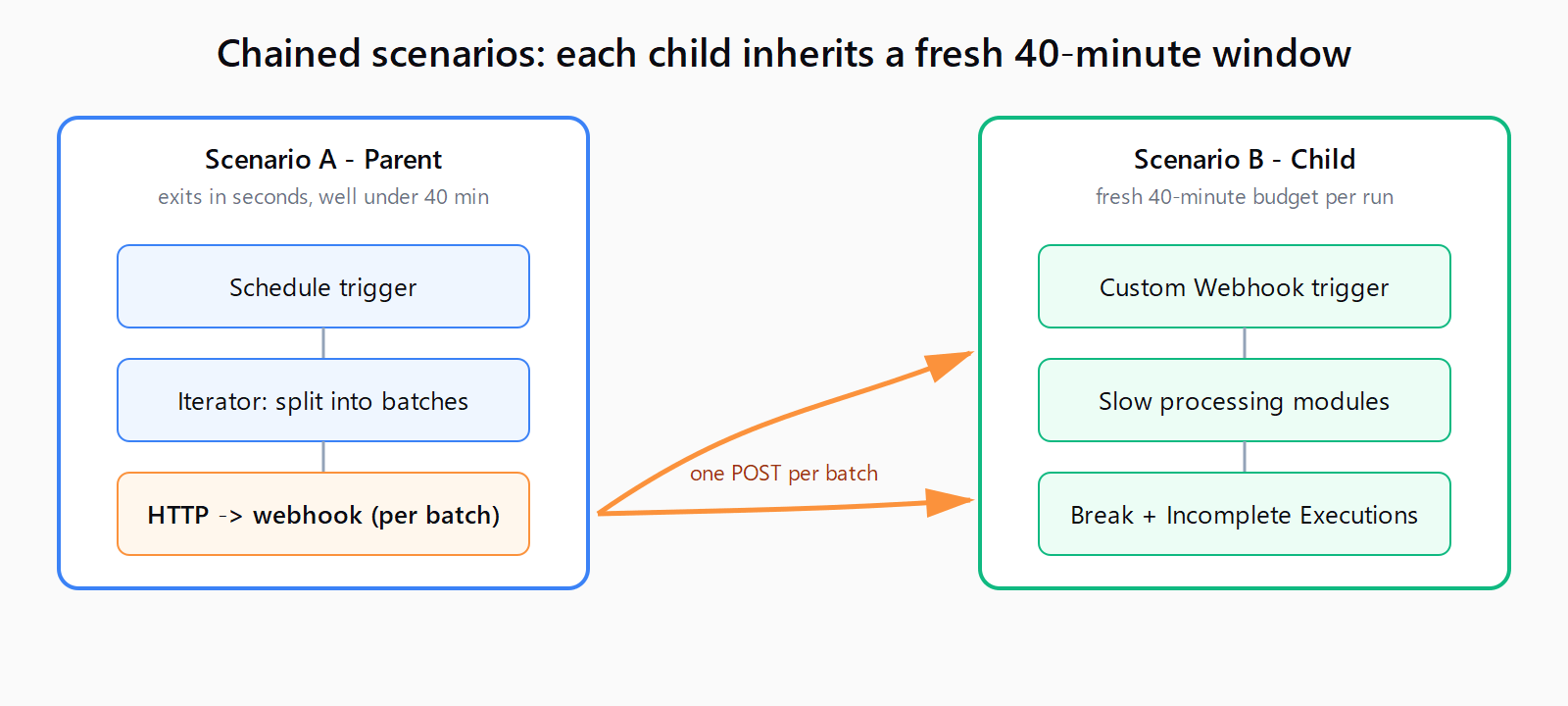
- Split work across chained scenarios. If a single scenario routinely processes 300+ items or runs slow API chains, no handler combination will keep it under 40 minutes. Refactor it into two scenarios: scenario A queues a batch and calls scenario B's webhook URL via an HTTP module per batch; scenario B starts with a Custom Webhook trigger and does the actual work. Each scenario gets its own 40-minute budget, and the parent exits in seconds. See the deeper write-up on how to split work across chained scenarios for the parent/child wiring and idempotency rules.
How do you verify the fix worked?
Run the scenario once with a payload large enough to have triggered the original timeout. The success criteria, in order: the execution log shows no ExecutionInterruptedError; if any bundle was queued, the Incomplete Executions tab shows it with status Resolved after the auto-retry interval; and for the chained-scenario refactor, scenario B's history shows one run per HTTP call from scenario A. Total wall time across all chained runs should stay well under the per-scenario 40-minute window.
What if the fix didn't work?
If the timeout still fires, the Break handler is firing on the wrong module - check the execution log to see which module was active at the cut, and move the handler there. If Incomplete Executions stays empty after a cut run, the flag is off at the scenario level or the parent scenario was set to Sequential processing, which queues bundles instead of storing them. If the chained-scenario refactor still hits the limit on scenario B, the batches are too large; cut batch size to 50-100 items and add a Sleep module between batches if the downstream API rate-limits.
FAQ
Why don't per-module error handlers stop the 40-minute timeout?
Because ExecutionInterruptedError is a scenario-level warning raised by the Make engine, not a module error. Error handlers - Break, Resume, Ignore, Commit, Rollback - only attach to modules and intercept errors emitted by modules. The timeout fires above that layer, so no handler tree catches it.
What is the maximum scenario execution time on Make in 2026?
On the hosted plans (Free, Core, Pro, Teams) the cap is 10 minutes on Free and 40 minutes on the paid hosted tiers, with a 5-minute grace period. Private White Label instances allow up to 60 minutes by default and can be raised further at the customer's discretion.
Does the Break error handler retry the failed scenario automatically?
Only if Incomplete Executions is enabled in scenario settings and the Break node has Automatically complete execution turned on with a non-zero number of attempts. Without both, Break stores the incomplete run but never resumes it; you would have to click Retry manually.
What's the difference between ExecutionInterruptedError and ModuleTimeoutError?
ModuleTimeoutError is a module-level error raised when one HTTP request does not return inside its expected window (Make caps individual requests at roughly 40 seconds). It is catchable by Break and Resume. ExecutionInterruptedError is a scenario-level warning raised when wall-clock time exceeds the plan's max execution time. It is not catchable by any handler.
Can I increase Make's 40-minute scenario timeout?
Not on hosted plans. The only path to a higher limit is moving to a private White Label instance, which lifts the cap to 60 minutes and lets the operator configure it further. For everyone else, splitting work across chained scenarios is the supported workaround.
Hit a different error? Browse the Automation Error Index for a searchable catalog of Make errors, each with a verified fix.