
How to fix the n8n LinkedIn "Requested version 20250401 is not active" error
The n8n LinkedIn node started failing with HTTP 426 NONEXISTENT_VERSION because the hard-coded LinkedIn-Version header (202504) was deprecated. Upgrade to n8n 2.18.0+ for the fixed value (202604), or replace the node with an HTTP Request node carrying an active version header.
TL;DR: Every n8n LinkedIn node call started returning 426 - {"status":426,"code":"NONEXISTENT_VERSION","message":"Requested version 20250401 is not active"} in mid-April 2026 because the node hard-codes a LinkedIn-Version request header that LinkedIn deprecated.
The fix is to upgrade to n8n 2.18.0 or later, which bumps the header to an active version. Full steps and the workaround for users who can't upgrade right now are below.
Why does the "Requested version 20250401 is not active" error happen?
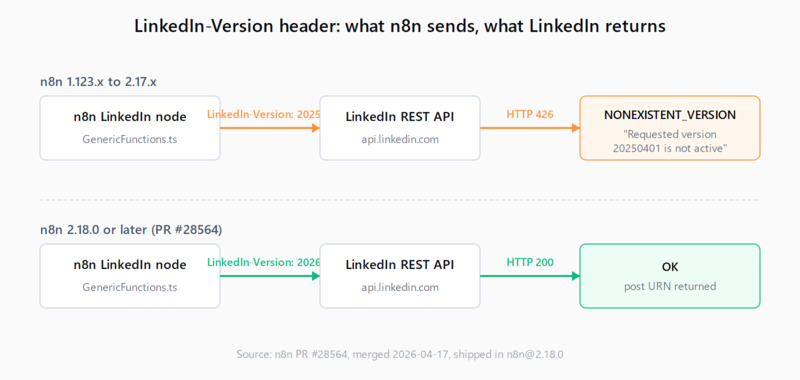
LinkedIn's REST API requires every request to carry a LinkedIn-Version header naming the API version. The value uses a six-digit YYYYMM form, and LinkedIn retires each version roughly twelve months after release. n8n's native LinkedIn node hard-codes that header in GenericFunctions.ts, and the value sitting in n8n 1.123.x through 2.17.x was 202504 - the April 2025 version. LinkedIn pulled that version out of the active list on April 16, 2026, and from that minute every Create Post, Get Post, and connection-management call from those n8n versions started returning HTTP 426.
The fix landed two days later as n8n PR #28564, which changed the literal string from 202504 to 202604. It shipped in n8n 2.18.0 on April 21, 2026. The same root cause is reported on issue #28559 and across multiple n8n community threads. There is one quirk worth noting before you go editing config: the error displays 20250401 (eight digits, YYYYMMDD) but the header n8n actually sends is 202504 (six digits). LinkedIn's server canonicalizes the value in the error response, which is why a grep across your n8n source for "20250401" turns up nothing.
How do you fix the LinkedIn version error in n8n?
- Confirm your n8n version. In the n8n UI go to Help -> About, or run
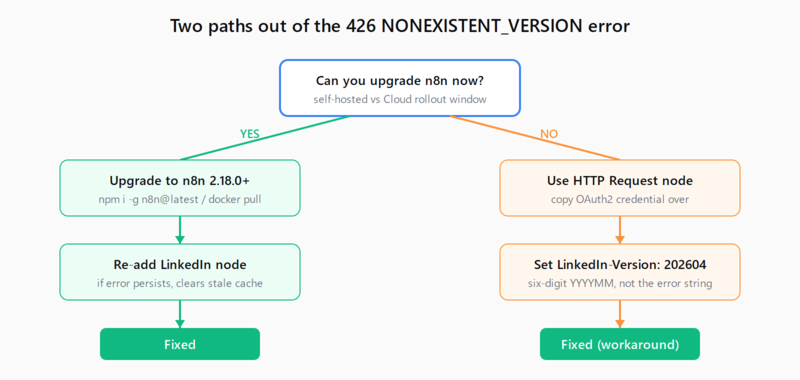
n8n --versionon a self-hosted box. If the version is below 2.18.0, you have the bug. n8n Cloud users see the version under Settings -> Usage. - Re-open the workflow and re-test the LinkedIn node. Some forum reports describe a stale-credential cache where the error persists after the upgrade until the LinkedIn node is removed and re-added (or the saved credential is re-selected from the dropdown). If the error survives one workflow run after the upgrade, do that re-add pass before assuming the upgrade did not take effect.
If you cannot upgrade right now, replace the LinkedIn node with an HTTP Request node. Set the URL to the LinkedIn endpoint you were calling (for example https://api.linkedin.com/rest/posts), copy the OAuth2 credential over from your n8n LinkedIn credential, and add these headers explicitly:
LinkedIn-Version: 202604
X-Restli-Protocol-Version: 2.0.0
Content-Type: application/json
Do not pin LinkedIn-Version: 202504 as a quick fix - it is the same dead value that broke the node. Use the version named in the current LinkedIn API reference, which today is 202604.
Upgrade to n8n 2.18.0 or later. The exact command depends on how n8n is installed:
# npm
npm install -g n8n@latest

# Docker
docker pull n8nio/n8n:latest
docker stop n8n && docker rm n8n
docker run -d --name n8n -p 5678:5678 -v ~/.n8n:/home/node/.n8n n8nio/n8n:latest

# Docker Compose
docker compose pull n8n && docker compose up -d
n8n Cloud customers do not have a self-serve toggle: the Cloud rollout follows its own schedule, so the workaround in step 4 is your real path until the version flips for your tenant.
How do you verify the fix worked?
Run any LinkedIn node operation that previously failed (Create Post is the easiest smoke test). A 200 or 201 response with a JSON body containing the post URN means the upgrade took effect. If you used the HTTP Request node workaround, the same response shape from your replacement node confirms the headers are right. If you still see the 426 error after a green workflow restart, the executor is still running the old build - check that node_modules for the LinkedIn node was re-installed (npm) or that the new container actually came up (docker ps).
What if the fix didn't work?
Three things keep this error live after an upgrade attempt. First, the n8n process is still the old one - common with PM2 deployments where pm2 reload n8n was skipped. Second, n8n Cloud has not rolled the new version to your tenant yet; the Cloud and self-hosted release schedules are independent, and there is no manual override. Third, the LinkedIn credential itself was re-issued by LinkedIn on a token-rotation event during the same window, in which case you are looking at a separate 401 problem dressed up as a 426 - re-authorize the credential under Credentials -> LinkedIn OAuth2 API -> Connect. If you are running a pinned production tag, the same shape of breakage is what hits when an n8n update broke another node and the workaround is structurally identical: pin the new minor, not the old one.
FAQ
Does this affect n8n Cloud and self-hosted equally?
Yes. The hard-coded header lives in the same source file across both, so any instance running 1.123.x through 2.17.x is affected. The only difference is that self-hosters can upgrade on their own clock, while Cloud users are at the mercy of the Cloud rollout for their tenant.
Why does the error say 20250401 if the code only contains 202504?
LinkedIn's API server returns a canonicalized eight-digit form (YYYYMMDD) in the error message even though the header it parses is six-digit YYYYMM. n8n sends 202504; LinkedIn echoes 20250401. Grep your code for the six-digit form, not the one in the error.
What value should I set as LinkedIn-Version in an HTTP Request node?
Use 202604. That is the value n8n itself sends as of 2.18.0 and the version LinkedIn lists as active in their REST reference. Avoid 202504 (deprecated) and avoid the eight-digit form from the error message - LinkedIn's parser does not accept it as a request value.
I updated n8n and the error is still there - now what?
Re-add the LinkedIn node in the workflow (delete the existing one, drop a fresh one in, re-bind the credential). Cloud and Docker installs occasionally hold the old node definition in cache until that step. If that does not clear it, your process is still the old build - pm2 reload, container restart, or npm rebuild until n8n --version reports 2.18.0 or higher.
Will this break again next April?
Probably. LinkedIn retires each API version about twelve months after release, so 202604 is on track to deprecate in April 2027. The fix shape is the same: upgrade n8n to whichever release lifts the header, or use the HTTP Request node escape hatch in the meantime. If you run a self-hosted n8n upgrade on a regular cadence, this never bites you for more than a day.
Hit a different error? Browse the Automation Error Index for a searchable catalog of n8n errors, each with a verified fix.