
Best free n8n workflow templates to copy in 2026
9,800+ free n8n workflow templates exist across the official library, GitHub repos, and community directories. Here are the best sources and what to do after importing.
TL;DR: The best place to find free n8n workflow templates in 2026 is n8n.io/workflows (9,800+ community templates) and the awesome-n8n-templates GitHub repo - but most templates require credential setup before they run; they are starting points, not plug-and-play installs.
n8n ships with a rich template library baked into its interface, and the community has contributed thousands more. The main confusion new users hit is that a "free template" means free to copy and import - it does not mean zero configuration. Every template that calls an external service needs an API key, OAuth connection, or credential block before it executes.
Where do you find the best free n8n templates?
Three sources cover the full range:
- n8n.io/workflows - the official library, 9,800+ templates, searchable by category (AI, marketing, DevOps, HR, finance). Maintained by the n8n team and community contributors. Templates show required nodes and credentials up front so you know what setup is needed before importing.
- awesome-n8n-templates on GitHub - 280+ curated, pre-tested workflows with clear documentation. Organized by use case, with notes on required API access and expected outputs. Better than browsing the official library when you have a specific automation goal in mind.
- n8nresources.dev - community-maintained directory with ratings and comments. Useful for finding templates others have used in production, not just published once and abandoned.
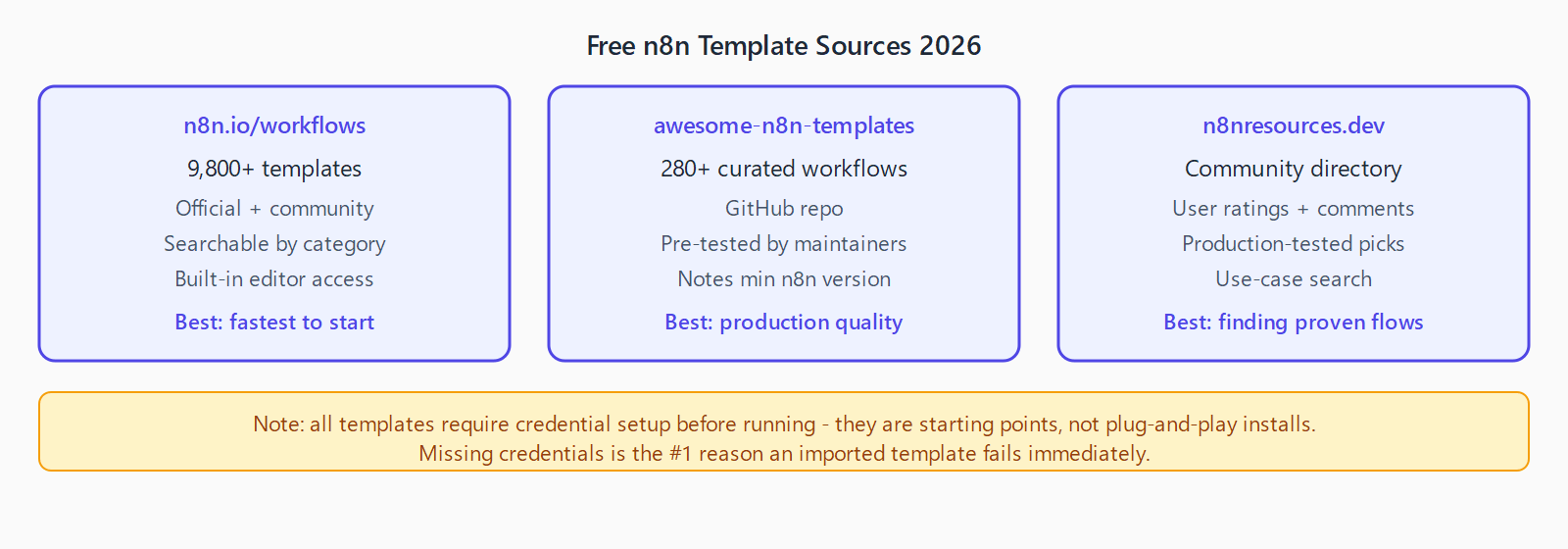
The Templates button inside n8n's editor also surfaces recommended templates based on which nodes you have credentials for - a fast way to find templates you can run immediately without new API setup.
What are the best template categories in 2026?
The highest-quality template categories, ranked by community engagement and practical reuse:
- AI and chatbots. Templates for building AI agents, RAG pipelines, Telegram and Slack bots backed by OpenAI or Anthropic. The "Scrape and summarize with AI" template is consistently in the top 10 by import count. Most require an LLM API key and a Chat Trigger or Webhook node.
- Email automation. Gmail label monitors, auto-reply workflows, contact list cleaners. Low complexity - good starting templates for new n8n users.
- Sales and marketing. Lead capture from forms to CRMs, Calendly-to-HubSpot syncs, cold outreach sequences. Templates in this category tend to be multi-step and need the most credential setup.
- DevOps and monitoring. GitHub issue trackers, server uptime monitors, deployment notifiers. Often require webhook nodes and involve fewer external APIs than CRM templates.
- Data backup and sync. "Back Up Workflows to GitHub" is one of the most-starred templates in the community library - useful for any self-hosted n8n operator.
What makes a good n8n template?
The templates worth copying share three traits. First, they document required credentials in the workflow's sticky notes or description - you know what API keys are needed before importing. Second, they use only built-in or commonly available community nodes, not nodes that require a separate install or that only work on specific n8n versions. Third, they have a clear failure path: an error handler or at least a notification step when something goes wrong, so silent failures do not go undetected for days.
Templates that hard-code endpoint URLs, embed test credentials, or skip error handling entirely are not production-ready. Treat them as sketches, not finished automations.
How do you import a template into n8n?
- Open n8n and click Templates in the left sidebar, or navigate directly to a template page on n8n.io/workflows.
- Click Use workflow. n8n opens the workflow in the editor with all nodes pre-built.
- Click each node that shows a red credential indicator and connect or create the required credential.
- Click Execute Workflow in test mode to verify the flow before activating it.
For JSON templates from GitHub or third-party sources: in the n8n editor, click the three-dot menu in the top-right corner and select Import from file or Import from URL. The workflow loads exactly as the JSON defines it.
See the n8n nodes catalog if a template references a node name you do not recognize - the catalog lists all built-in and community nodes with their operation details and version requirements.
FAQ
Are the templates on n8n.io free forever?
Yes. n8n.io/workflows is a free community resource with no paywall. The templates themselves are free to use, modify, and share. Some templates use n8n nodes that require a paid n8n Cloud plan (like certain AI nodes in older versions), but the template files themselves carry no cost.
Why does my imported template fail immediately?
The most common reason is missing or misconfigured credentials. An imported template opens with all credentials blanked out - n8n never imports actual API keys, only credential references. Open each node showing a red badge and link an existing credential or create a new one.
Can I share my own workflow as a template?
Yes. Export the workflow as JSON from the editor (three-dot menu > Download), then submit it at n8n.io/workflows via the "Share workflow" button. The submission is reviewed before it appears publicly. Remove any hardcoded personal values (email addresses, API keys, resource IDs) before sharing.
Do templates work across different n8n versions?
Most do, but node parameter names and operation names can change between major versions. If a template was built for n8n 1.x and you are running an older self-hosted version, check the version tag on the template page. The awesome-n8n-templates repo notes minimum n8n versions where relevant.
What is the difference between a template and a workflow backup?
A template is a shareable starting point - generic, with credentials removed and variables left as placeholders. A workflow backup is a full JSON export of a live workflow including credential references (but not secrets). Import a template to start fresh; import a backup to restore a specific workflow on a new instance.