
How to sync HubSpot deals to a Notion database with Make.com
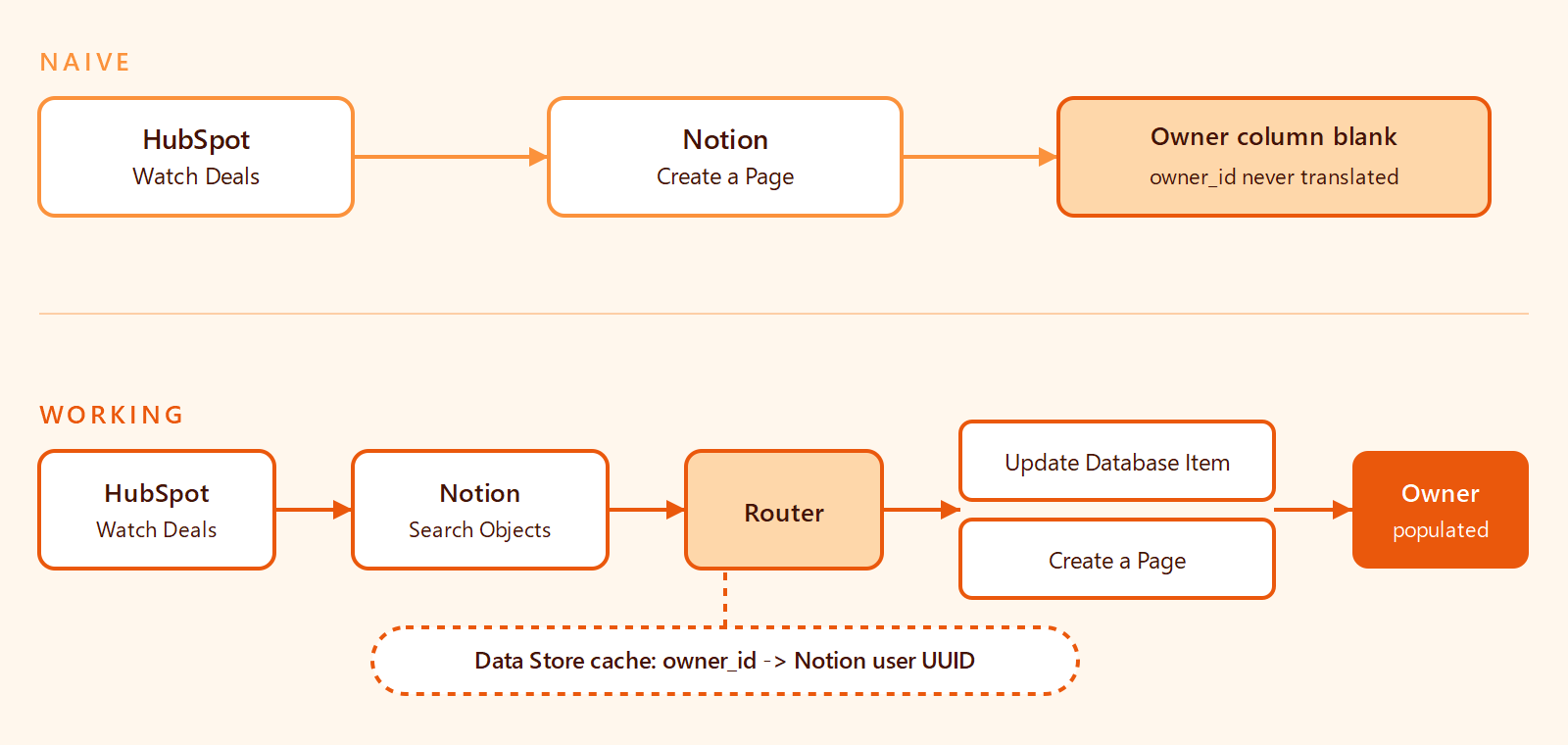
HubSpot's Watch Deals module emits owner IDs, not names, so Notion's Owner column ends up blank. The fix is a Data Store cache between Notion's List Users and the page write.
TL;DR: Sync HubSpot deals into a Notion database with Make.com using a Watch Deals -> Search Objects -> Router -> Update or Create Page scenario, plus a Data Store cache that maps email to Notion user ID for deal owners.
The Watch Deals trigger only emits the HubSpot owner ID, never the name, so the owner column ends up blank unless that translation step is in place.
This guide walks through the working scenario end-to-end, including the part the Make vendor page never explains: how to map HubSpot owner IDs to Notion People without paying for an HTTP module call on every deal. Tested on Make in 2026 against Notion's current API and HubSpot's CRM Owners API.
Prerequisites
- A HubSpot account with a connected Make app (the standard OAuth connection, not the deprecated HTTP+OAuth2 workaround).
- A Notion workspace with an integration token added to the target database. The database needs at minimum: a Title property (deal name), a Number or Text property for HubSpot deal_id, a Select for stage, a Number for amount, and a Person property for Owner.
- One Make.com Data Store (Make's built-in key-value store, free tier covers tens of thousands of records).
Step 1: How do you set up the HubSpot Watch Deals trigger?
Add a HubSpot module and choose Watch Deals. Pick the connected HubSpot account, set the trigger to "By Created Date" or "By Modified Date" depending on whether you want only new deals or also updates, and pick a polling interval (15 minutes is the practical floor on the Free plan; Core and above can poll every minute).
Filter by pipeline ID inside the trigger configuration so unrelated pipelines do not trash your Notion database. Watch Deals returns the full deal record on each tick, including dealname, amount, dealstage, hubspot_owner_id, and pipeline. Note that hubspot_owner_id is a numeric string, not a name - that is the field we have to translate.
If you also need line items on the deal, the right module is Get a Deal -> Get Associated Line Items, not Watch Deals; the trigger by itself does not return line items.
Step 2: How do you search Notion for an existing page by deal_id?
Add a Notion module and choose Search Objects (or "Search a Database" depending on plan tier). Set the Object to your target database, the Filter property to your HubSpot Deal ID column, and the value to {{1.id}} from the Watch Deals output.
This is the upsert key. Without it, every modified-deal tick creates a new Notion page and the database fills with duplicates inside a week. Make's HubSpot connection emits a stable id for each deal - that is what the Notion column should store.
Step 3: How do you add a router for Update vs Create?
Drop a Router after the Search module with two branches:
- Branch A (Update): filter
Total number of bundlesfrom the Search step is greater than 0. Connects to a Notion Update a Database Item (or "Update a Page") module that targets the page returned by the Search step. - Branch B (Create): filter
Total number of bundlesequals 0. Connects to a Notion Create a Page module that creates a new row in the database.
Map each Notion property: Title gets {{1.dealname}}, Stage gets {{1.dealstage}}, Amount gets {{1.amount}}, HubSpot Deal ID gets {{1.id}}. Leave the Owner property empty for now - Step 5 fills it.
Step 4: How do you translate the HubSpot owner_id to a Notion user?
Here is the part the vendor docs skip. Make's Notion -> List Users module returns every user in the workspace, including each person's id (the UUID Notion expects for a Person property) and person.email. HubSpot's owner record carries email as well. Email is the join key.
The naive approach - call List Users on every deal, then iterate to find the matching email - works but is wasteful. Notion enforces an average of three requests per second per integration; a busy pipeline burns that budget on a list call that returns the same data every time.
Step 5: How do you cache the owner mapping in a Make Data Store?
Add a Data Store -> Get a Record module before the router. Key it with the HubSpot owner_id ({{1.hubspot_owner_id}}). Two outcomes:
- Hit. The Data Store returns the cached Notion user UUID. Pipe it into the Owner property of the Update/Create page module.
- Miss. Fall through to a HubSpot Get an Owner module to read the owner's email, then a Notion List Users module filtered to that email, then a Data Store Add a Record module to write back the mapping. Future deals from the same owner skip both API calls.
This pattern is worth keeping in your toolkit for any "join two SaaS apps by user" scenario. It also gracefully handles archived HubSpot owners - the API returns archived: true and a null userId, but email is still populated, which is all the Notion side cares about.
For accounts where HubSpot and Notion users do not share a common email (an external sales contractor, a personal Gmail mismatched against a company Notion login), the fallback is the community-recommended switch() pattern: a static map of HubSpot owner_id to Notion user UUID embedded in a Make Set Variable. It is not elegant, but it is one row per teammate and survives every refactor.
Step 6: How do you test and avoid the Make scenario time limit?
Run the scenario manually with a single test deal first. Confirm the Notion page lands with every property populated and the Owner shows up as the linked person, not a numeric string. Then enable the schedule.
For initial backfills of large pipelines (hundreds of deals), watch the Make scenario time limit - Make hard-stops any single execution at 40-45 minutes. Backfills past that ceiling need to be split into pipeline-filtered chunks or, on the self-hosted side, you can self-host an n8n instance with no per-execution time cap. For the steady-state sync described above, runtimes stay under a minute even on busy portals.
FAQ
Why is the Notion Owner column blank after Make creates the page?
Because Make's HubSpot Watch Deals module returns the HubSpot owner_id (a numeric string), and Notion's Person property requires a Notion user UUID. The two systems do not share IDs. Step 4 above does the translation; Step 5 caches it.
Do I still need an HTTP + OAuth2 module to fetch HubSpot owners?
No. That was the workaround in the original 2023 Make community thread when Make's HubSpot owner modules were less complete. The current HubSpot app exposes a "Get an Owner" module that uses the existing OAuth connection - no separate HTTP module, no second OAuth dance, no 401 errors.
How do I avoid creating duplicate Notion pages on every deal update?
Use the deal_id as an upsert key. Add a Search Objects step before the Create/Update branch (Step 2 above), filter by your HubSpot Deal ID column, and route to Update if a match is found, Create if not. Without this, every Watch Deals tick that fires on a modification creates a new Notion page.
What if the HubSpot owner has a different email than the Notion user?
Fall back to the static switch() map: a Set Variable module with a hand-coded HubSpot owner_id -> Notion user UUID lookup. One row per teammate. Refactor when the team changes; the cost is bounded by team size, not deal volume.
Does this scenario work for the Watch CRM Objects trigger as well?
Yes. Watch CRM Objects emits the same hubspot_owner_id field on a deal record, so the mapping logic is identical. Pick Watch CRM Objects when you want a single trigger that handles deals, contacts, and companies; pick Watch Deals when the scenario is deal-only and you want pipeline filtering in the trigger UI.
How often does Watch Deals poll HubSpot?
Configurable per scenario. Free plan minimum is 15 minutes; Core, Pro, and Teams plans poll as often as every minute. There is no real-time webhook for deal updates on the standard HubSpot integration - Make's trigger is poll-based.