
Fix LinkedIn "Requested Version Is Not Active" in Zapier and Make
LinkedIn retires its API version every year, and Zapier's and Make's LinkedIn connectors break when it does. Here's the same-day Zapier fix, and why Make has none yet.
TL;DR: LinkedIn retires each API version yearly, breaking Zapier and Make LinkedIn connectors with "Requested version is not active" (Make: DataError 426), fixable in Zapier by reconnecting via the plain LinkedIn app, not fixable in Make until a connector patch ships.
The error shows up without warning: a Zap or scenario that ran fine for months suddenly refuses to post to LinkedIn, and the message names a version number nobody typed in. Most existing threads tell you to "wait for a patch," which is true for Make but skips the one thing that actually fixes Zapier same-day.
Why does LinkedIn return "Requested version is not active"?
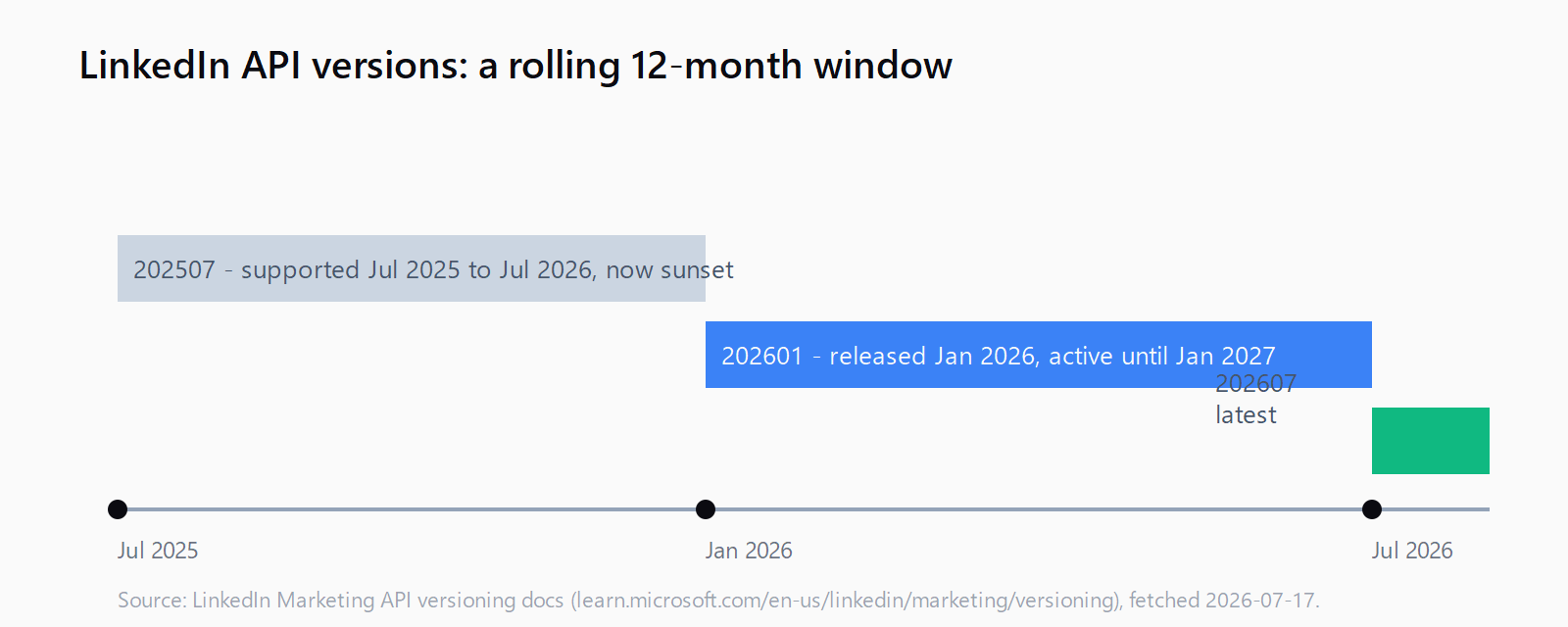
Every call to LinkedIn's Marketing API must carry a LinkedIn-Version header formatted YYYYMM, and LinkedIn supports each version for a minimum of one year before sunsetting it. Zapier's and Make's LinkedIn connectors hard-code a specific version internally rather than always requesting the latest one. When that pinned version ages past its one-year window, every call fails with a 426-style error until the platform ships a connector update pointing at a version LinkedIn still accepts. As of this month LinkedIn's own docs list July 2025 (202507) as freshly sunset, so any connector still pinned there breaks today even if it worked last week.
How do you fix it in Zapier?
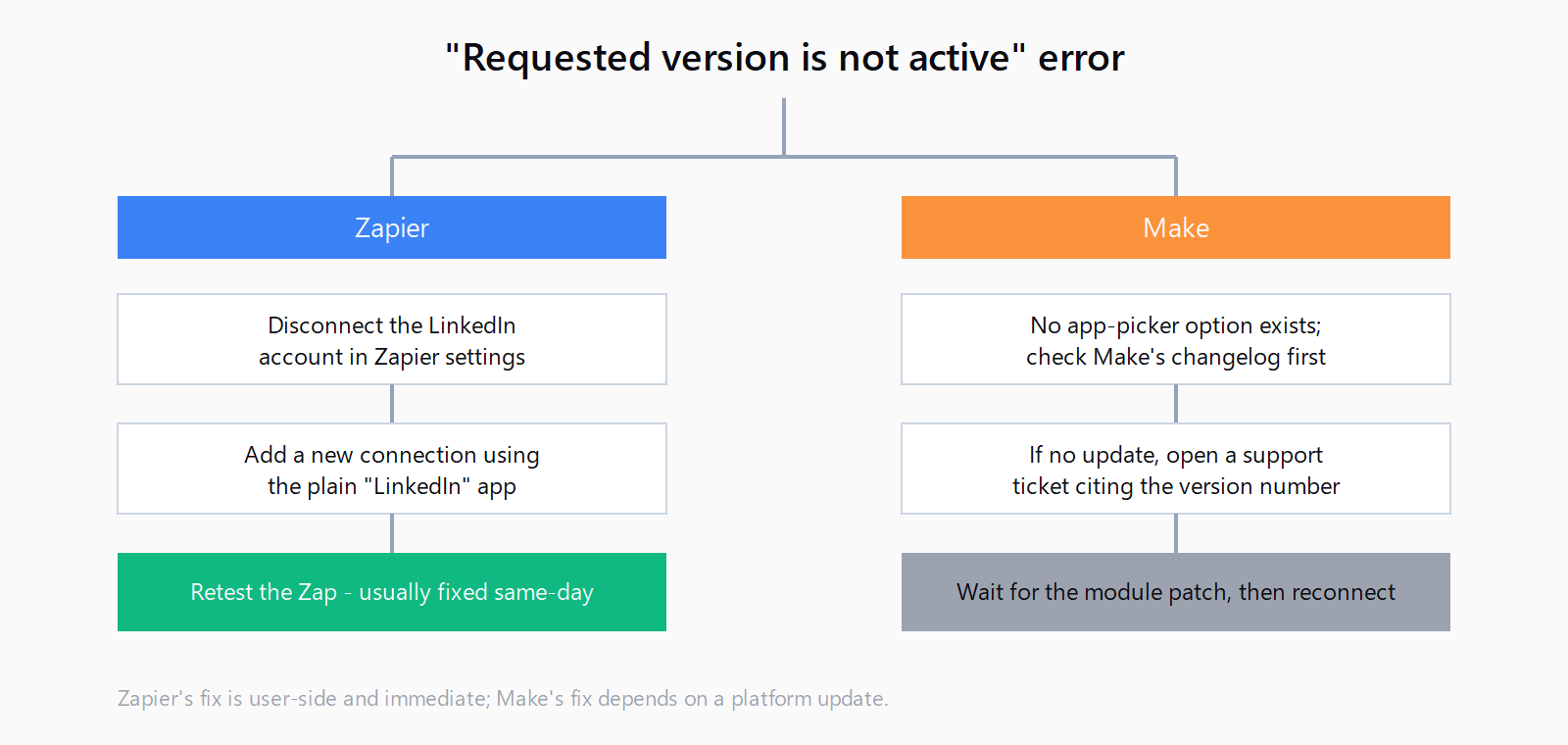
LinkedIn appears as two separate options when you add a new connection in Zapier: a plain LinkedIn app and an older, version-suffixed one like LinkedIn (1.12.1). The suffixed app is the one still pointing at a dead version. A Zapier Community thread traced the fix to switching apps, and Zapier staff confirmed it as a valid workaround.
- Open your Zap's LinkedIn step and note which app it currently uses (check for a version number next to the app name).
- Disconnect the broken LinkedIn account from Zapier's connected accounts settings rather than trying to re-authenticate the existing connection.
- Add a new connection using the plain "LinkedIn" app, not any option with a version suffix.
- Re-select the new connection in your Zap's LinkedIn step and re-test the trigger or action.
If the version-suffixed app isn't the cause, check Zapier's status page first. A separate incident in January 2026 produced the identical error text from a Zapier-side bug that Zapier fixed server-side, with nothing for users to change. Version errors aren't the only way a LinkedIn step can fail silently; a Zapier response payload size error shows the same "reconnect didn't fix it" symptom for a completely different reason.
How do you fix it in Make?
Make's LinkedIn module doesn't expose a version choice the way Zapier's app picker does, so the app-switch workaround doesn't apply. A Make Community thread reporting DataError 426: Requested version 20240201 is not active confirms the version is retired on LinkedIn's side with no field or setting inside the module to point it elsewhere. The only real path is Make shipping an updated module:
- Check Make's changelog for a LinkedIn module update dated after the error started.
- If no update exists yet, open a support ticket referencing the exact version number from your error message; Make's team prioritizes connector patches once enough reports land.
- Once the module updates, reconnect the LinkedIn account in the scenario rather than assuming the existing connection auto-refreshes.
While you're waiting on the patch, double-check that the scenario isn't also tripping on an unrelated Make request timeout error further down the module chain; both surface as a failed run and it's easy to misattribute one for the other.
How do you verify the fix worked?
Run the Zap or scenario manually against a test post. A successful run returns a post URN instead of an error object, and the LinkedIn step in your run history shows no red error badge. If it fails again with the same version number, the reconnect didn't take, usually because the old connection is still cached elsewhere in the Zap or scenario.
Will this happen again?
Yes. LinkedIn retires a version every year on a rolling basis, and both Zapier and Make have hit this more than once, in November 2025, January 2026, and in earlier 2024 reports. There's no permanent fix on the user side for either platform; the recurring cost is watching for the error and reconnecting (Zapier) or waiting on a patch (Make) each time a pinned version ages out. Hit a different connector error entirely? The Automation Error Index catalogs fixes across Zapier, Make, and n8n by exact error string.
FAQ
Why did my LinkedIn Zap or scenario suddenly stop working with a version error?
LinkedIn retired the specific API version your connector was pinned to. Nothing in your Zap or scenario configuration changed; the version simply aged past LinkedIn's one-year support window.
How do I reconnect LinkedIn in Zapier without waiting for a patch?
Disconnect the existing account and add a new connection using the plain "LinkedIn" app rather than a version-suffixed option like "LinkedIn (1.12.1)". This resolves the version-sunset case same-day.
What does Make's DataError 426 mean for a LinkedIn module?
It's the same underlying cause as Zapier's error: the module's hard-coded API version is no longer active. Unlike Zapier, Make doesn't offer an unversioned app alternative, so there's no equivalent same-day workaround.
How long does LinkedIn keep an API version active?
A minimum of one year from release, per LinkedIn's own versioning documentation. LinkedIn can also patch a version early for security or critical bug fixes.
Is this the same issue as the n8n LinkedIn version error?
Same root cause, different connector. See n8n's LinkedIn node version error for the equivalent fix on that platform.
Will reconnecting LinkedIn lose my existing Zap or scenario history?
No. Reconnecting only replaces the authentication token; past runs, step configuration, and field mappings stay intact.