
How to fix Make's "request has exceeded the allotted timeout" error
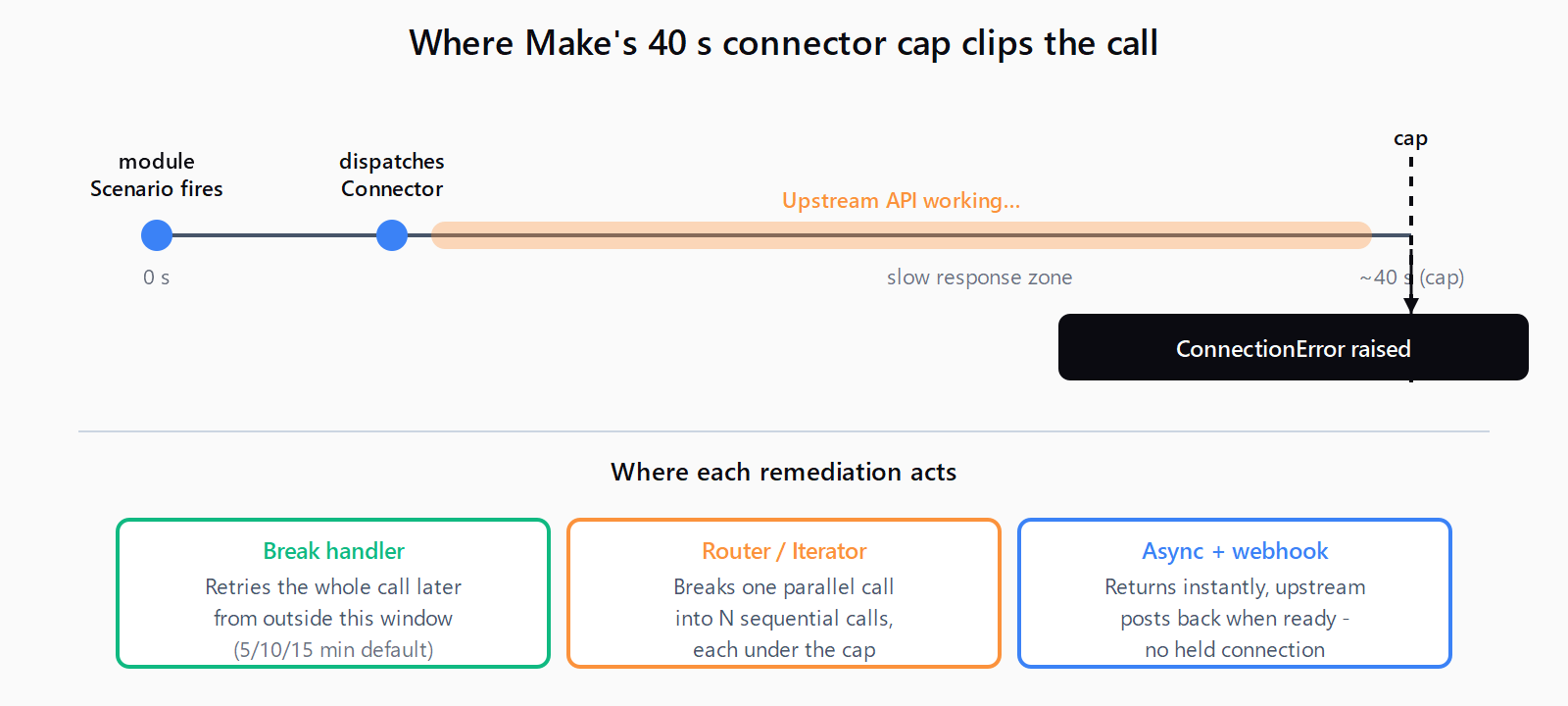
Make's connector layer caps outbound calls at ~40 seconds. Same error fires from HTTP, WordPress, Notion, Google Sheets, and FTP modules - the fix lives inside the scenario, not the upstream API.
TL;DR: The error fires when any Make module's outbound API call exceeds Make's ~40s connector cap; fix it with a Break error handler for intermittent slowness, or chunk, sleep, or async-redesign the call when the upstream is reliably slow.
The error string "The request has exceeded the allotted timeout" shows up on more than just the HTTP module - users hit it on WordPress, WooCommerce, Google Sheets, Notion, and FTP modules too. Most guides treat it as a slow-API problem and tell you to wait it out. The fix usually lives inside Make: the module emitted the error because Make's connector layer capped the wait, not because the upstream provider is broken.
What does "the request has exceeded the allotted timeout" actually mean?
Make's connector infrastructure caps any single outbound API call at roughly 40 seconds. When that window expires, the failing module raises a ConnectionError (or TimeoutError, depending on the module) carrying one of three near-identical messages, all documented on Make's Timeout error reference page:
The operation timed out.The request has exceeded the allotted timeout.ETIMEDOUT: Service is temporarily unavailable.
The "allotted" wording is the giveaway that the cap is Make-side, not upstream. The 40-second ceiling is set by the connector and is not user-configurable on most modules. If you have already seen the Make HTTP module 40-second timeout bite, this is the same cap, surfacing under a different error message and on a different module.
Which Make module is throwing the timeout?
The remediation differs depending on which connector raised the error. Identify the failing module in Scenario detail -> History -> expand the failed run -> click the red badge. The four common offenders:
- HTTP module. Hand-rolled REST call to a slow endpoint - typically a report generator, AI inference, large export, or a cold serverless function.
- WordPress / WooCommerce. The classic case is image upload. A confirmed pattern on the community thread for this exact error is the module timing out when uploading more than two images in parallel.
- Google Sheets / Notion / Airtable. Large batched writes, or hitting the API during the upstream service's quiet-hours maintenance window. One Notion user tracked the error firing daily between 2 AM and noon EST for over a week without an upstream incident.
- FTP / SFTP. The error reads
Module initialization failed. Timeout while connecting to server- the TCP handshake itself didn't complete in 40 seconds, usually because of a firewall or hostname change.
The HTTP and FTP cases are about one slow call. The WordPress and Google Sheets cases are about concurrency - the module fires multiple requests in parallel and one of them hits the ceiling. Different problem, different fix.
How do you fix the allotted-timeout error?
- Add a Break error handler to the failing module. Right-click the module -> Add error handler -> Break. The Break handler removes the failed bundle from the live flow and queues it for retry. Per Make's Break error handler docs, it auto-retries
ConnectionErrorandRateLimitErrorby default - which covers this error string. - Enable incomplete executions. Scenario settings -> tick Allow storing of incomplete executions. Without this flag the Break handler has nowhere to queue the retry and silently drops the bundle.
- Set retry attempts and interval. In the Break panel, the defaults are 3 attempts with delays of 5, 10, and 15 minutes (Make's exponential-backoff schedule). Leave these unless you have a reason - shorter intervals on a deterministically slow API just burn ops budget.
- If the slowness is concurrency-driven, force the module sequential. Add a Router with one route per bundle, or insert an Iterator before the failing module so it processes one record at a time instead of in parallel. This is the fix for the WordPress image case - two parallel uploads timeout, one-at-a-time succeeds.
- If the slowness is deterministic, redesign the call. Chunk paginated GETs into smaller pages (50 records ten times beats 500 once); switch to an async + webhook pattern when the upstream API supports it (Make's Custom Webhook trigger receives the callback when the job finishes); or fall back to a poll loop on a scheduled scenario when the API only returns a job ID.
- Insert Sleep between same-vendor modules. When the upstream service is the bottleneck and you cannot redesign, add a 5-10 second Sleep module between consecutive calls to the same provider. WordPress, in particular, recovers visibly when given that breathing room. Sleep counts against the 40-minute scenario budget, so keep it short.
How do you pick the right remediation?
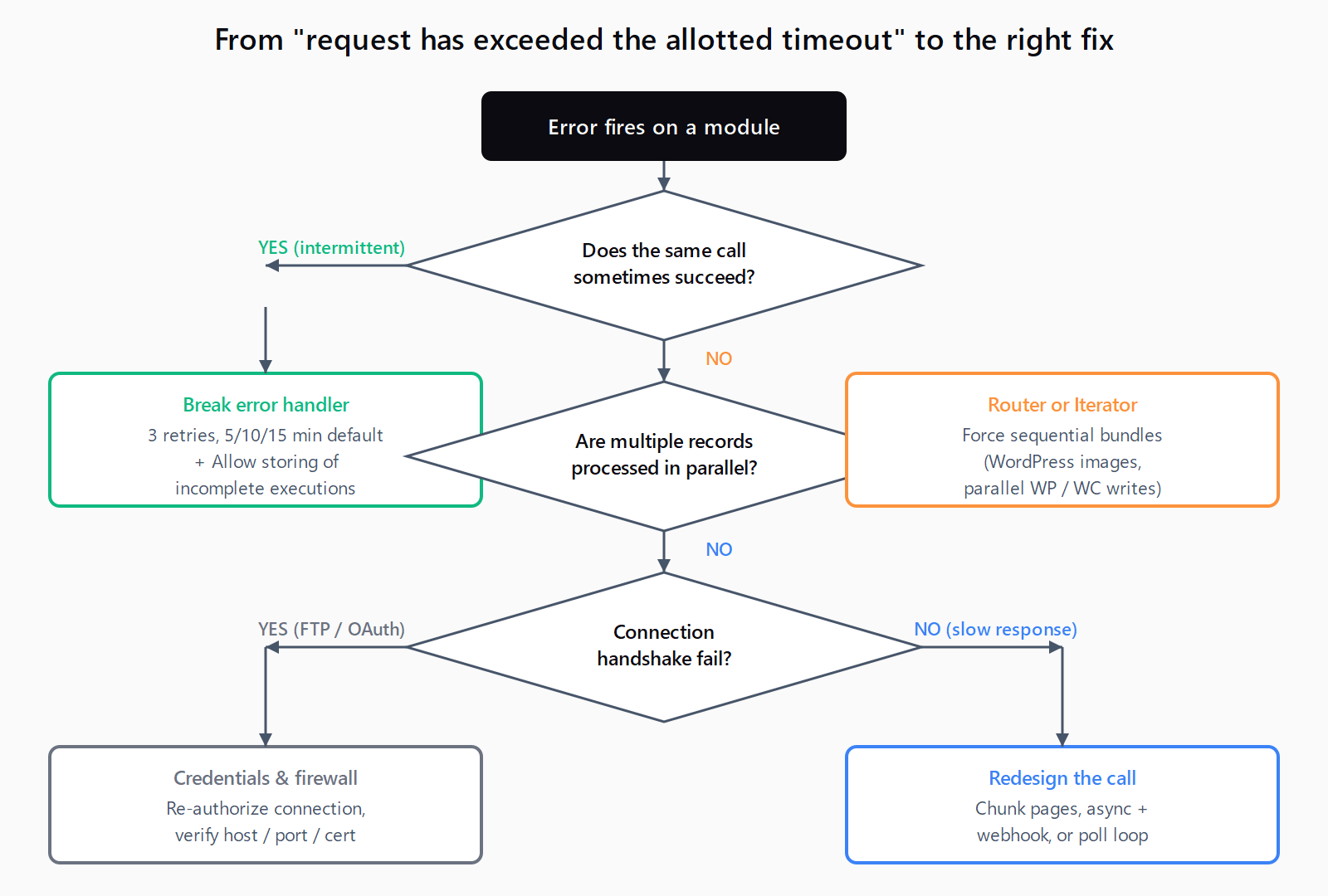
The figure below maps the failure pattern to the fix. Use it before reaching for Break by default - the wrong remediation wastes ops and leaves the scenario flapping.
How do you verify the fix worked?
Run the scenario manually and open the History tab. The expected signals depend on which fix you applied:
- Break handler. Failed bundles appear under Incomplete executions, not as a scenario-level failure. Successful retries clear from the queue. Repeated entries for the same bundle mean the upstream is deterministically slow - move to the redesign fixes.
- Router or Iterator. Each bundle's run duration in the module detail panel drops back under 40 seconds. The total scenario runtime goes up (sequential is slower than parallel) but completes.
- Async + webhook. The triggering scenario completes in seconds; the receiver scenario shows a fresh execution when the upstream job posts back.
One trap to watch for: if the Break handler retries forever every minute on the same bundle, the API is genuinely down. Cap retry count at 3-5 attempts and add an email alert on final failure - retry-of-doom loops chew through the operations quota fast.
What if the fix didn't work?
Three less-common causes worth checking:
- You hit the scenario-level limit, not the request-level one. If the History tab shows the scenario ran for exactly 40 minutes before dying, you are looking at Make's 40-minute scenario hard limit, not the per-request 40-second one. Same vendor, different ceiling.
- The upstream service is throttling, not timing out. A 503 or 429 from the provider can surface as a
ConnectionErrorin Make's connector wrapper. Inspect the failed bundle's error payload for the upstream status code before assuming it's a slow-API problem. - Connection credentials expired. On Google Sheets, Notion, and Airtable, an expired OAuth refresh token can present as a connection timeout rather than a 401. Re-authorize the connection from Connections in the Make admin and rerun.
FAQ
Is "the request has exceeded the allotted timeout" the same as the 40-second HTTP module timeout?
The 40-second cap is the same; the error message just surfaces under different module types. The HTTP module says The operation timed out; WordPress, Notion, and most app-specific modules say The request has exceeded the allotted timeout. The underlying constraint is Make's connector-level wait limit, not the upstream API.
Can I increase the timeout on a Make module?
Not on most modules. The HTTP module has a per-request timeout setting (configurable up to 300 seconds), but app-specific modules like WordPress, Notion, and Google Sheets use a fixed connector-level cap. The reliable fix is to make each call shorter (chunk, paginate, async) rather than to extend the wait.
Why does the error spike at the same time every day?
Some upstream APIs (Notion, large WordPress hosts) run nightly maintenance or autoscaler scale-down events that slow responses for a few hours. If History shows the failures clustered in one window, schedule the scenario to run outside that window or add a Break handler with retries that span the slow period.
How is this different from the 45-minute scenario timeout?
The 40-second cap bounds one outbound API call. The 40-minute (or 45-minute on Enterprise) cap bounds the entire scenario run. You can hit the long one with hundreds of fast calls, or hit the short one on a single slow call. Different limits, independent of each other.
Why does this happen on Google Sheets or Notion modules specifically?
Both APIs have soft rate limits and slow large-batch writes. A scenario that worked at 200 rows per run starts failing at 2,000 because the single batched request exceeds 40 seconds. The fix is to chunk the writes (Iterator + smaller batches) or to upgrade to the vendor's native bulk endpoint where one exists.
Will adding a Break handler always fix it?
Only when the slowness is intermittent. Break retries the same call, so if the API deterministically takes 60 seconds, every retry also times out and the bundle still ends up failed - just three to five minutes later. For consistently slow calls, redesign the request (chunk, async, or poll) before adding Break.
Hit a different error? Browse the Automation Error Index for a searchable catalog of Make errors, each with a verified fix.