
Fix n8n array min/max: Maximum call stack size exceeded
Fix n8n min and max errors on large arrays with pairwise reduction, strict numeric validation, per-item Code node examples, and focused result checks.

TL;DR: If n8n array min/max throws Maximum call stack size exceeded on large numeric arrays, replace argument spreading with a reduction and validate the input before calculating.
A small test array can work while a production array fails at the same expression. The reported failure comes from passing every element as a separate function argument. Reducing the number of workflow items will not help if one item still contains the entire large array.
Why does n8n array max overflow the call stack?
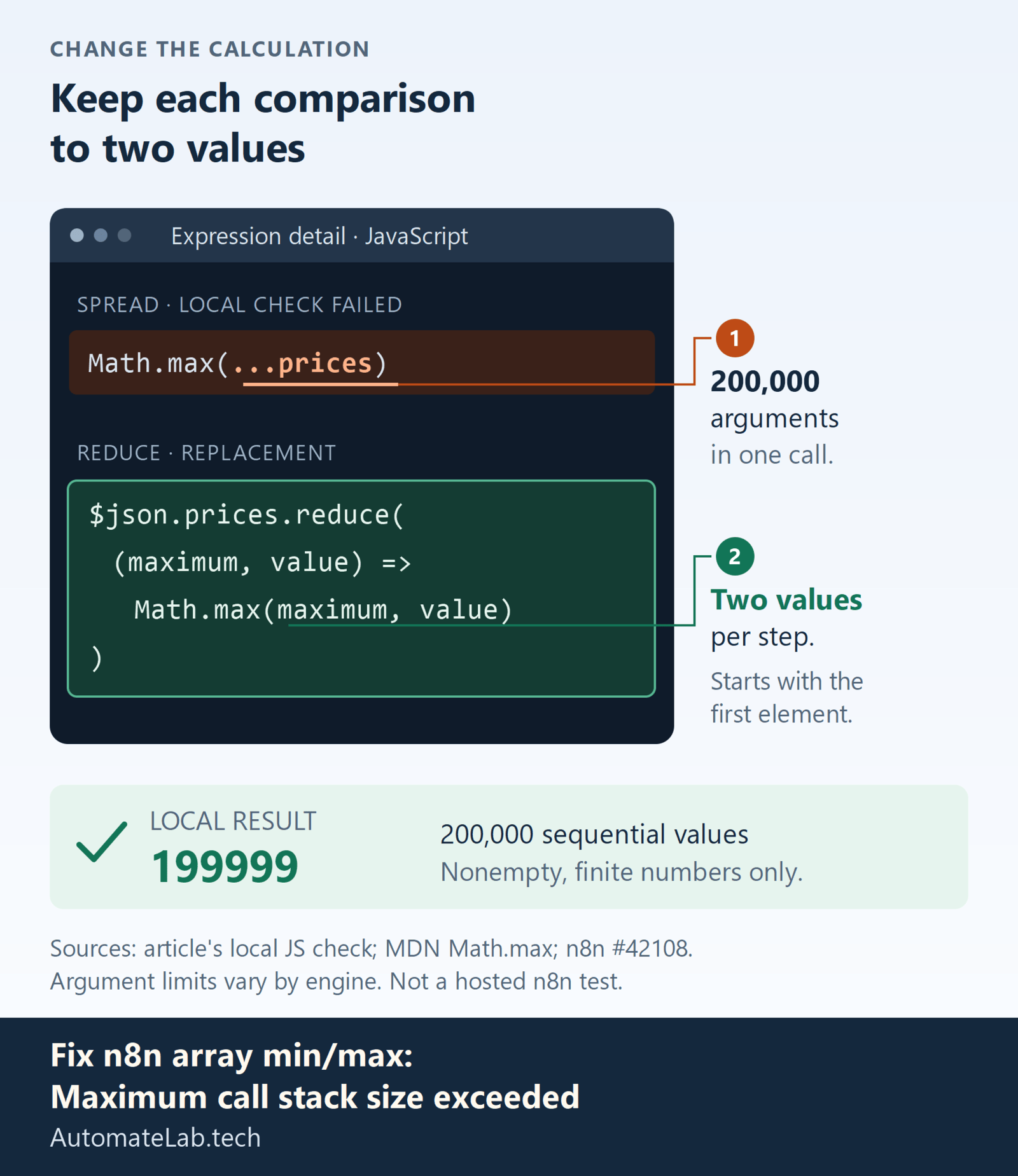
The n8n large-array issue reports that the min and max helpers spread their numeric values into Math.min or Math.max. The reporter reproduced the problem with 200,000 numbers in both expression implementations. That reproduction size is not a universal documented limit for every installation.
JavaScript engines limit how many arguments a function call can receive. Passing a large array through spread syntax makes one call with many arguments. This can cause a stack error without recursive workflow execution. MDN's Math.max reference explicitly warns that spread and apply can fail with too many array elements.
As checked on 26 October 2026, the issue remains open and reports current master. It does not establish a released-version range or a fixed release. Inspect the expression that failed before assuming that every stack error has this cause. For other symptoms, use the Automation Error Index.
How do you calculate a maximum without spreading the array?
For a known, nonempty array of finite numbers, use a reduction that compares two values on each iteration. The n8n Array expression reference documents reduce alongside the built-in min and max helpers. Put the expression in the field currently using the failing helper.
{{ $json.prices.reduce((maximum, value) => Math.max(maximum, value)) }}For a minimum, use Math.min with the same pattern. Leaving out an initial value makes the first element the initial result. This also handles arrays whose values are all negative. A maximum initialized to zero would return an incorrect answer for such input.
{{ $json.prices.reduce((minimum, value) => Math.min(minimum, value)) }}These expressions require a nonempty array of finite numbers. They deliberately do not define an empty-array policy or convert strings. Do not insert them into a mixed-data workflow without deciding those contracts. An expression that avoids a stack error can still produce an invalid business result from bad input.
How do you validate prices before calculating min and max?
When input comes from an API or spreadsheet, an explicit Code node makes the contract easier to inspect. Configure Run Once for Each Item and use the following JavaScript. This example expects one item containing a prices array and preserves the item's other JSON fields. It returns JSON only; copy binary metadata explicitly if later nodes need it.
const values = $json.prices;
if (!Array.isArray(values) || values.length === 0) {
  throw new Error('prices must be a nonempty array');
}
for (const value of values) {
  if (typeof value !== 'number' || !Number.isFinite(value)) {
    throw new Error('prices must contain only finite numbers');
  }
}
const minimum = values.reduce((a, b) => Math.min(a, b));
const maximum = values.reduce((a, b) => Math.max(a, b));
return { json: { ...$json, minimum, maximum } };
n8n's Code node guide distinguishes execution modes. This code belongs in the per-item mode. If values arrive as separate workflow items, collect the intended group first or write an all-items calculation with the corresponding return shape.
The validation is intentionally stricter than implicit numeric conversion and rejects missing array positions. An every() check skips those positions, so this example inspects values with a loop. If upstream values are strings, normalize them in a separate step with a stated rule for blank cells, currencies, and decimal separators. Silently dropping invalid entries can change a minimum price or a maximum invoice amount while making the run look successful.
Related guides cover n8n Code node: Run Once for All Items vs Each Item and How to throw a custom error in an n8n Code node inside a loop.
How do you verify the result and avoid a false fix?
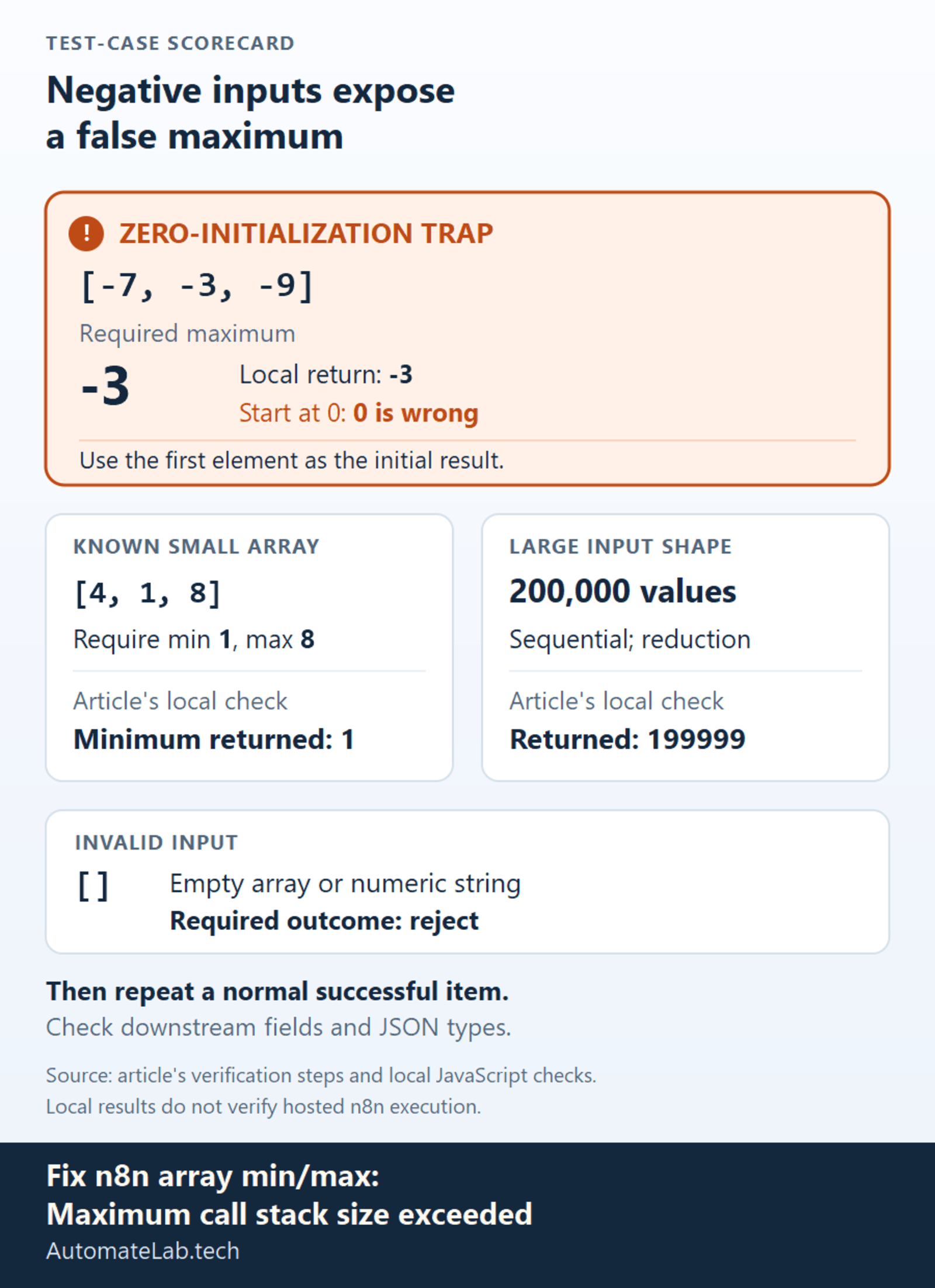
Start with a known small array such as [4, 1, 8]. Require minimum 1 and maximum 8. Then test [-7, -3, -9], where the maximum must be -3. Finally repeat the large input shape from the failing execution. Keep production records out of diagnostic logs when synthetic values can demonstrate the problem.
A local Node.js check during research reproduced the spread failure with 200,000 sequential values; the reduction returned 199999. The negative-array maximum returned -3 and the small-array minimum returned 1. Those checks verify the JavaScript mechanism. They are not an execution test against a hosted n8n instance or a guarantee about another engine's exact argument limit.
Also test an empty array and a numeric string. The validated Code node should reject both under this example's contract. Repeat a normal successful item afterwards. Check that the resulting fields reach the intended downstream node and retain the expected JSON types.
Raising memory limits or retrying the same expression does not remove the argument expansion. Splitting workflow items also leaves the issue intact when the large array stays inside one item. A reduction changes the calculation that owns the failure; it does not repair the upstream helper. Recheck the issue and release notes before removing this explicit calculation after an upgrade.
FAQ
Does Maximum call stack size exceeded always mean recursion?
No. A function call with too many expanded arguments can cause it too. Confirm that the failing expression uses min, max, spread, or apply over a large array.
Can Math.max.apply fix the same large-array problem?
No reliable fix follows from switching to apply. It also supplies the array as function arguments; use pairwise reduction instead.
Which n8n release fixes this issue?
No fixed release was verified for this article. The linked issue was open when checked; test your installed release with a synthetic large array.