
Power Automate Hosted RPA vs UiPath VM Cloud Robots in 2027
Compare Power Automate Hosted Process and UiPath VM Cloud Robots for desktop capacity, licensing, private networks and a practical unattended test.
TL;DR: Choose Power Automate Hosted Process for existing desktop flows and shared hosted capacity, or UiPath VM Cloud Robots for existing UiPath automations with Orchestrator-managed execution.
Both services remove the job of provisioning your own robot machines. The buying decision still depends on the desktop application, its network access, and the concurrency you need. This comparison, checked on 26 October 2026, covers unattended desktop GUI work; UiPath's serverless execution surface is a separate choice.
How do hosted Power Automate and UiPath VM robots compare?
| Decision | Power Automate hosted machine groups | UiPath Automation Cloud Robots - VM |
|---|---|---|
| Existing workflow | Power Automate desktop flows. | UiPath processes managed through Orchestrator. |
| Capacity model | Hosted Process capacity allocated to the environment; max and committed bots govern group allocation. | Check Unified Pricing platform units or Flex Robot Units; match the quote to VM size and configuration. |
| Windows setup | Default or custom Azure Compute Gallery image. | Configurable VM, including uploaded custom image. |
| Internal network | Custom Azure virtual network connection. | Configured VPN gateway with routed, non-overlapping robot networks. |
| Price baseline | Hosted Process USD 215/bot/month, paid yearly. | Request an applicable VM and unit quote; units do not imply a universal cash price. |
Start with the automation you already own. Rewriting selectors, application logic, and recovery behavior creates work that a hosting comparison cannot price for you. For a new workflow, use a representative application test and compare the cost of meeting its deadline, including operator time.
What does each platform manage for unattended desktop jobs?
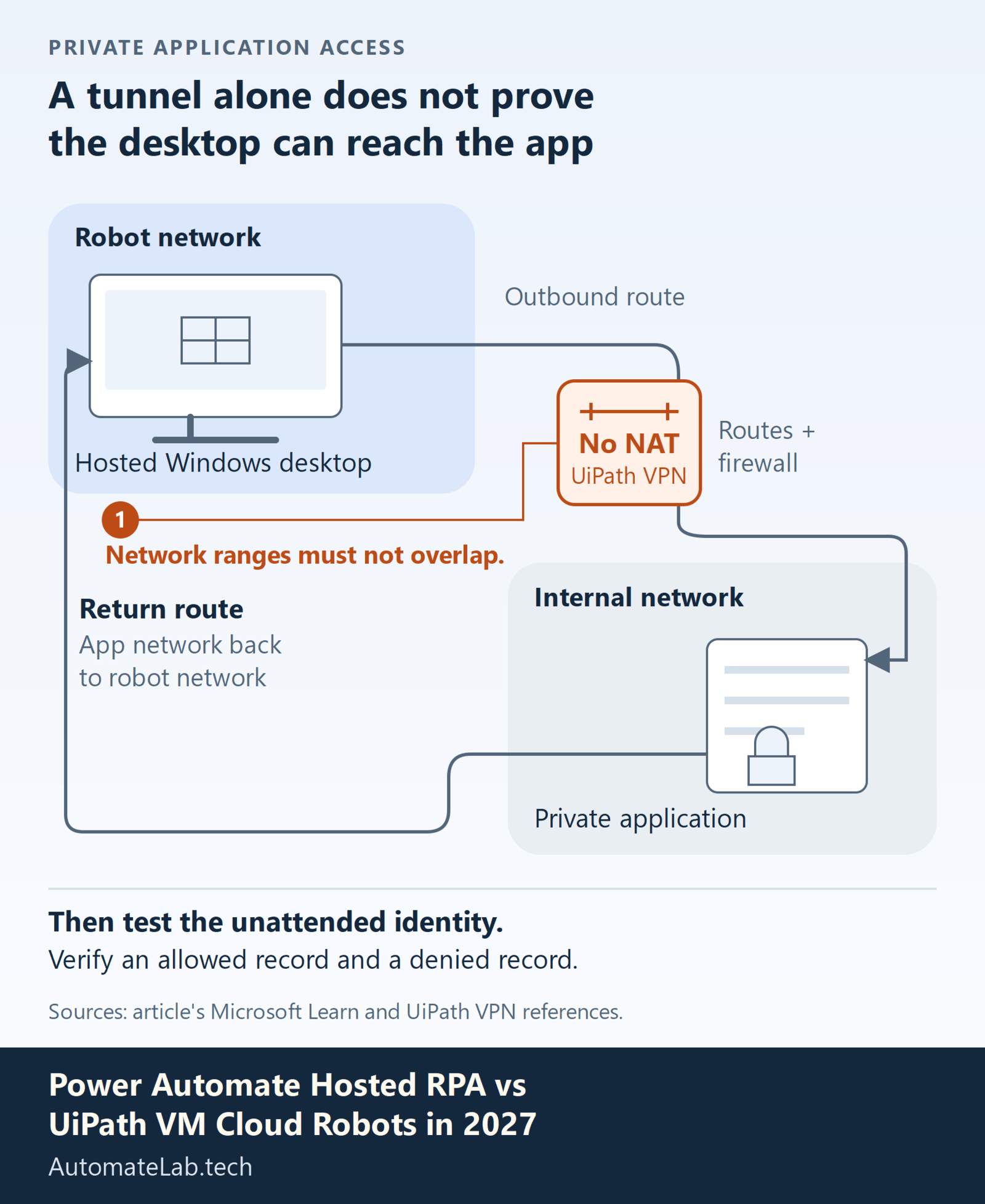
Microsoft's hosted machine group documentation describes queued desktop flows and automatic provisioning. Parallel bots draw on Hosted Process capacity assigned to the environment. Max bots is a scaling ceiling; committed bots reserve the group's allocation. Setting a large maximum does not create extra licensed capacity. In Microsoft's example, ten Hosted Process licenses with two standalone hosted machines leave eight bots for the groups to share.
UiPath's cloud robot overview separates VM robots, serverless robots, and Elastic Robot Orchestration in a customer's cloud account. VM robots fit unattended work requiring a configured virtual machine. Choose that surface when comparing Windows desktop applications; do not substitute a serverless price or API-only demonstration for the GUI workload.
Keep application configuration in the trial scope. Microsoft's hosted RPA FAQ supports custom images and network connections, and describes hosted machine groups as stateless. UiPath documents uploading a custom Windows image into Orchestrator. Prove that every newly provisioned machine receives the software and configuration the workflow needs.
How should you compare licenses and scaling costs?
Microsoft's published Hosted Process price is USD 215 per bot/month, paid yearly. Process and Premium are different offers; use the hosted product when estimating managed machines. Ask for the complete bill covering development and any separately licensed desktop applications.
UiPath's licensing documentation distinguishes Unified Pricing from Flex. Under Unified Pricing consumption, UiPath-hosted VM robots use platform units instead of unattended runtimes; the displayed Standard production baseline is 1,200 units per deployed machine/month. The displayed Standard test rate is 600 units per VM/month; Fast and Always profiles add 100 and 200 units respectively. Existing VMs reserve their next monthly allocation; an empty queue does not by itself remove the deployed-machine charge.
That unit number cannot be compared directly with USD 215. Obtain a quote using the applicable licensing model, VM sizes, and pool configuration. Ask what remains allocated when the queue is empty and how adding a second simultaneous desktop session changes the bill. Avoid mixing legacy Robot Units with platform units in the same estimate.
Model an ordinary day and a deadline spike. Measure queue wait separately from execution time, then calculate whether available concurrency completes the backlog on time. Include operator recovery time when startup or sign-in failures delay jobs.
Related guides cover UiPath vs Power Automate for Enterprise Scale in 2026 and How to fix Power Automate desktop flow NoCandidateMachine error.
What can break access to internal desktop applications?
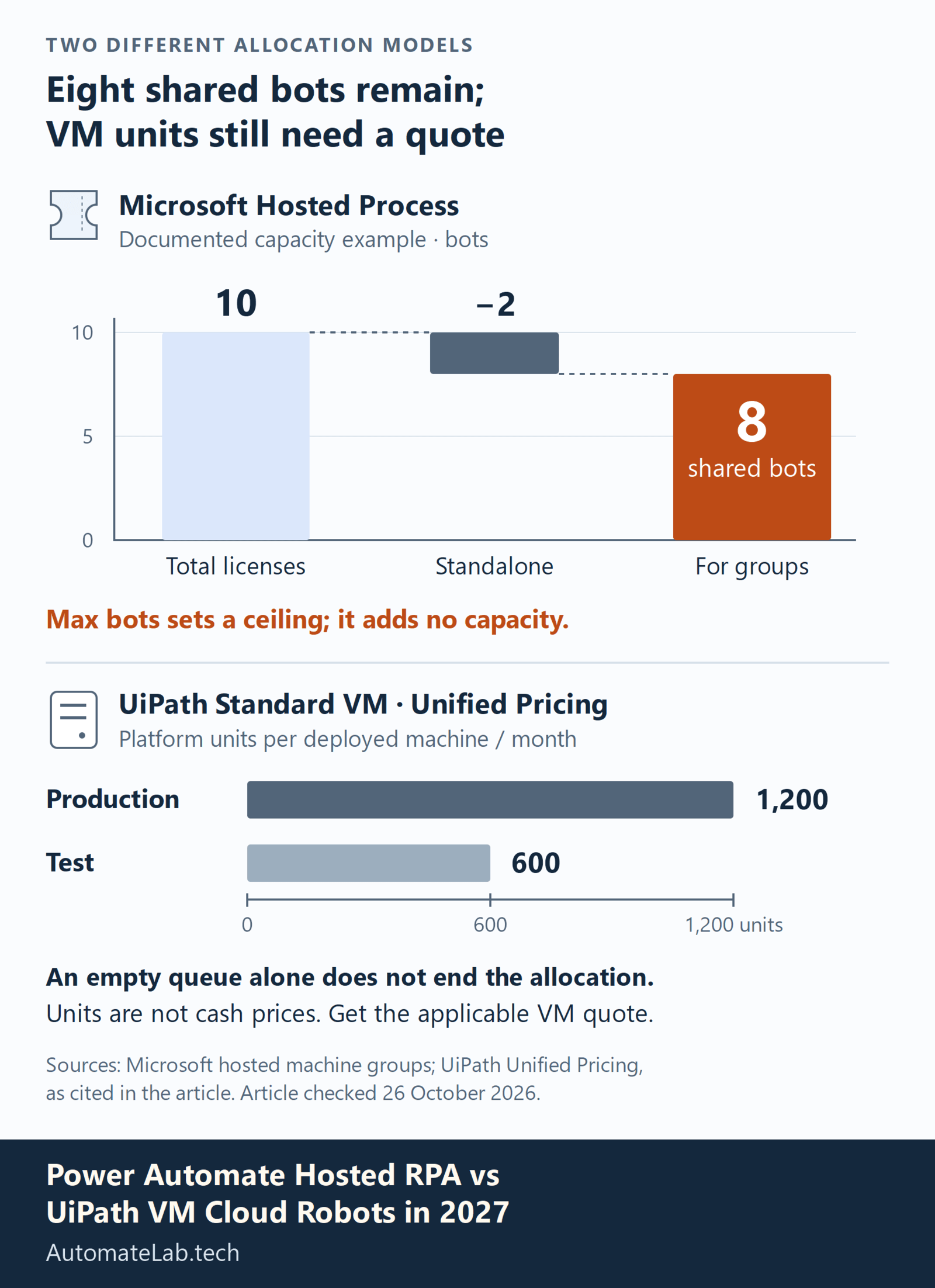
A provisioned Windows machine still needs a valid route to the target system and an account allowed to use it. Test those dependencies before testing the complete business process. Use the intended unattended identity to open the application, read a permitted record, and attempt access to a record it should not see.
UiPath's VPN configuration guide says its gateway does not perform NAT. Robot network ranges must not overlap with internal ranges, and firewalls and return routes must allow the robot networks. An established tunnel alone does not prove application connectivity. Verify an allowed record, a denied record, and the return route from the application network using the same unattended identity.
Agree who updates the image, rotates credentials, and receives failure alerts. UiPath's monitoring guide separates pending jobs from machine creation failures and provides machine event logs. Require the operator to identify which layer failed without relying on the original workflow author.
How do you run a fair unattended desktop acceptance test?
Use a disposable application record and a written completion deadline. Submit more work than one robot can execute immediately, observe the queue, and repeat after the environment has been idle. Record cold-start delay and the number of jobs that overlap. These are proposed tests, not measured vendor results.
Next, interrupt access before the final save, restore access, and retry. Confirm that the record is created once and that failed work is visible to the operator. Recreate a machine from the chosen image and rerun the same test; a fix installed manually on one VM should not be required.
FAQ
Is Power Automate Premium the same as Hosted Process?
No. Microsoft's pricing lists Premium per user and Hosted Process per bot. Compare the product that includes the hosted infrastructure.
Are UiPath serverless robots equivalent to VM robots?
No. UiPath distinguishes them as execution surfaces. Use VM robots for this comparison of workflows requiring a configured desktop environment.
Does setting maximum bots guarantee that capacity?
Microsoft distinguishes maximum from committed bots and limits allocation to the environment's available Hosted Process capacity. Verify both settings against the intended concurrent workload.