
How to set up Entra Service Principal auth for n8n Microsoft nodes
Run n8n's Microsoft nodes unattended: the full Entra app registration and Service Principal credential setup for n8n 2.30, plus the node behaviour change to plan for.
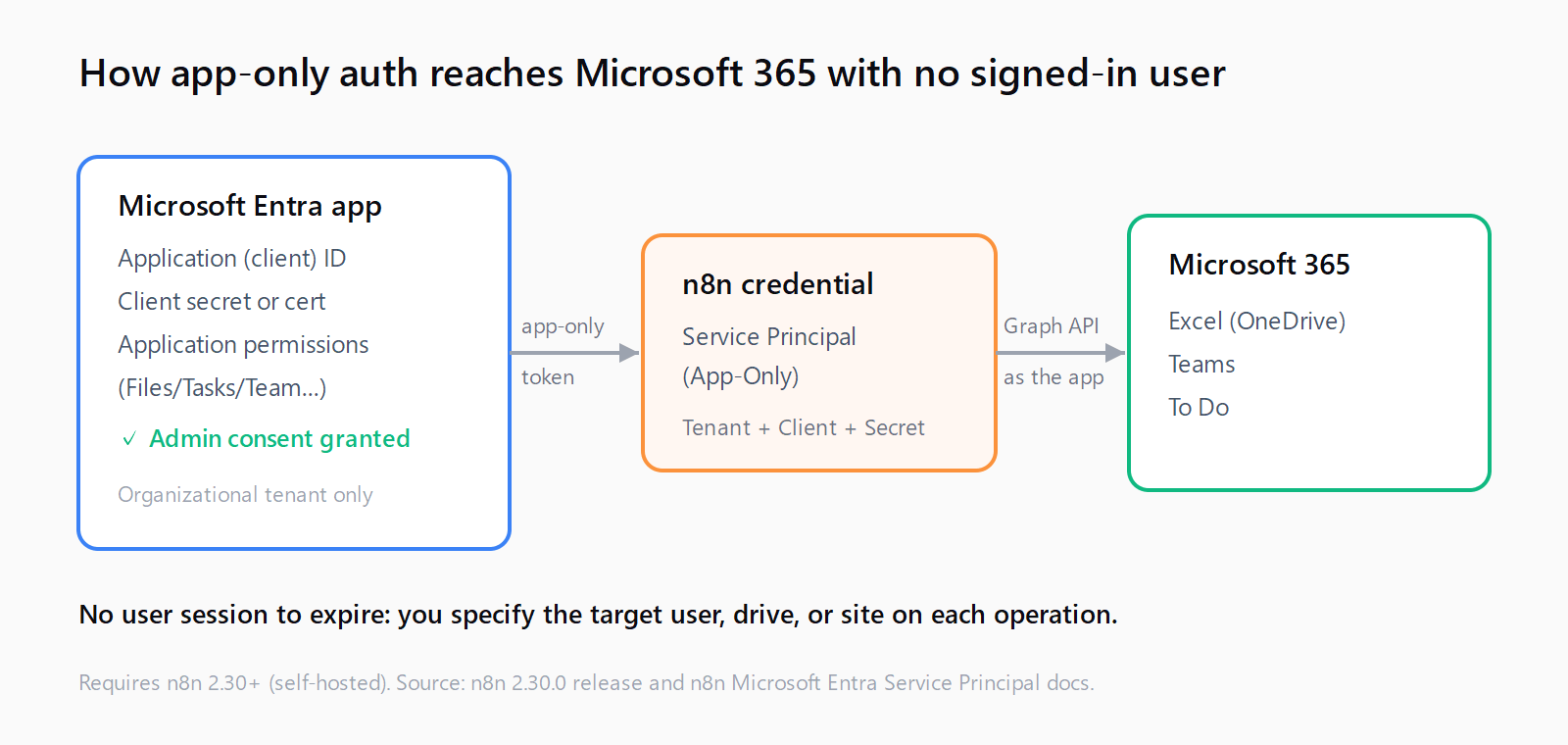
TL;DR: n8n 2.30 adds Service Principal (App-Only) authentication to the Microsoft Excel, Teams, and To Do nodes: register a Microsoft Entra app, grant it Graph application permissions with admin consent, add a client secret, then create the credential in n8n.
Until n8n 2.30, the Microsoft Excel, Teams, and To Do nodes could only authenticate as a signed-in user through delegated OAuth. That is fine for a personal workflow, but it breaks the moment you want an unattended or shared automation: the flow stops working when that user's session expires or they leave the company. App-only authentication through a Microsoft Entra Service Principal fixes this by letting the workflow act as an application, with no human account attached. Here is the full setup, and the behaviour change that trips people up after they switch.
What changed in n8n 2.30 for Microsoft nodes?
Released on 7 July 2026, n8n 2.30.0 added a Service Principal (app-only) option to three Microsoft nodes: Excel (#33014), Teams (#33105), and To Do (#33081). The same release also added certificate authentication to the Microsoft Entra Service Principal credential, so you can authenticate with a certificate instead of a client secret if your tenant policy requires it. Community reports put this on self-hosted n8n only for now; it is not yet confirmed on n8n Cloud, so plan around a self-hosted instance if app-only auth is a hard requirement.
The credential type you will create is called Microsoft Entra Service Principal. One credential works across all three nodes, so you register the Entra app once and reuse it.
How do you register a Microsoft Entra app for n8n?
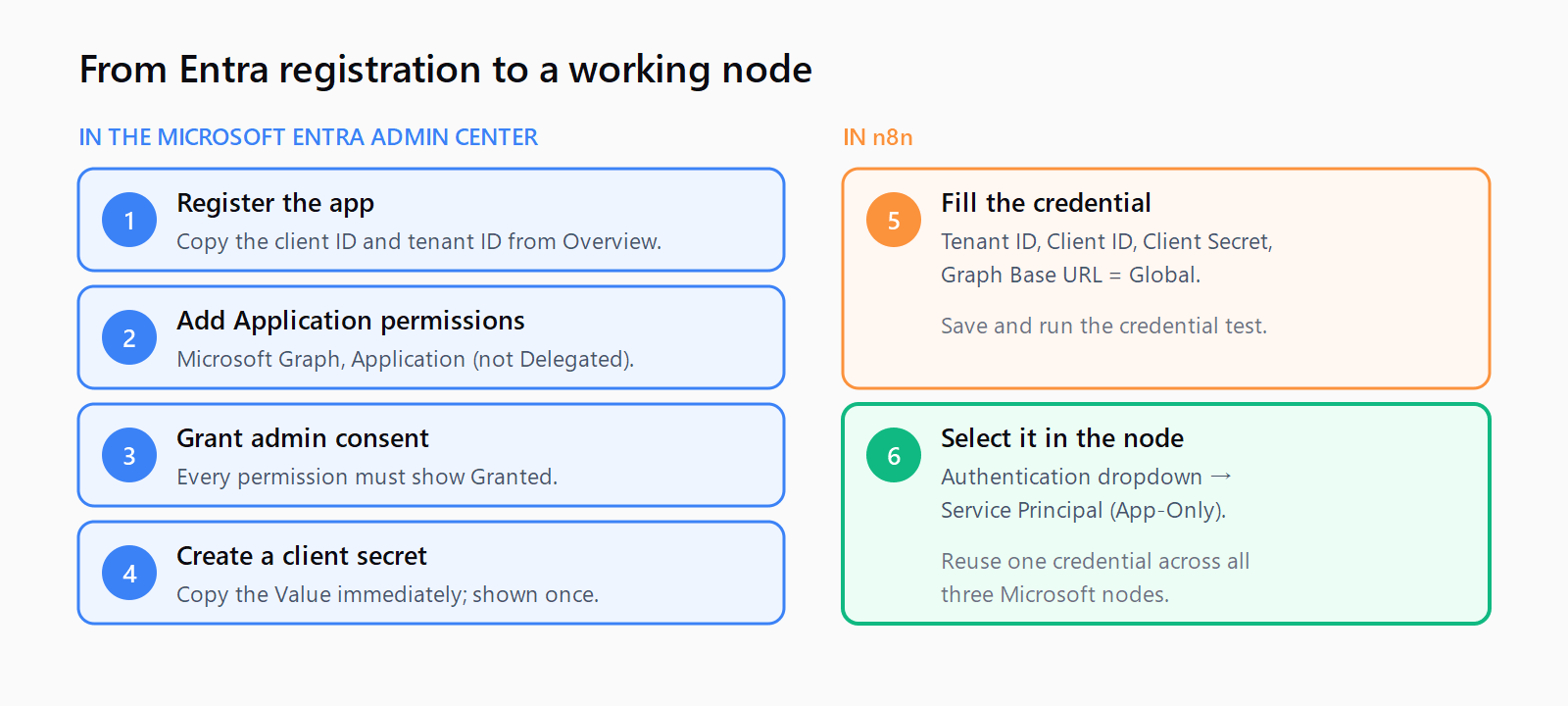
You need a Microsoft 365 organizational tenant (personal Microsoft accounts cannot grant application permissions) and an account that can create app registrations and grant admin consent. In the Microsoft Entra admin center:
- Go to Entra ID > App registrations > New registration. Name it (for example,
n8n service principal), choose Accounts in this organizational directory only, and select Register. - On the app's Overview page, copy the Application (client) ID and the Directory (tenant) ID. You will paste both into n8n.
- Open API permissions > Add a permission > Microsoft Graph, then choose Application permissions, not Delegated. Add the permissions your nodes need (see the table below), plus
Organization.Read.AllorDirectory.Read.Allso n8n's credential test can run. - Back on the API permissions page, select Grant admin consent for <your tenant> and confirm. Every permission must show a green Granted status before the credential will work.
- Open Certificates & secrets > Client secrets > New client secret, set an expiry, and copy the secret Value immediately. Entra shows it only once.
Choosing Application permissions rather than Delegated is the step people skip. Delegated permissions still assume a signed-in user, so the credential test passes but the app-only calls fail. Match the permission to the node:
| Node | Microsoft Graph application permission |
|---|---|
| Microsoft Excel (OneDrive) | Files.ReadWrite.All |
| Microsoft Teams | Team.ReadBasic.All plus the permission each operation needs |
| Microsoft To Do | Tasks.ReadWrite.All |
| Credential test (all nodes) | Organization.Read.All or Directory.Read.All |
How do you add the Service Principal credential in n8n?
In n8n, create a new credential of type Microsoft Entra Service Principal and fill in four fields:
- Directory (Tenant) ID: from the app Overview page, or a verified domain like
contoso.onmicrosoft.com. - Application (Client) ID: from the app Overview page.
- Client Secret: the secret Value you copied during registration.
- Microsoft Graph API Base URL: select Global for a standard commercial tenant (choose a sovereign cloud only if your tenant runs in one).
Save the credential and let n8n run its test. A failure here almost always means missing admin consent or a Delegated-instead-of-Application permission, not a wrong secret. The same care that avoids n8n OAuth callback errors on delegated credentials applies here: the values must match Entra exactly. Once the test passes, open a Microsoft node, set its Authentication dropdown to Service Principal (App-Only), and pick this credential.
How do the nodes change with app-only authentication?
This is the part most walkthroughs miss. With app-only auth there is no signed-in user, so the nodes cannot infer "me", and you have to tell them who or what to act on. In the Teams node, the Task operations drop the friendly group, plan, bucket, and member pickers and expose plain ID fields instead. For Excel, you specify the target drive or site rather than relying on the current user's OneDrive. The workflow gains tenant-wide reach, and with it the responsibility to scope every operation deliberately.
Treat the switch as a small redesign, not a drop-in swap. Any existing Teams or Excel workflow you migrate from delegated to app-only auth will have empty ID fields where the pickers used to be, and it will silently target nothing until you fill them in. Fetch the group or drive IDs once with a Graph call or the Entra portal, store them as workflow variables, and reference them.
How do you fix app-only authentication failures?
Three causes cover almost every failure. First, missing admin consent: if the API permissions page does not show every permission as Granted, calls return insufficient-privileges errors, so grant consent and retry. Second, a personal Microsoft account: application permissions require an organizational tenant, so a personal account cannot host this at all. Third, n8n Cloud: app-only auth for these nodes is reported on self-hosted only as of 2.30, so a Cloud instance may not expose the option. If you are standing up a self-hosted instance for this, our guide to self-hosting n8n with Docker Compose covers the runtime, and the wider n8n setup and troubleshooting guides cover credential and node issues around it.
FAQ
Does Service Principal auth work on n8n Cloud?
As of n8n 2.30, community reports place app-only authentication for the Excel, Teams, and To Do nodes on self-hosted instances only. It is not yet confirmed on n8n Cloud, so use a self-hosted instance if you need it now.
Which Microsoft Graph permission does each node need?
Excel needs Files.ReadWrite.All, To Do needs Tasks.ReadWrite.All, and Teams needs Team.ReadBasic.All plus a permission for each operation you call. Add Organization.Read.All or Directory.Read.All so n8n's credential test can run. All must be Application permissions with admin consent.
Why do the Teams pickers show ID fields instead of dropdowns?
Because app-only auth has no signed-in user, the node cannot list your groups, plans, or buckets. It exposes plain ID fields so you name the target directly. Fetch the IDs from Graph or the Entra portal and store them as workflow variables.
Can I use a certificate instead of a client secret?
Yes. n8n 2.30 added certificate authentication to the Microsoft Entra Service Principal credential, so you can upload a certificate instead of pasting a client secret if your tenant policy requires it.
Can I use a personal Microsoft account?
No. Application permissions require a Microsoft 365 organizational tenant. Personal Microsoft accounts cannot grant them, so app-only authentication is not available on a personal account.
Why does the credential test fail with insufficient privileges?
Almost always missing admin consent or a Delegated permission where an Application permission was needed. Open API permissions, confirm every entry shows Granted, and check the permissions are under Application, not Delegated.