
Fix UiPath Studio 2026.0.196 "workflow missing" XAML errors
Studio 2026.0.196 flags present XAML files as missing after the update. Here's the cache-clear fix and the patched build that ends it.
TL;DR: UiPath Studio 2026.0.196 reports existing workflows as missing because the project's .local cache desyncs after the update; remove the project cache and rebuild, or update to the patched early-July-2026 build.
The errors appear right after the update: a project that opened cleanly yesterday now shows red on Invoke Workflow File activities, complains that files like InitAllSettings.xaml "cannot be found," and reports references to variables or members that "don't exist," even though every file is present and every path is correct. Two UiPath forum threads four days apart — one on the 2026.0.196 STS missing-workflow error and one on the 26.0.196-cloud XAML resolution errors — plus a Japanese thread reporting the same build, trace it to one cause. Here is the fix, and the gotcha that wastes the most time.
Why does UiPath Studio 2026.0.196 say a workflow is missing when the file exists?
Because Studio is not reading the file. It is reading a stale cache. Build 2026.0.196 (STS) and 26.0.196-cloud.237860 introduced a bug in the project cache that Studio maintains under each project's .local folder. During compilation the cached, in-memory view of the project desyncs from what is on disk, so path resolution for invoked workflows fails. Studio then surfaces two symptoms that look unrelated but share the root cause: XAML files reported as missing, and variable or member references flagged as undefined.
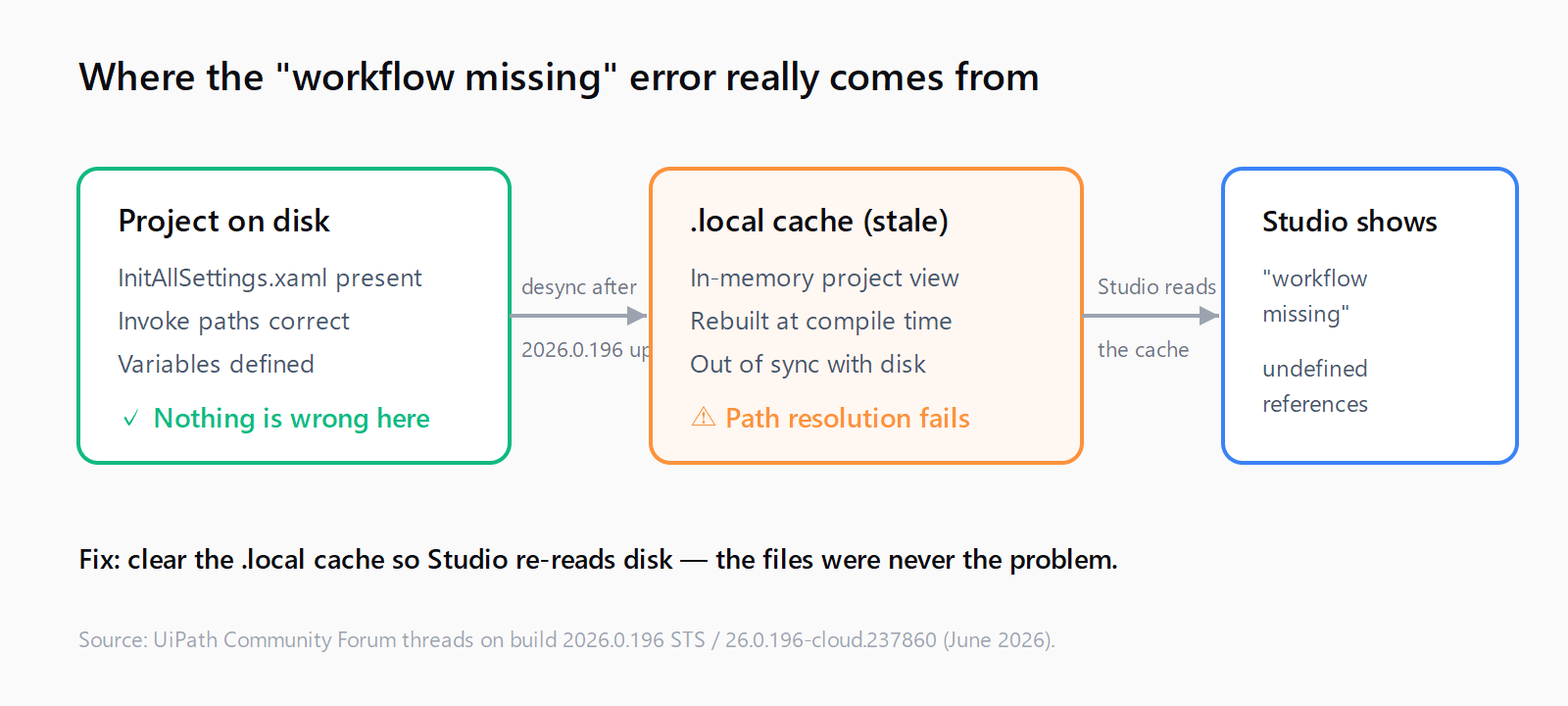
.local cache, which is why clearing it fixes the false errors.The trap is that both symptoms mimic a genuinely broken project. The instinct is to re-add the workflow, rename it, or move it to a different folder. None of that helps, because nothing is actually wrong with the files. If you have seen a CS0246 namespace publish error after a previous update, this is the same class of problem: Studio's project state, not your code, is out of sync.
How do you fix the "workflow missing" error in UiPath Studio 2026.0.196?
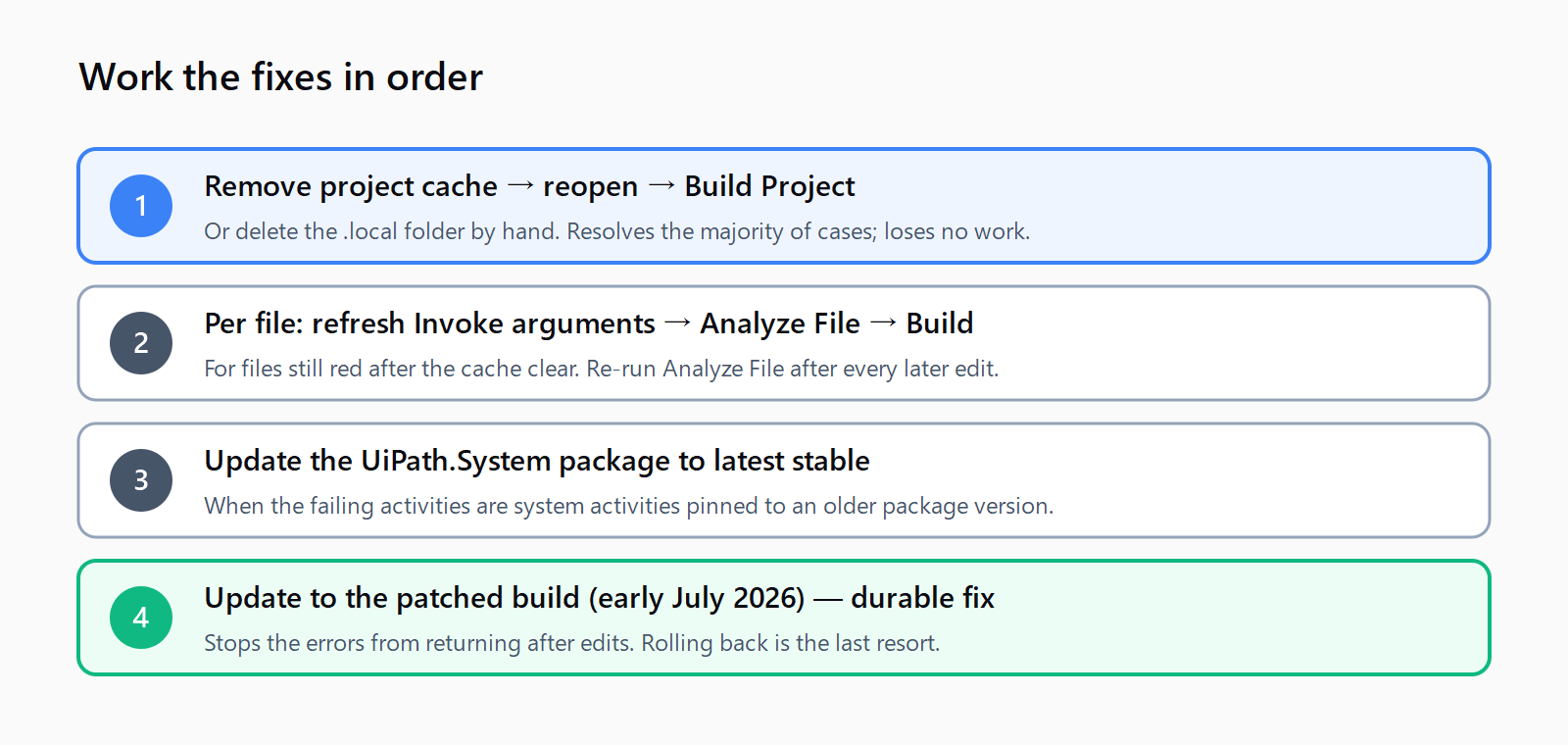
Clear the cache first. It resolves the majority of cases in under a minute and loses no work, because the .local folder holds only regenerable build artifacts, not your XAML.
- Close the project (or close Studio entirely).
- In Studio's project panel, use Remove project cache. If the option is unavailable, delete the project's
.localfolder manually from the file system. - Reopen the project and let Studio recompile.
- Run Build Project to confirm the invokes resolve.
If a handful of XAML files still show errors after the cache clear, fix them individually. Open the affected file, select the Invoke Workflow File activity, refresh its arguments, open the argument dictionary and save it without changes, then save the XAML. Run Analyze File followed by Build Project. This forces Studio to rebuild the reference from disk.
The gotcha most posts miss: until you are on the patched build, you must re-run Analyze File after any change to the project. Edit an argument, add an activity, or rename a variable, and the false "missing" errors can return; only a fresh Analyze File clears them. Treat it as a temporary ritual, not a one-time fix.
What if clearing the cache does not work?
A short ladder of secondary fixes covers the remaining cases. Work down it in order.
| Fix | When it applies |
|---|---|
Update the UiPath.System package to the latest stable version | Errors concentrate on system activities; the package pinned in the project predates the update. |
Check Invoke paths for double backslashes: use Framework\InitAllSettings.xaml, not Framework\\InitAllSettings.xaml | Only some invokes fail, and they sit in subfolders. |
| Move invoked workflows from subfolders up to the project root | Temporary unblock when a specific nested path refuses to resolve. |
| Roll back to the previous Studio version | You cannot update immediately and need a stable machine now. |
These are documented workarounds from the forum threads, not official guidance, so verify each against your project before relying on it in production. A UiPath Studio install error after an update can compound the confusion on a freshly-updated machine; rule out install-time failures before assuming a cache issue. For sibling problems across the platform, the Automation Error Index catalogs UiPath and Power Automate errors with their fixes.
Should you roll back or wait for a patch?
Neither. Update forward. UiPath shipped a corrected build in early July 2026, and the original reporter confirmed the "workflow missing" errors cleared after installing it. If your organization controls Studio updates through a managed feed, the cache clear plus the Analyze File ritual keeps you working until that build reaches you. Rolling back is the last resort: it is clean, but it strands you on an older toolchain and you will have to re-update eventually anyway.
How do you clear all the false errors in five minutes?
- Close the project so nothing holds the cache open.
- Run Remove project cache, or delete the
.localfolder by hand. - Reopen and let Studio recompile, then Build Project.
- For any file still red, refresh the Invoke arguments, save, then Analyze File.
- Update the
UiPath.Systempackage if system activities are the ones failing. - Plan the update to the patched build to stop the errors returning after edits.
FAQ
Is my UiPath project corrupted?
No. The XAML files are intact and the paths are correct. The errors come from Studio's stale .local cache after the 2026.0.196 update, which is why clearing the cache resolves them without touching your workflows.
Will deleting the .local folder lose my work?
No. The .local folder holds only cached build and design-time artifacts, all regenerated on the next compile. Your workflows, variables, and project files live outside it and are untouched.
Which UiPath Studio build fixed the workflow-missing bug?
UiPath shipped a corrected build in early July 2026, after the 2026.0.196 (STS) and 26.0.196-cloud.237860 releases. Updating to the current build is the durable fix; the cache clear is the interim workaround.
Why do the missing-workflow errors come back after I edit the project?
On the affected 2026.0.196 build, any project change can re-trigger the cache desync. Re-run Analyze File after each edit until you are on the patched build, which stops the errors from returning.
Does rolling back to the previous Studio version help?
Yes, but treat it as a last resort. Reverting to the prior version avoids the regression entirely, at the cost of an older toolchain you will have to update again later. Clearing the cache and updating forward is usually the better path.
Does this affect cloud and standalone Studio the same way?
Yes. Both the standalone 2026.0.196 STS build and the 26.0.196-cloud.237860 release show the same path-resolution regression, and the same cache clear resolves both.