
How to fix Power Automate desktop flow NoCandidateMachine error
Decode the NoCandidateMachine sub-error codes and fix the session or machine state blocking your desktop flow, with the 12-hour queue timeout explained.
TL;DR: Power Automate's NoCandidateMachine error means no machine was free within the 12-hour queue window; read the run's sub-error code in queue events and fix the session state it names on the target machine.
"No machine able to run the desktop flow has been found" is a queue timeout, not a crash. Power Automate holds desktop flow runs in a queue when every machine in the target group is busy or in the wrong session state, and after 12 hours the run fails with NoCandidateMachine. The error fires before your flow executes a single action, so the flow logic is never the problem. The sub-error code attached to the run tells you exactly which session condition blocked it, and each one has a specific fix.
What does the NoCandidateMachine error mean?
When no machine is free, Power Automate queues the run and assigns machines first-in, first-out by priority and request time. If no machine in the group becomes available within 12 hours of the request, the orchestrator gives up and marks the run NoCandidateMachine (Microsoft KB 5004537). Because this happens before execution, the cause is always about machine availability or session state, never your actions. Attended and unattended runs fail for opposite reasons, which is why a single generic fix does not exist.
How do you find the sub-error code?
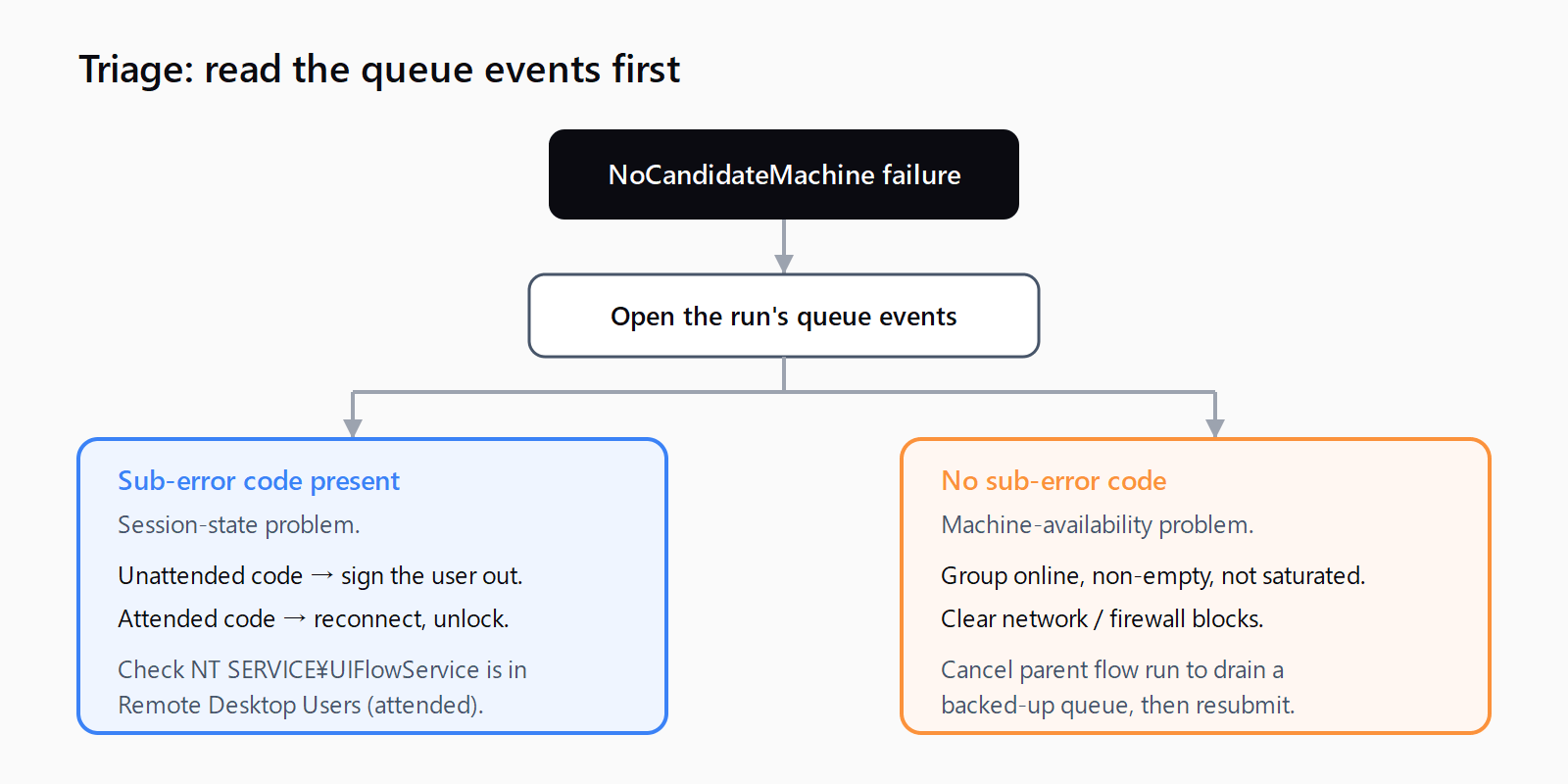
Open the failed run's monitor details and look at the queue events section. Each launch attempt is logged there with a sub-error code, and that code is the real diagnostic. Read Microsoft's desktop flow queue error reference alongside it. If a run shows no sub-error code at all, skip to the "no sub-error code" section below; the cause is machine-level, not session-level.
How do you fix each NoCandidateMachine sub-error?
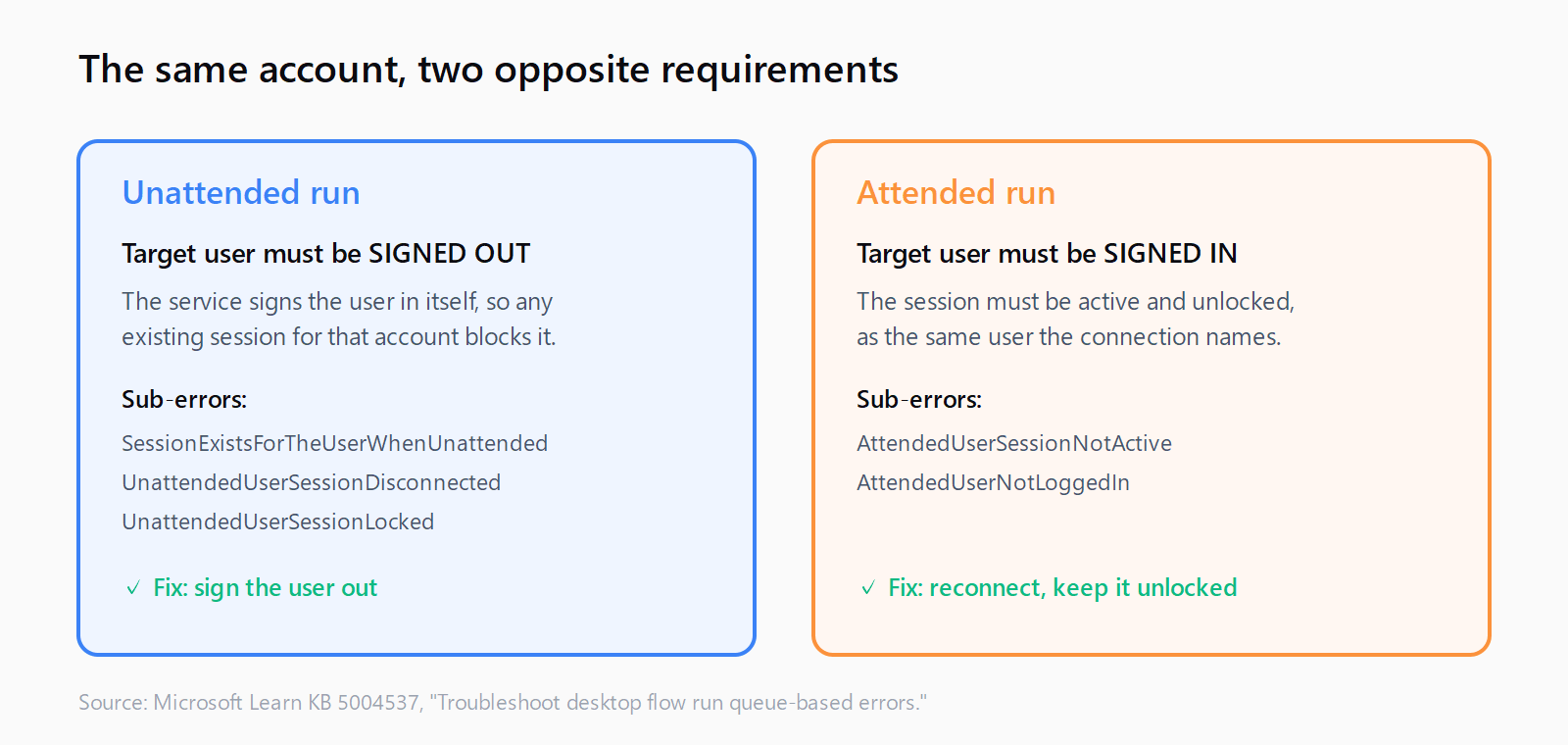
Five of the six sub-errors are session-state problems. The rule underneath them is simple: an unattended run needs the connection's user to be signed out of the target machine, while an attended run needs that same user to be signed in with an active, unlocked session. Match the sub-error to its fix:
| Sub-error code | What it means | Fix |
|---|---|---|
SessionExistsForTheUserWhenUnattended | Unattended run, but the connection's user is signed in on the machine. | Sign out that user; confirm no one is logged in as them. |
UnattendedUserSessionDisconnected | Unattended run, but a disconnected session exists for that user. | Sign out the disconnected session. |
UnattendedUserSessionLocked | Unattended run, but a locked session exists for that user. | Sign out the locked session. |
AttendedUserSessionNotActive | Attended run, but the user's session is locked or disconnected. | Reconnect as that user and leave the session active and unlocked. |
AttendedUserNotLoggedIn | Attended run, but the connection's user is not signed in. | Sign in as that user; check the credentials match with whoami. |
UIFlowAlreadyRunning | The machine hit its concurrent-session limit, or the user is already signed in. | Wait for the running flows to finish, or cancel their parent cloud flow run. |
The counter-intuitive one is the unattended group: operators see the account logged in, assume that is correct, and cannot understand the failure. For unattended execution the service signs the user in itself, so any pre-existing session for that account, even a locked one, blocks it. This is the same class of session confusion that trips up Power Automate triggers not firing: the platform state, not your flow, is wrong.
Why do attended flows fail even after signing in?
For the two attended sub-errors, verify the machine can host a remote session for the service account. By default the Power Automate service runs as NT SERVICE\UIFlowService, and it must be in the machine's Remote Desktop Users group. Open Start > Run, type usrmgr.msc, select Groups, open Remote Desktop Users, and confirm NT SERVICE\UIFlowService is listed. If it is missing, add it (this needs administrator rights) and restart the machine. Also confirm you are targeting the intended machine: in the machine runtime application, select View machine in portal and check it matches the machine in your connection.
What if there is no sub-error code?
A NoCandidateMachine with no sub-error is a machine-availability problem, not a session one. Work through the machine-level causes:
- Offline machines: start the machine and confirm Power Automate for desktop is installed and can reach the internet.
- Empty machine group: the group must contain at least one machine before you assign a run to it.
- Machines continuously busy: if runs never get picked up in time, the group is under-provisioned; add machines to spread the load.
- Network blocks: a proxy or firewall may be unreachable, so allow the required Power Automate IP addresses and domains with your IT team.
- Signed-in mismatch: do not run unattended on a group whose machines are all signed in, or attended on a group whose machines are all signed out.
If the queue has already backed up behind one of these, clear it in bulk with the Cancel parent flow run action on the Desktop flow runs page, then restart the cloud flows once the machine issue is resolved. Since this is a specific error code, it is worth logging in your own runbook; our Automation Error Index catalogs Power Automate and UiPath errors like this one, and the neighbouring Power Automate 401 and 403 errors cover the connection-auth failures that surface separately.
How do you clear a NoCandidateMachine failure in order?
- Open the failed run's queue events and read the sub-error code.
- If it is an unattended code, sign every session for the connection user out of the target machine.
- If it is an attended code, reconnect as that user and leave the session unlocked.
- For attended codes, confirm
NT SERVICE\UIFlowServiceis in the Remote Desktop Users group. - If there is no sub-error code, check the machine group is online, non-empty, and not saturated.
- Cancel the parent cloud flow run to clear a backed-up queue, then resubmit.
FAQ
What is the 12-hour timeout in NoCandidateMachine?
Power Automate queues a desktop flow run when no machine is free and assigns machines first-in, first-out. If no machine in the target group becomes available within 12 hours of the request, the run times out and fails with NoCandidateMachine.
Why does an unattended flow fail when the user is already logged in?
Unattended execution signs the connection user in itself, so it needs no existing session for that account. A session that is already open, disconnected, or locked blocks it, producing SessionExistsForTheUserWhenUnattended, UnattendedUserSessionDisconnected, or UnattendedUserSessionLocked. Sign the user out.
Where do I find the NoCandidateMachine sub-error code?
Open the failed run in monitor run details and read the queue events section. Each launch attempt is logged there with its sub-error code, which tells you the exact session-state or machine cause.
How do I fix the NT SERVICE\UIFlowService permission error?
Add NT SERVICE\UIFlowService to the machine's Remote Desktop Users group. Run usrmgr.msc, open Groups, open Remote Desktop Users, add the account if it is missing (administrator rights required), and restart the machine.
How do I clear a backed-up desktop flow queue?
Use the Cancel parent flow run action on the Desktop flow runs page to bulk-cancel queued runs. Resolve the underlying machine or session issue first, then restart the cloud flows so the runs re-enter a healthy queue.
Does the NoCandidateMachine error mean my flow is broken?
No. The error fires before the flow executes any action, so the flow logic is never the cause. It is always about machine availability or session state on the target machine.