
n8n Postgres SSH tunnel hangs: diagnosis and workarounds
n8n Postgres queries hang after an SSH tunnel closes? Check shared pools, bound workflow runtime, and learn why statement_timeout cannot stop this hang.
TL;DR: If n8n Postgres hangs after an SSH tunnel closes, inspect shared pool lifecycles and set a workflow timeout; PostgreSQL statement_timeout cannot bound a query that never reaches the server.
A database node can remain pending without producing an error output. Start by checking whether a query reached PostgreSQL at all, then compare the failure with the shared-SSH-client report before tuning SQL or adding retries.
Which SSH tunnel hang has been reported?
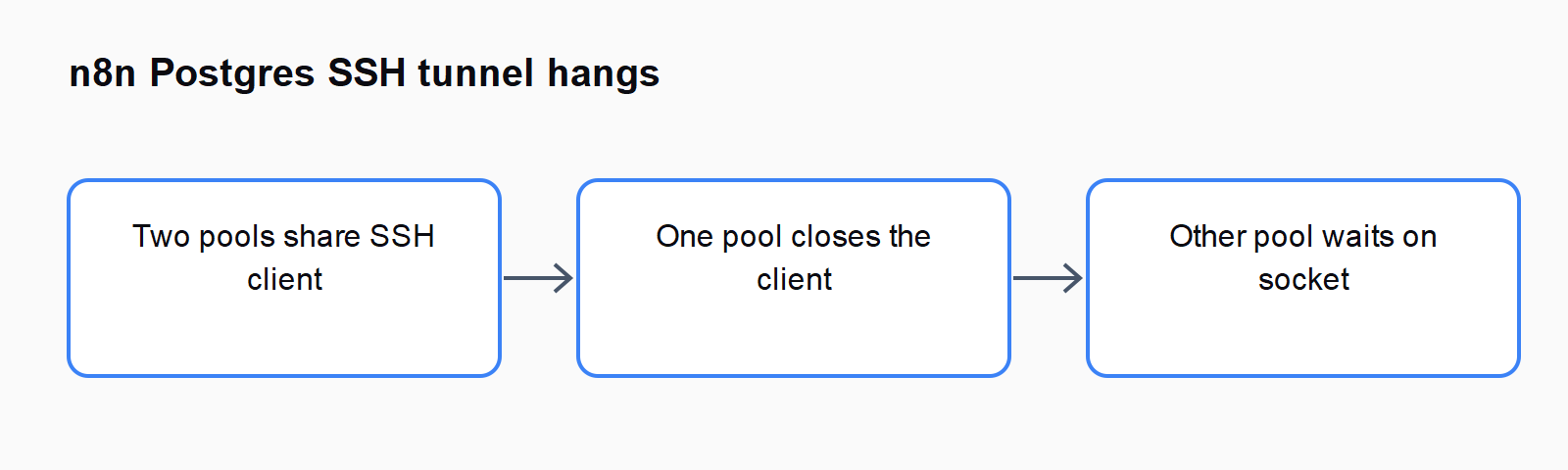
The n8n Postgres SSH lifecycle issue reports an indefinite wait on n8n 2.41.4. Two Postgres nodes with different node versions use one SSH credential. Their database pools have separate lifecycles, but the pools share an SSH client that one of them can close.
The remaining pool then tries to use the closed client. The report describes a port-forwarding failure that leaves an accepted socket waiting without a usable connection to PostgreSQL. Because the database operation has not rejected normally, the node's retry and error-output settings do not get the expected error to handle.
Record the n8n application version separately from each Postgres node's typeVersion. These are different values. Check the credential used by each node and when the hang begins. A slow SQL query, unreachable database, or rejected SSH login needs a separate diagnosis even if the visible node also appears stuck.
How do you distinguish a tunnel wait from a slow query?
Use a read-only test such as SELECT 1 and inspect the n8n logs, SSH server logs, and database activity around the same execution. If the database receives the query and it waits on a lock, investigate PostgreSQL. If no connection or query reaches the server, inspect the network and tunnel path first.
Look for Not connected near an SSH-client cleanup event. Compare it with the execution that remains pending. The useful evidence is a timeline linking client cleanup, the following connection attempt, and the missing database activity; the text of one error alone is not enough to identify the shared-pool defect.
On a disposable instance, compare two nodes using the same node version with two nodes using different versions on the same SSH credential. Allow the older pool to become idle while continuing the other test. This is a diagnostic comparison based on the report, not a benchmark or proof that every mixed-version workflow will hang.
Why does PostgreSQL statement_timeout not stop this wait?
PostgreSQL's statement_timeout definition starts the timer when a query-related message arrives at the server. It can bound a server-side statement, but it cannot time a request still waiting in n8n's local proxy or SSH forwarding path.
A database setting therefore cannot repair a closed client socket that never delivered the request. Keep statement timeout for the query cases it actually covers. Treat connection startup, client-side waiting, and statement execution as different boundaries when choosing a timeout.
The issue also describes a pool-cache caveat for the node's connection timeout: changing a setting does not demonstrate that an already cached pool adopted it. After any timeout change, inspect a new test execution and verify the observed bound. Do not infer protection solely from a value displayed in the node editor.
How can you contain the workflow while the issue is open?
Enable the workflow's timeout using n8n's workflow settings. Pick a duration appropriate to that workflow and test that a stalled execution is cancelled within the expected limit. This contains runtime; it does not repair the SSH lifecycle or guarantee that earlier side effects are reversed.
Inspect work already completed before rerunning the workflow. If an earlier step wrote a record or sent an email, a new full execution may repeat it. Use a read-only reproduction to test the timeout, and give business operations a stable identity that lets you detect completed work.
Keeping Postgres nodes on a consistent supported node version is a reported mitigation worth testing because it removes the mixed-version setup. Review parameter compatibility before changing versions. Confirm behavior on a copy and keep a rollback export; a compatibility change can create a different problem even when it removes this trigger condition.
Has the proposed SSH forwarding fix been released?
As checked on 8 October 2026, the fail-fast SSH forwarding pull request remains open and unmerged. It proposes closing the accepted socket when forwarding fails so the database client can reject, rather than wait indefinitely.
The proposal explicitly leaves the shared SSH-client lifecycle problem outside its scope. Closing a failed socket and preventing one pool from closing another pool's client are related repairs with different outcomes. Do not describe the pull request as a released version fix, or assume installing the current release necessarily includes it.
When a fix ships, test both the failure response and the following reconnection. A useful result is a bounded error that reaches your error route, followed by a fresh successful read-only query. Verify the installed release notes and your execution trace before removing containment.
For nearby failure paths, compare How to fix the n8n "ECONNREFUSED" error in HTTP Request nodes and How to run n8n in queue mode with Redis and worker containers on Docker.
FAQ
Will Retry On Fail recover an indefinitely pending node?
A retry needs a failure to handle. In the reported path the query stays pending, so a workflow timeout provides containment while the connection problem is investigated.
Should you set a PostgreSQL statement timeout anyway?
It can help with slow statements that reach PostgreSQL. It does not cover the pre-query tunnel wait described here.
Does a node version mean the installed n8n version?
No. The node's typeVersion identifies its node implementation version. Record that value alongside the application version when comparing workflows.
Where can you compare other database failures?
The Automation Error Index links related guides. Match connection, authentication, query, and parameter errors to the stage where they occur.