
Slack call_rejected webhook event: what it means and how to handle it in n8n
The call_rejected event fires when an invited user declines an API-created Slack call. Zero OAuth scopes required. Here is how to subscribe and handle it in an n8n Webhook workflow.
TL;DR: The Slack call_rejected event fires when an invited user declines an API-created call in a DM; it carries call_id, user_id, channel_id, and external_unique_id, and requires no OAuth scopes beyond Events API access.
The event belongs to Slack's Calls API, which lets apps inject third-party call links (Zoom, Google Meet, Webex) directly into DM windows as interactive cards. When the recipient clicks Decline on that card, Slack posts a call_rejected payload to your Event Subscription URL within seconds. It does not fire for native Slack Huddles or built-in video calls - only calls created via calls.add qualify. Builders who see the event arriving and search for it often land on generic Slack webhook guides that skip this distinction entirely.
What does the call_rejected payload contain?
The outer envelope is a standard event_callback wrapper common to all Slack Events API pushes. The inner event object contains four fields unique to call lifecycle events:
call_id- the Calls API identifier, always prefixed withR(e.g.R123ABC456). Use this to look up the call record in your system.user_id- the Slack user who clicked Decline. Resolve to a display name with a Slack Get User call if you need to include the name in a notification.channel_id- the DM channel where the call card was posted. DM channel IDs start withD.external_unique_id- the ID your app passed tocalls.addwhen creating the call. This is your internal reference - conference room booking ID, meeting UUID, or CRM record key.
Full example payload from Slack's official reference:
{
  "token": "12345FVmRUzNDOAu12345h",
  "team_id": "T123ABC456",
  "api_app_id": "BBBU04BB4",
  "event": {
    "type": "call_rejected",
    "call_id": "R123ABC456",
    "user_id": "U123ABC456",
    "channel_id": "D123ABC456",
    "external_unique_id": "123-456-7890"
  },
  "type": "event_callback",
  "event_id": "Ev123ABC456",
  "event_time": 1563448153
}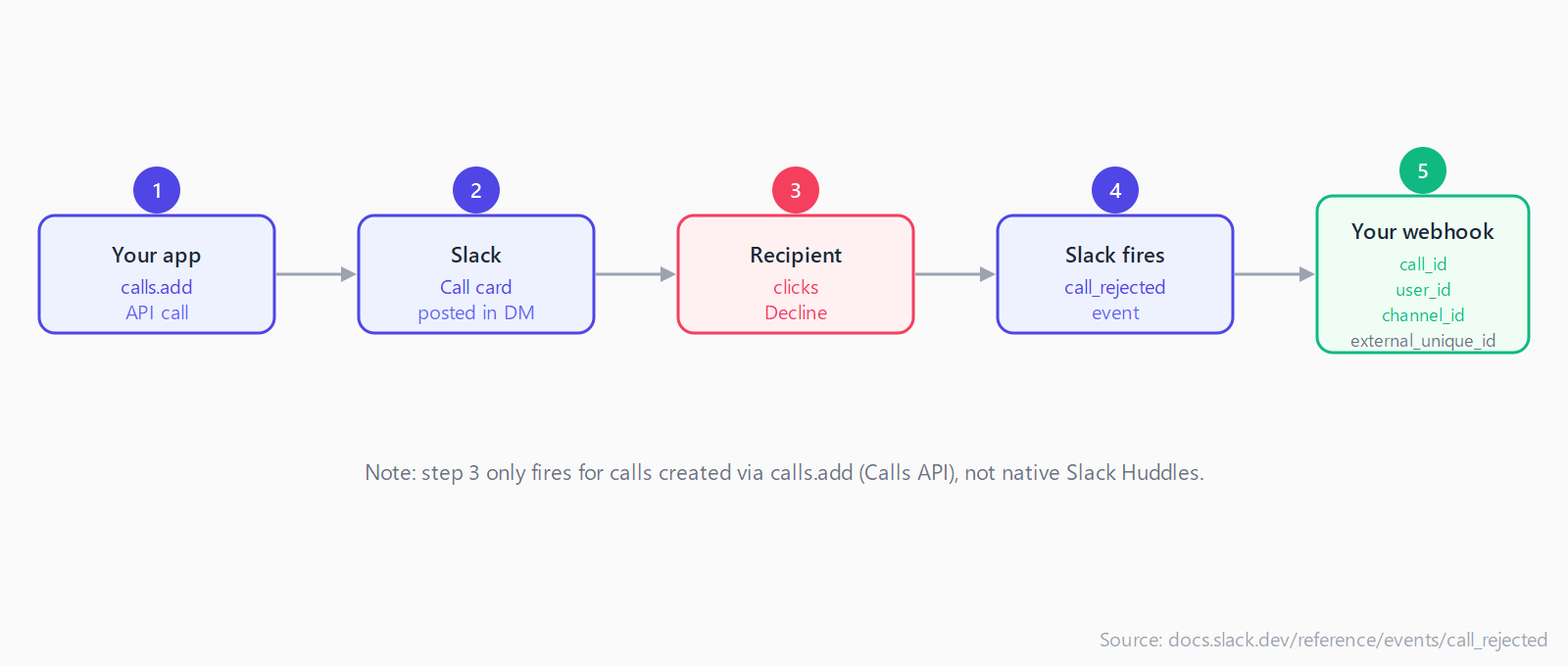
calls.add - not after declining a native Slack Huddle.How do you subscribe to call_rejected in a Slack app?
Open your Slack app configuration, navigate to Event Subscriptions, and enable the feature. Under Subscribe to bot events, add call_rejected. Slack lists no required scopes for this event - if your app already has the Events API enabled, the event is available immediately.
The Request URL field must pass Slack's url_verification challenge. Slack sends a POST request with {"type":"url_verification","challenge":"...token..."} and expects an HTTP 200 response that echoes back the challenge value within three seconds. If the endpoint does not respond in time, Slack shows "Your URL didn't respond with the value of the challenge parameter."
Three conditions cause this to fail in n8n specifically:
- The workflow is not yet Active. Test-mode webhook URLs differ from production URLs, and Slack registers only one URL at a time.
- The n8n instance is on a private network that Slack's servers cannot reach.
- On a self-hosted n8n deployment, the
WEBHOOK_URLenvironment variable does not match the externally reachable hostname.
How do you handle call_rejected in an n8n Webhook workflow?
Use a Webhook trigger node rather than the built-in Slack Trigger node. The Slack Trigger node handles message and reaction events over OAuth; the call_rejected event arrives as a raw Events API push where manual challenge handling gives you full control. Set HTTP Method to POST and Response Mode to "Using 'Respond to Webhook' Node."
Add an IF node immediately after the Webhook to branch on event type. Set the condition to: {{ $json.body.type }} equals url_verification. On the true branch, connect a Respond to Webhook node with body {{ $json.body.challenge }} and HTTP status 200 - this passes Slack's verification check. On the false branch, route the actual call_rejected events to your handling logic.
In the false branch, extract the four fields with n8n expressions:
{{ $json.body.event.call_id }}- look up the pending call in your database or CRM.{{ $json.body.event.user_id }}- the user who declined. Use with a Slack Get User node to resolve to a name.{{ $json.body.event.external_unique_id }}- your internal call reference, useful for linking back to the originating record.{{ $json.body.team_id }}- the workspace ID, needed if your app is installed on multiple Slack workspaces.
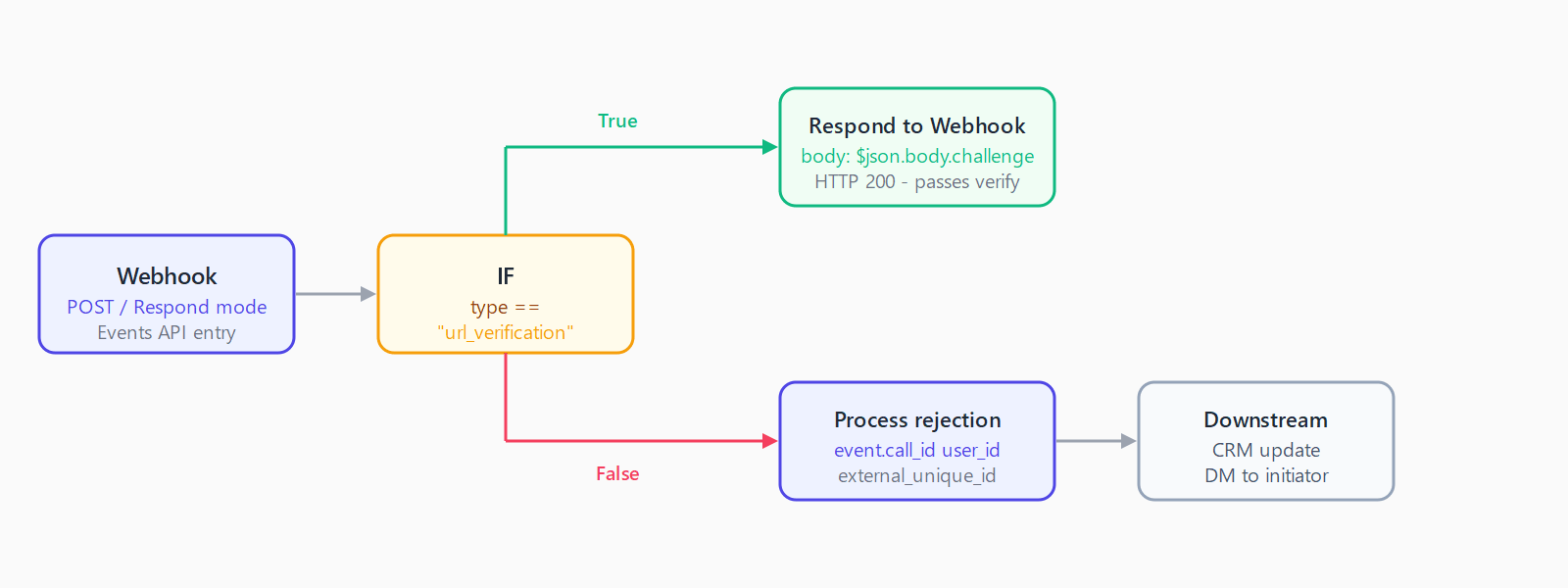
type == "url_verification" lets a single Webhook node handle both Slack's challenge handshake and the live call_rejected events.Common downstream actions after a rejection: send a DM to the call initiator ("Alex declined your call"), update a booking system status field, or write a rejection timestamp to a database row. The n8n webhook returns 404 troubleshooting guide covers the most common reasons a verified webhook stops receiving events after deployment.
Why is the Calls API the only source of this event?
Slack's native Huddles and video calling use an internal signaling system that does not surface events to the Events API. The call_rejected event is scoped exclusively to calls created through calls.add: typically third-party call links injected by an app - a Zoom link, a Google Meet room, or a custom conferencing system. If your workflow is subscribed to call_rejected but receiving nothing, confirm that the calls triggering the subscription were created through the API and not started natively inside Slack. The SaaS Webhook Catalog indexes all Slack webhook events alongside their payload structures if you need to handle related call lifecycle events in the same workflow.
FAQ
Does call_rejected fire for Slack Huddles?
No. Huddles use Slack's internal calling system, which does not emit Calls API events. The call_rejected event only fires for calls created via the calls.add API method - typically apps that inject third-party conference links into DM windows.
What OAuth scopes does call_rejected require?
None. Slack's own reference lists no required scopes for call_rejected. This distinguishes it from most Slack events, which require at least channels:read or users:read. Any app with Events API access can subscribe to it without additional permission grants.
How does Slack retry if my webhook misses a call_rejected event?
Slack retries three times: near-immediately, after one minute, and after five minutes. Each retry adds x-slack-retry-num and x-slack-retry-reason headers so you can detect and deduplicate replays. To suppress retries for an intentionally dropped event, respond with HTTP 200 and include the header x-slack-no-retry: 1.
Can I filter call_rejected events by workspace or user in n8n?
Yes. Slack delivers all call_rejected events for every workspace where your app is installed. Add an IF node on {{ $json.body.team_id }} to isolate a specific workspace, or filter on {{ $json.body.event.user_id }} to route events from particular users to different branches.
Why does my n8n Slack webhook stop receiving events after a few days?
This is a known intermittent issue where long-running n8n webhook URLs fail Slack's periodic endpoint health checks, documented in n8n GitHub issue #11424. The current workaround is to delete and recreate the Webhook trigger node, which generates a new URL that Slack re-verifies immediately. The issue affects production deployments on Render and similar platforms and is not specific to call_rejected.