
Slack user_huddle_changed event: when it fires and how to use it in n8n
user_huddle_changed fires on Slack Huddle entry and exit. Requires users:read. Here is the full payload, how it differs from user_change, and how to handle it in n8n.
TL;DR: The Slack user_huddle_changed event fires when a user enters or exits a Slack Huddle; the payload includes huddle_state, huddle_state_expiration_ts, and the full user profile, and requires the users:read scope.
The event is part of Slack's user presence system. When someone in your workspace starts or ends a Huddle, Slack pushes a user_huddle_changed event to every app subscribed to it in that workspace. It dispatches simultaneously with the broader user_change event, but is scoped specifically to Huddle state changes rather than all profile updates. This makes it the right trigger for presence-based automations: auto-setting status in other tools, logging team availability, or routing support tickets away from users currently in a call.
What does the user_huddle_changed payload contain?
The event wraps inside the standard Events API event_callback envelope. The inner event.user object contains the full user profile with three Huddle-specific fields appended:
huddle_state- the user's current Huddle state. Values aredefault_unset(not in a Huddle),in_a_huddle, orin_a_huddle_remote(cross-workspace Huddle). An event fires on entry and on exit.huddle_state_expiration_ts- a Unix timestamp indicating when the Huddle state should expire. Usually set to the expected Huddle end time when entering; cleared on exit.huddle_state_call_id- the internal identifier for the Huddle session. Matches across events for the same call, allowing your app to correlate entry and exit events.
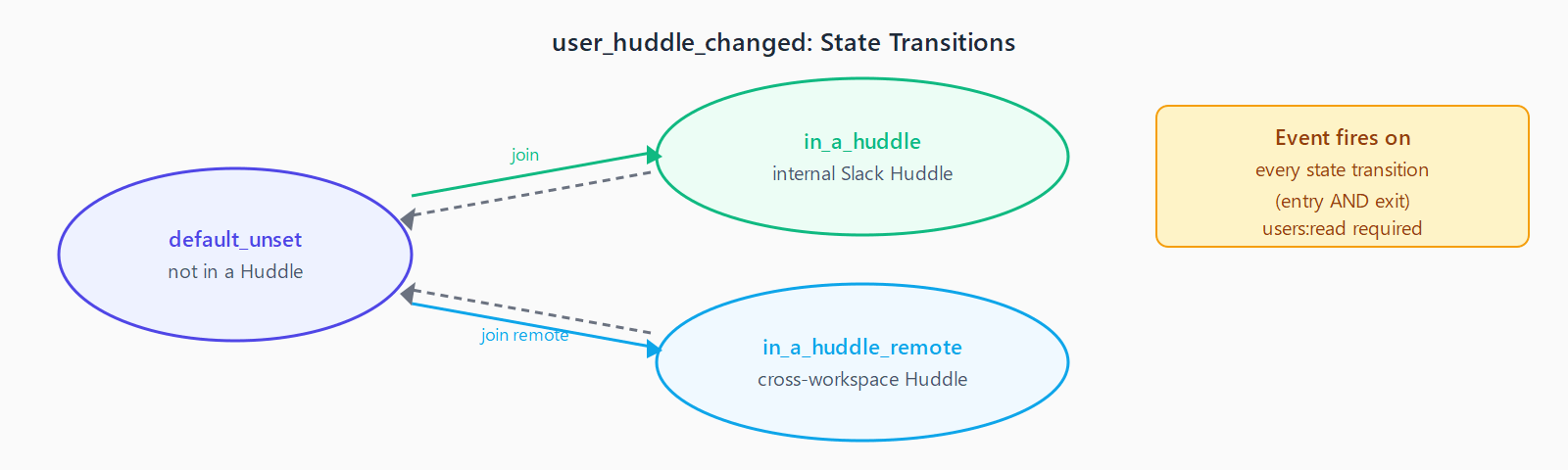
huddle_state to distinguish the direction - in_a_huddle means joined, default_unset means left.The event also carries all standard user profile fields: id, name, real_name, profile.display_name, and status fields. Extract event.user.id to identify which user triggered the state change.
What OAuth scopes does user_huddle_changed require?
The event requires users:read on bot tokens. Unlike the Slack Calls API events that require no scopes, user_huddle_changed accesses user profile data, which falls under the user-read permission category. If your app already subscribes to other user-presence events like user_change, the scope is already satisfied.
How do you handle user_huddle_changed in n8n?
Use the Slack Trigger node in n8n rather than a raw Webhook node. The Slack Trigger node handles the url_verification challenge automatically when the workflow is Active, and it authenticates incoming events against your app's signing secret (supported since n8n 1.106.0 via the Slack Signing Secret field in the credential).
After activating the workflow, copy the production webhook URL from the Slack Trigger node and paste it into your Slack app's Event Subscriptions > Request URL field. Once verified, add user_huddle_changed under Subscribe to bot events.
In the n8n workflow, branch on {{ $json.event.user.huddle_state }}:
in_a_huddleorin_a_huddle_remote- user just entered a Huddle. Trigger: set status in Notion or Linear as "In a call", pause scheduled DM delivery, log attendance start time.default_unset- user just left the Huddle. Trigger: clear the "In a call" status, resume DM delivery, log duration usinghuddle_state_expiration_tsminus entry timestamp.
For broader Slack event handling patterns, see the Slack call_rejected event guide, which covers challenge verification and Webhook node setup in detail.
What is the difference between user_huddle_changed and user_change?
user_change fires on any user profile update: display name changes, status text changes, avatar changes, and Huddle state changes. It is a superset. user_huddle_changed fires only when the Huddle state field specifically changes. If you need to react to Huddle activity without triggering on every other profile update, subscribe to user_huddle_changed exclusively - it is lower noise.
The two events fire simultaneously when a Huddle state changes. Your app will receive both if subscribed to both. De-duplicate by checking event.type at the top of your handler.
FAQ
Is there a way to query current Huddle status without subscribing to events?
Not directly. The Slack API has no "get current Huddle participants" endpoint. The users.info method returns user profile data including huddle_state, but you would need to poll it - there is no push-only alternative to the event subscription for real-time Huddle tracking.
Does user_huddle_changed fire for external participants in cross-workspace Huddles?
Yes. When a user in your workspace joins an external (cross-workspace) Huddle, the event fires with huddle_state: "in_a_huddle_remote". You can use this to distinguish internal calls from cross-org calls in your attendance tracking.
Can I access the Huddle history after the fact?
No. Slack does not expose Huddle history via any API endpoint. If you need attendance records, your app must capture and store the entry and exit events in real time. Build a database table keyed on huddle_state_call_id to group multiple users in the same Huddle session.
Why does my n8n Slack Trigger stop receiving events after a few days?
This is a known intermittent issue with long-running n8n Slack webhook URLs, documented in GitHub issue #11424. The webhook URL gradually fails Slack's periodic health checks. The current workaround is to delete and recreate the Slack Trigger node to generate a fresh URL that Slack re-verifies immediately.
What is the huddle_state_expiration_ts field used for?
It represents the expected end time for the Huddle as a Unix timestamp. In practice, Huddles rarely end exactly at this time - it is an estimate set when the session starts. On exit, the field is cleared. Use the actual exit event timestamp rather than this field for accurate duration calculations.