
Build an AI Sales Agent: Tools, Workflow, and Prompts
Five-scenario Make or n8n architecture plus the four prompt elements (tone, structure, fallback, formatting) that stop an AI sales agent from silently dropping qualification questions.
TL;DR: An AI sales agent pairs Claude or GPT-4o with five tool-scenarios in Make or n8n to qualify inbound leads and book meetings automatically - the step most guides skip is writing prompts with explicit fallback rules.
Inbound sales teams lose leads between the "contact us" form and the first real human touch. The average response delay is over five hours; most qualified prospects move on in twenty minutes. An AI sales agent closes that gap by handling the first three to five turns of every conversation autonomously - greeting the prospect, asking qualification questions, enriching company data, logging the record, and booking a meeting - then handing off only when a human is genuinely needed.
What does an AI sales agent actually do that a CRM workflow can't?
A CRM workflow fires a fixed sequence: send email A, wait two days, send email B. It cannot deviate based on what the prospect said. An AI sales agent reads each reply, decides which tool to call next, and adapts the response to context - so if a lead answers two of three qualification questions in their first message, the agent asks only for the missing one rather than sending the full questionnaire again.
The underlying mechanism is the same agent loop described in agentic AI frameworks: the LLM receives the conversation thread, reasons over it, selects a tool (send reply, enrich domain, book meeting), observes the result, and iterates until the outcome is reached or it needs human input. For sales this loop typically resolves in three to six tool calls per lead.
Which tools does an AI sales agent need to function?
The minimum working stack has five components, each replaceable:
| Role | Common choice | Alternatives |
|---|---|---|
| LLM reasoning | Claude 3.5 Sonnet or GPT-4o | Gemini 1.5 Flash (lower cost) |
| Email inbox monitor | Gmail watch trigger | Outlook, Front, IMAP |
| Company enrichment | Clearbit or Apollo | ZoomInfo, Pipl, Hunter.io |
| CRM logging | HubSpot | Salesforce, Pipedrive, Copper |
| Meeting scheduling | Calendly | SavvyCal, Cal.com |
The agent itself is not one of these tools - it is the Make or n8n scenario (or a dedicated agent platform like Relevance AI) that orchestrates the whole set. The LLM does the reasoning; each other tool is a skill the LLM can invoke by name. For teams already on Make, the n8n MCP server offers an alternative route if you want to expose your n8n workflows as agent tools directly from an LLM client.
How do you wire the five-scenario workflow in Make?
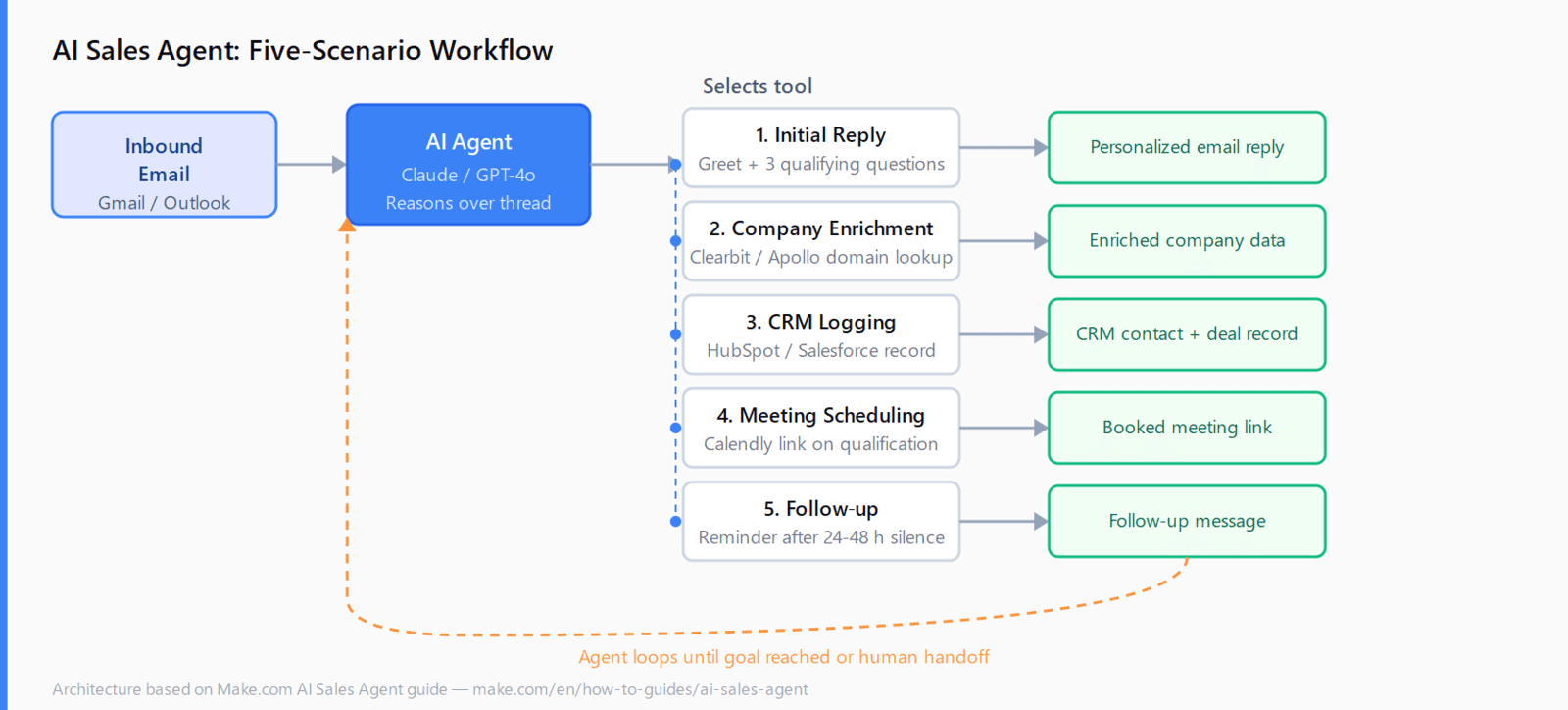
Each tool is a separate scenario in Make, exposed to the agent as a callable skill. The agent receives the inbound email, reasons over the thread, and selects which scenario to execute.
- Initial Reply scenario: takes the email body as input, returns a drafted reply that greets the sender, describes the product in two sentences, and poses the three qualification questions.
- Company Enrichment scenario: takes the sender's email domain, calls Clearbit or Apollo, returns company size, industry, funding stage, and country.
- CRM Logging scenario: creates or updates the HubSpot contact and company records with the enrichment data and a deal stage tag.
- Meeting Scheduling scenario: fires when the lead scores above threshold or explicitly asks to book - returns a personalized Calendly link.
- Follow-up scenario: sends one polite reminder if the qualification questions are still unanswered after a configurable delay (24-48 hours is typical).
In the email-watcher scenario, the inbound message is forwarded to the agent module. The agent picks the right tool, the scenario executes, the agent's generated reply is sent back on the same thread. The agent has access to full thread history, so each iteration builds on the prior exchange.
n8n users can replicate this with the AI Agent node and five sub-workflows. For agents that also need to look up knowledge base articles or pricing pages, connecting via the Model Context Protocol turns any n8n workflow into a structured tool the LLM can call by name, with typed input and output schemas.
What prompts make an AI sales agent reply consistently?
Prompt quality is the main variable in agent output quality. A minimal system prompt for the Initial Reply scenario needs four things:
- Tone and register: "Professional and friendly. Write the way a senior account executive would, not a support bot."
- Structure mandate: "Explain what [product] does in exactly two sentences. Then ask the three qualifying questions below as a numbered list."
- Fallback rule: "If the prospect's email is off-topic or you cannot determine their intent, ask one clarifying question using the same tone. Do not send the qualifying questions until intent is clear."
- Formatting: "Use paragraph breaks. No dense text blocks. No bullet points inside bullet points."
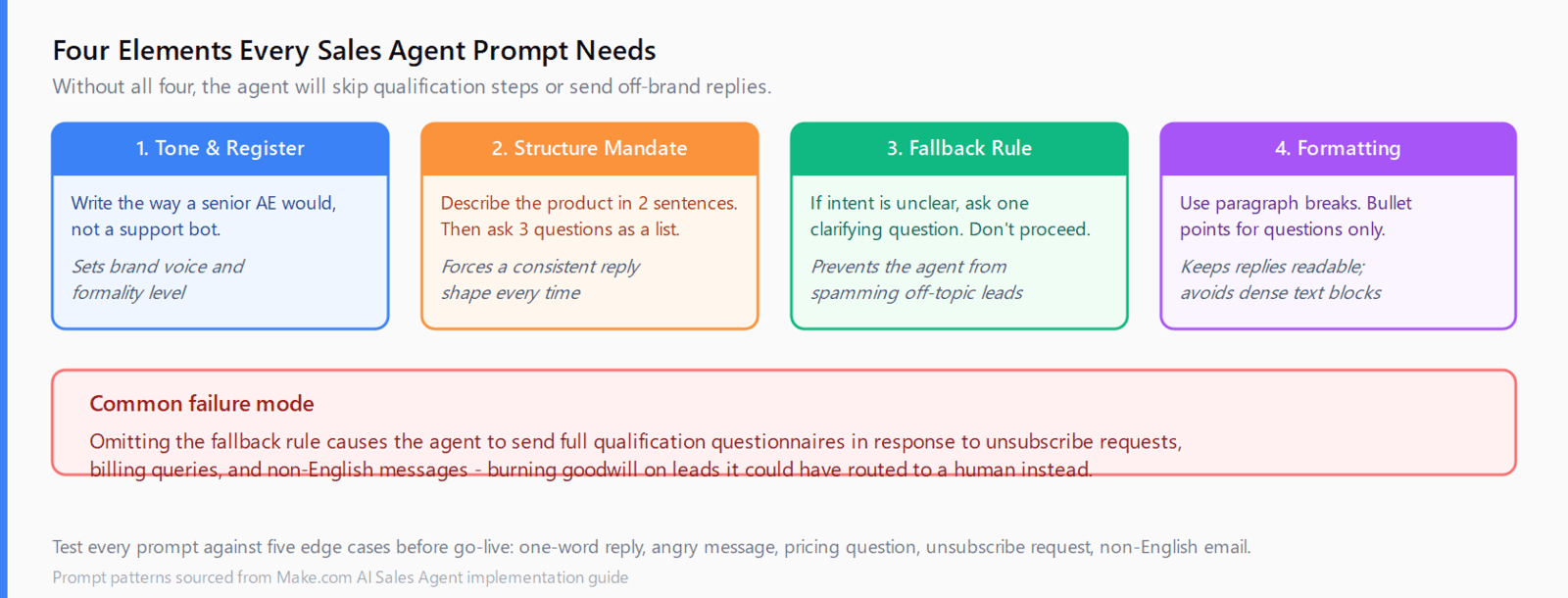
The fallback rule is the part most builds omit. Without it, the agent sends the full qualification questionnaire in response to "Can you remove me from your list?" or "Is this the right email for billing?" Test the prompt against five edge-case inputs before going live: a one-word reply, an angry message, a question about pricing, a request to unsubscribe, and a message in a second language.
For the Follow-up scenario, add a step count guard to the agent's system prompt: "Send at most one follow-up per lead thread. If a follow-up has already been sent in this thread, take no action." Without it, the agent can loop into repeated reminders if the conversation stalls.
FAQ
How does an AI sales agent qualify leads automatically?
The agent reads each inbound message, identifies unanswered qualification criteria (company size, budget, use case), and asks only for the missing data points. It uses the enrichment tool to fill in firmographic details the prospect never needs to type manually.
Can you build an AI sales agent without coding?
Yes. Make and n8n both offer visual agent nodes that connect to email, CRM, and enrichment APIs without custom code. Relevance AI and Voiceflow are dedicated no-code agent builders with sales-specific templates if you want a faster starting point than assembling individual scenarios.
What is the difference between an AI sales agent and a sales chatbot?
A chatbot follows a fixed decision tree and cannot deviate. An AI sales agent uses an LLM to reason over the full conversation thread, select the right tool dynamically, and adapt its response to what the prospect actually said - including edge cases the original workflow designer never anticipated.
Which CRMs does an AI sales agent connect to?
Any CRM with an API or a Make/n8n connector: HubSpot, Salesforce, Pipedrive, Copper, and Zoho are all commonly used. The CRM Logging scenario is the one component you need to rebuild per CRM; the rest of the workflow stays the same.
How much does running an AI sales agent cost?
At 1,000 inbound leads per month, the LLM cost with Claude 3.5 Sonnet or GPT-4o is roughly $10-30 depending on thread length. Make's operations cost adds $10-40 at that volume. Clearbit or Apollo enrichment is the largest variable: API plans start around $100/month for 1,000 domain lookups. Total infrastructure cost typically runs $150-200/month before CRM and scheduling tool fees.
What happens when the AI makes a mistake?
Set the agent to require human approval before sending meeting links, or route any lead that scores below a minimum confidence threshold to a human queue. Most production deployments start with human-in-the-loop on the scheduling step and remove it after two weeks of reviewing the agent's decisions.