
Per-node n8n execution debugging with Claude: patterns and pitfalls
Three silent n8n execution failures -- Filter node drops, missing AI Agent Chat Model, and inactive webhook -- plus how to use Claude and the n8n MCP to diagnose them in plain language.
TL;DR: Three n8n patterns cause silent execution failures with no error shown -- Filter drops non-matching items, AI Agent runs without Chat Model, production webhook needs workflow activation -- diagnose all three via Claude and the n8n MCP.
Silent failures in n8n all look the same from the outside: the workflow ran, the execution log shows green, and downstream nodes received zero items. No red dot, no error message, just an empty output. The three patterns below account for the majority of these cases in n8n v1.90.0+ queue-mode deployments. Pair each diagnostic with Claude's n8n MCP server to read execution traces in plain language instead of navigating the execution-history JSON manually.
What are the most common n8n silent execution failures?
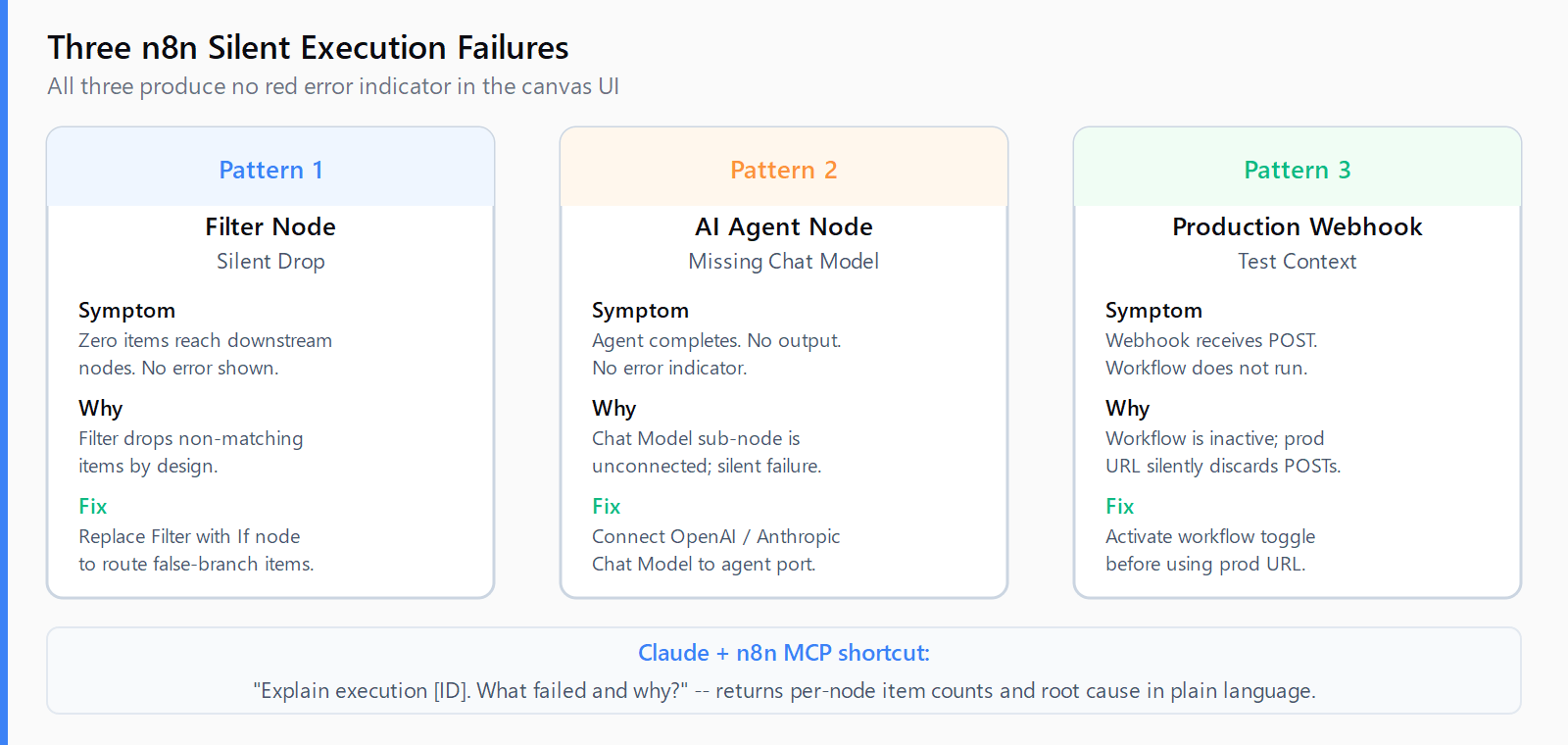
These three patterns are documented in n8n's own docs but produce no visible error in the canvas UI, making them easy to spend hours debugging without realizing the root cause.
Pattern 1: Filter node drops non-matching items.
Symptom: Downstream nodes receive zero items. No error. Execution log shows the Filter node ran successfully.
Diagnostic: Open the Filter node in the execution log. The "Items" column shows how many items entered vs. exited. If 12 items entered and 0 exited, every item failed the filter condition.
Fix: The Filter node is by design -- it sends only matching items forward and silently discards non-matching ones, per the n8n Filter node docs. If you need both matching and non-matching items to continue down separate paths, replace the Filter node with an If node: matching items travel down the "true" branch, non-matching items travel down the "false" branch, and neither set is dropped.
Pattern 2: AI Agent node missing Chat Model sub-node.
Symptom: The AI Agent node completes with no output or a generic "model not configured" message. No red error indicator on the canvas.
Diagnostic: In the workflow editor, click the AI Agent node and check the sub-node connection list in the lower panel. If "Chat Model" shows "not connected," the agent has no language model to call. The n8n AI Agent common issues docs document this as the top silent failure.
Fix: Connect a Chat Model sub-node (OpenAI Chat Model, Anthropic Chat Model, etc.) to the AI Agent node's "Chat Model" input port. The agent will not queue an error or halt execution without this connection -- it simply produces no output. For Claude-based agents, see the n8n OpenAI streaming guide for the sub-node configuration pattern.
Pattern 3: Production webhook running in test context.
Symptom: The webhook receives POST requests but the workflow does not execute, or it only executes when the browser has the workflow editor open.
Diagnostic: n8n issues two webhook URLs per workflow: a test URL (active only while the editor is open and "Listening" mode is on) and a production URL (active only when the workflow is activated via the toggle). The n8n Webhook common issues docs cover this: sending to the production URL while the workflow is inactive silently swallows the request.
Fix: Activate the workflow (blue toggle, top-right of the canvas) before switching your sender to the production webhook URL. The two URLs are structurally different: test URLs contain /test/, production URLs do not.
How do you use Claude to debug an n8n execution trace?
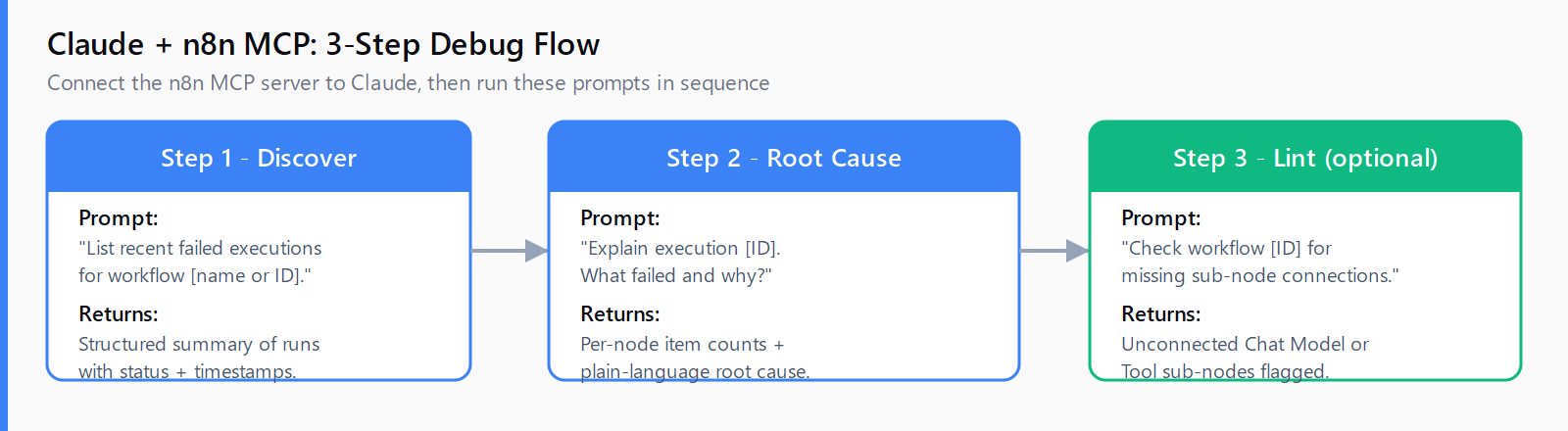
Once the n8n MCP server is connected to Claude, the debugging workflow is:
- In Claude, ask: "List recent failed executions for workflow [name or ID]." The MCP's
list_executionstool returns a structured summary of each run. - Pick the failed execution ID and ask: "Explain execution [ID]. What failed and why?" Claude reads the per-node item counts, error messages, and status codes and returns a plain-language root cause -- for example: "The Filter node at position 3 dropped all 12 items because the condition checked
status === 'active'but every incoming item hadstatus: 'pending'." - For AI Agent failures: "Check workflow [ID] for missing sub-node connections." The MCP linter flags unconnected Chat Model or Tool sub-nodes before you run the workflow.
The n8n MCP approach cuts root-cause time from manual JSON inspection to a single conversational query.
The n8n Code node execution mode guide covers a related silent pattern: Code nodes set to "Run Once for All Items" that silently process only the first item when the mode should be "Run for Each Item."
How do you test n8n silent-drop patterns in under five minutes?
- Open the failed execution in History, click each node in order, and check the item count column.
- For a zero-output Filter node: verify the condition expression against a sample item in the Input panel.
- For a zero-output AI Agent: check the sub-node connection list for a missing Chat Model.
- For a webhook that only fires in the editor: compare the URL prefix --
/test/vs. no/test/. - If still unclear: connect the n8n MCP to Claude and ask it to explain the execution by ID.
FAQ
Why does the n8n Filter node drop all items?
The Filter node drops items whose condition evaluates to false -- this is its documented behavior, not a bug. Open the Filter node in the execution log and compare the "Items In" and "Items Out" counts. If Items Out is zero, all items failed the condition. Use the Input panel to inspect what values the node received and adjust the condition expression accordingly.
What is the difference between n8n Filter node and If node?
The Filter node has one output: items that match. Items that don't match are silently discarded. The If node has two outputs: "true" branch (matching items) and "false" branch (non-matching items). Use Filter when you want to discard non-matching items; use If when you need to route them differently.
How do I fix n8n AI Agent producing no output?
Check the sub-node connections on the AI Agent node. A Chat Model sub-node must be explicitly connected to the "Chat Model" input port. Without it, the agent runs but produces no output and raises no error. Connect an OpenAI Chat Model, Anthropic Chat Model, or another supported model sub-node to resolve it.
Why does n8n production webhook not trigger my workflow?
The production webhook URL only triggers executions when the workflow is activated via the toggle in the top-right of the canvas. If the workflow is inactive, n8n receives and silently discards incoming requests to the production URL. Activate the workflow first, then use the production URL (which contains no /test/ segment) in your sender.
How do I use n8n execution logs to debug silent data loss?
Open Executions in the left sidebar, select the relevant run, then click each node in sequence. The per-node view shows Items In, Items Out, and any error message. A node that received items but output zero -- without an error -- is your silent drop point. The Filter node is the most common culprit, but a mis-configured Set or Code node can also produce zero items without raising an error.