
How to Fix Power Automate Triggers Not Firing
A silent Power Automate trigger is almost always one of six things. Each cause with the one-minute check that confirms it and the exact fix.
TL;DR: A Power Automate trigger that never fires is almost always a suspended flow, a failed trigger registration ("Fix the trigger"), a broken connection, or a trigger condition that never evaluates true - check those four first.
When a flow goes silent, the trigger is usually the culprit, not the actions. The flow looks fine in the editor, the run history is just empty. This walks through the causes Microsoft documents for a Power Automate flow checker to catch, each with the one-minute check that confirms it and the exact fix. Work them top to bottom; the first four cover the large majority of cases.
Why is my Power Automate trigger not firing?
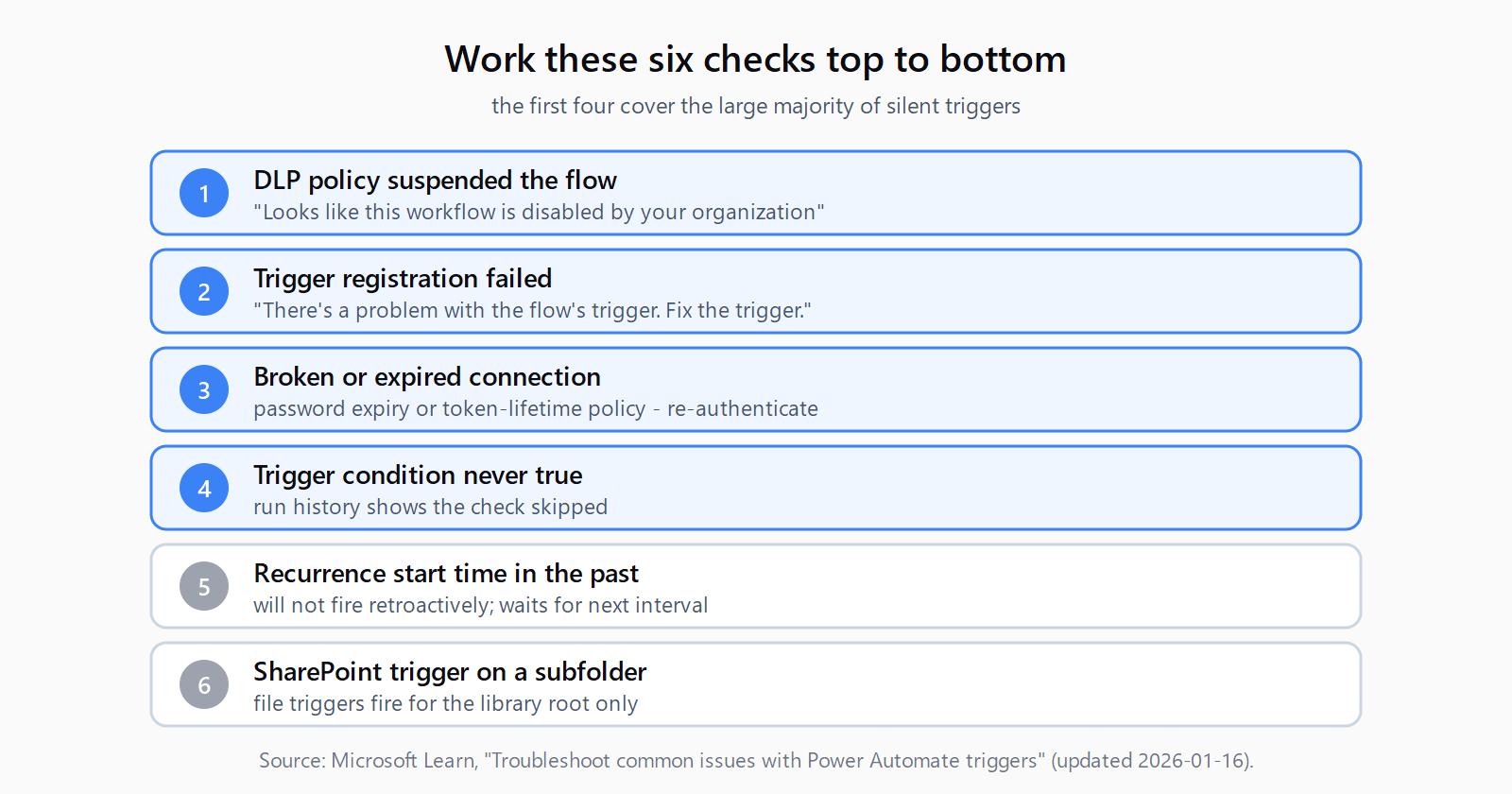
1. The flow is suspended by a DLP policy
Symptom: The trigger never fires and you see "Looks like this workflow is disabled by your organization" when creating or editing the flow.
Diagnostic: Open the flow and try to save it. The flow checker reports whether the flow violates a data loss prevention policy that mixes Business and Non-Business connectors.
Fix: An admin opens the Power Platform admin center, finds the tenant- or environment-level DLP policy blocking the connector pair, and updates or removes it. You cannot self-resolve this one without admin rights.
2. The trigger registration failed
Symptom: The flow details page shows "There's a problem with the flow's trigger. Fix the trigger." The flow will not run until this clears.
Diagnostic: Go to My flows, open the flow, and read the Details page. The banner means Power Automate tried repeatedly to register the trigger and failed - often because the service endpoints are not on your network allowlist.
Fix: Have IT add the required Power Automate IP addresses and domains to the allowlist. Then edit the flow, save it, edit it back, and save again - the re-save forces the trigger to register. These connection-layer failures are close cousins of Power Automate 401 and 403 errors, and the same allowlist gaps cause both.
3. The connection is broken or its token expired
Symptom: The flow ran fine for weeks, then stopped with no error in the run history.
Diagnostic: Go to More > Connections and find the connection the flow uses. A broken connection shows a status link asking you to fix it. Passwords expiring or a Microsoft Entra token-lifetime policy are the usual triggers.
Fix: Select the fix link next to the connection's status and re-authenticate. The trigger re-registers on the refreshed connection.
4. The trigger condition never evaluates true
Symptom: Events happen but the flow's run history shows the check as skipped, or shows nothing at all.
Diagnostic: Open the 28-day run history and select All runs. A skipped check means the trigger condition was not met. Open the trigger card, go to Settings, and read the Trigger conditions field.
Fix: Correct the condition expression so it matches the real event data. A common mistake is a condition referencing a column value that arrives in a different case or type than expected.
5. A recurrence trigger has a start time in the past
Symptom: A scheduled flow appears to do nothing after you enable it.
Diagnostic: Open the Recurrence card and check the Start time. If it is even slightly in the past when the flow is enabled, the recurrence will not fire retroactively - it waits for the next valid interval, which on a long interval can look like total silence.
Fix: Set Start time to a clearly future UTC value such as 2026-06-10T10:00:00Z, and confirm the flow's time zone matches your expectation. Time-zone drift is a frequent cause of recurrence misfires.
6. A SharePoint trigger is watching a subfolder
Symptom: "When a file is created or modified" never fires for files added inside a subfolder.
Diagnostic: Check whether the file lands in the root of the library or in a subfolder. SharePoint file triggers do not fire for subfolder events.
Fix: Create a separate flow per subfolder you need to watch, or restructure so the watched files land in the root. There is no single-flow setting that covers all subfolders.
How do you find a misfiring trigger in five minutes?
- Open the flow and save it - if it blocks, a DLP policy has suspended it.
- Read the Details page for "Fix the trigger" and clear it with a save-edit-save cycle.
- Check More > Connections and re-authenticate any broken connection.
- Open the 28-day run history and look for skipped trigger checks.
- Confirm a recurrence Start time is in the future and the time zone is correct.
- Verify the watched files are not in a SharePoint subfolder.
If all six pass and the flow still will not fire, check the catalog of Power Automate errors for the specific message in your run history, then test the flow manually to confirm whether the trigger or an action is the real blocker.
FAQ
Why does my Power Automate flow stop triggering after a few weeks?
The most common cause is a broken connection - an expired password or a token-lifetime policy invalidated the credential. Re-authenticate the connection under More > Connections and the trigger re-registers.
What does "There's a problem with the flow's trigger" mean?
Power Automate tried multiple times to register the trigger and failed, usually because its service endpoints are not on your network allowlist. Add the required IP addresses and domains, then re-save the flow.
Why doesn't my recurrence flow run on schedule?
Check the Start time on the Recurrence card. If it is in the past when you enable the flow, the schedule will not fire retroactively and waits for the next interval. Set a future start time and verify the time zone.
Why doesn't my SharePoint trigger fire for files in subfolders?
SharePoint file triggers only fire for the library root, not subfolders. Create one flow per subfolder you need to monitor, or move the watched files to the root.
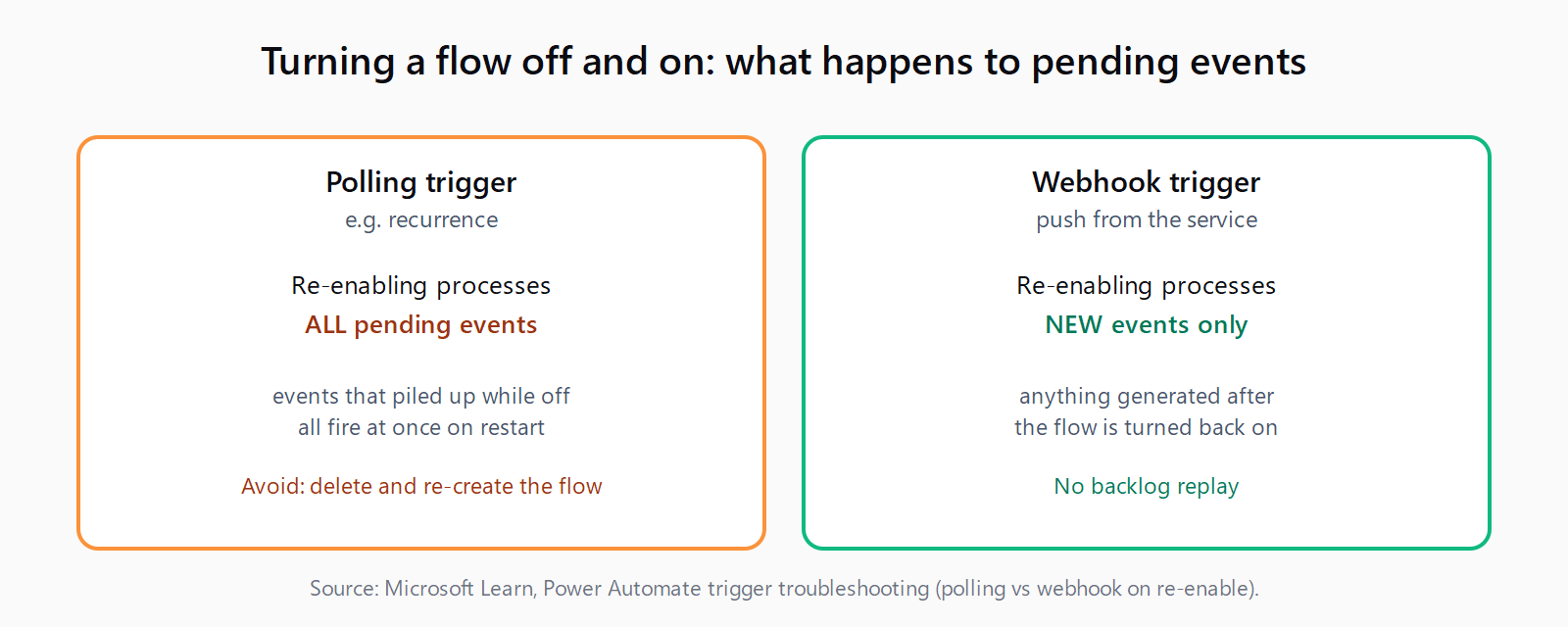
Does turning a flow off and on re-run old events?
It depends on the trigger type. A polling trigger like recurrence processes pending events when re-enabled; a webhook trigger only handles events generated after it is turned back on. Delete and re-create the flow if you do not want pending items processed.