
How to fix UiPath Studio 2024.10.1 EEUI / 1603 install error
MSI exit 1603 on UiPath Studio 2024.10.1 hides an AV-blocked rundll32. Whitelist the installer, install .NET 4.8.1, re-run - here's the log line that proves it.
TL;DR: The EEUI - InitializeEmbeddedUI failure with MSI exit 1603 on UiPath Studio 2024.10.1 happens when endpoint protection kills rundll32.exe; whitelist the installer, install .NET 4.8.1 plus ASP.NET Core 8.0, and re-run.
This one bites silent-install pipelines on Windows 11 where a corporate endpoint-protection update has rolled out between successful installs of older Studio versions and the 2024.10.1 build. The vendor's docs page for 1603 talks about disk space and permissions; the actual root cause is buried two log-lines deeper, and the generic "1603" wrapper sends most people down the wrong rabbit hole.
Why does the EEUI / InitializeEmbeddedUI install failure happen?
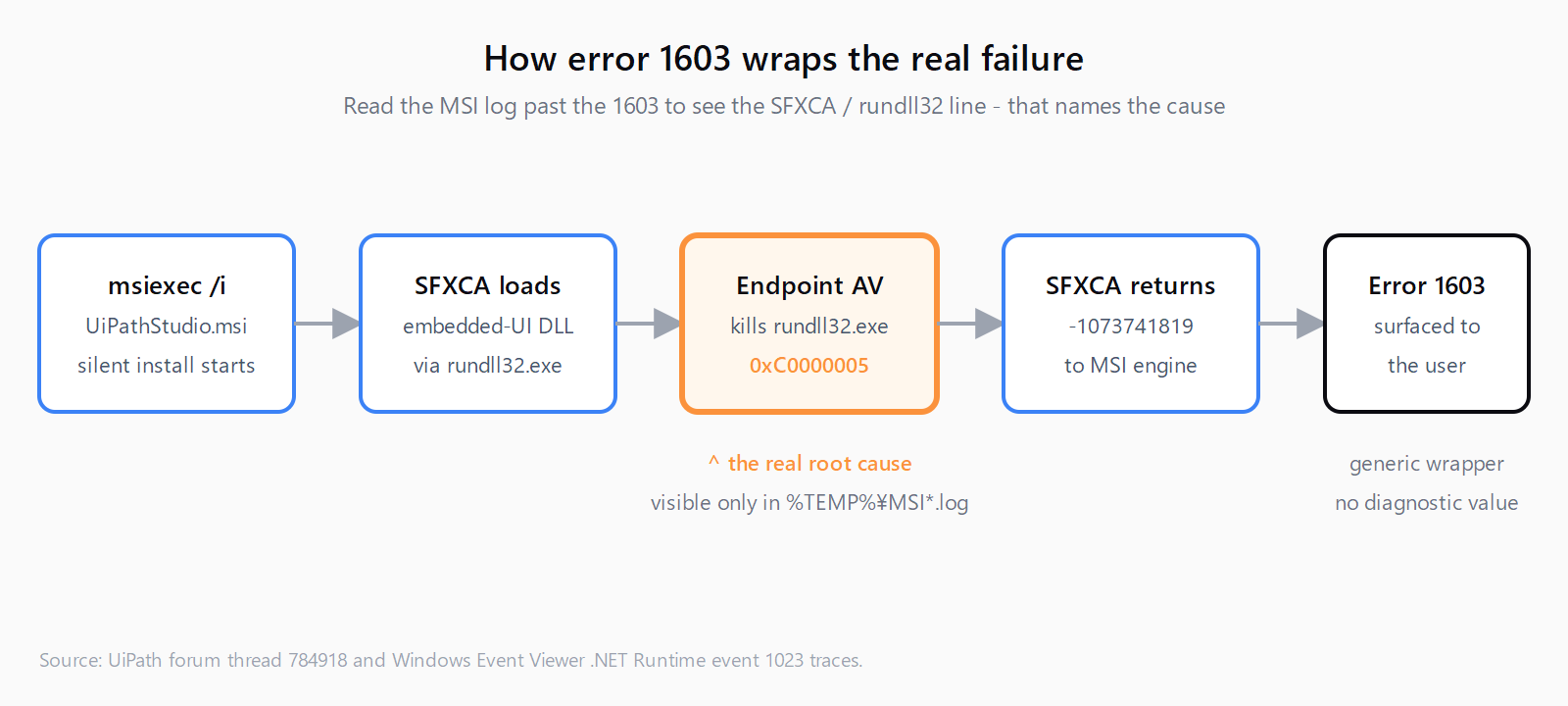
The UiPath Studio installer is built with WiX and uses an SFX custom action: a managed DLL packed inside the MSI is unpacked at install time and loaded by rundll32.exe to render the installer's embedded UI. When endpoint protection blocks or kills rundll32.exe during that load, the custom action returns -1073741819 (0xC0000005, access violation) and the MSI bubbles it up as a generic error 1603. The visible string is EEUI - Call to InitializeEmbeddedUI on a UI DLL failed, which is the WiX framework's wrapper around the failed call into the embedded-UI DLL.
The confirmed trigger on 2024.10.1 is a McAfee endpoint-protection update that started quarantining components of the UiPath installer, as documented in the UiPath community thread on the EEUI error. Defender and other AV products can produce the same signature when their signatures change. The Windows Event Viewer .NET Runtime entry shows event ID 1023 with rundll32.exe exit code 80131506 - a CLR "critical failure that the runtime cannot recover from", consistent with the process being killed mid-load.
How do you fix the EEUI install error?
- Whitelist the UiPath installer with your security team. Add the installer path and the unpacked temp folders (
%TEMP%\MSI*,%TEMP%\SFXCA*) to the endpoint-protection exclusions. For McAfee specifically, the on-access scanner and the threat-prevention process-monitoring rule both need the exclusion - whitelisting one without the other still killsrundll32.exe. This is the step that resolved the original report. - Install .NET Framework 4.8.1 and ASP.NET Core 8.0 Runtime. The custom action runs managed code; if either runtime is missing or one Windows-Update KB short, the load can fail before the AV path even matters. Pull them from Microsoft's download pages and reboot before retrying.
Re-run the installer. Use the same command line you started with. The silent-install pattern that surfaced this error is:
msiexec /i UiPathStudio.msi ADDLOCAL=DesktopFeature,Studio,Robot,Packages,JavaBridge,ChromeExtension,FirefoxExtension,EdgeExtension,ExcelAddin ENABLE_PIP=1 /QWatch the log; the SFXCA line should now show returned error code: 0.
Open the MSI log to confirm the cause. The 1603 alone is not diagnostic. Run with logging enabled, then open %TEMP%\MSI*.log (newest file) and search for SFXCA: RUNDLL32 returned error code. If the code is -1073741819 (0xC0000005) or 80131506, this is the AV scenario, not disk-space or permissions:
msiexec /i UiPathStudio.msi /L*V "%TEMP%\UiPathStudio.log" /qn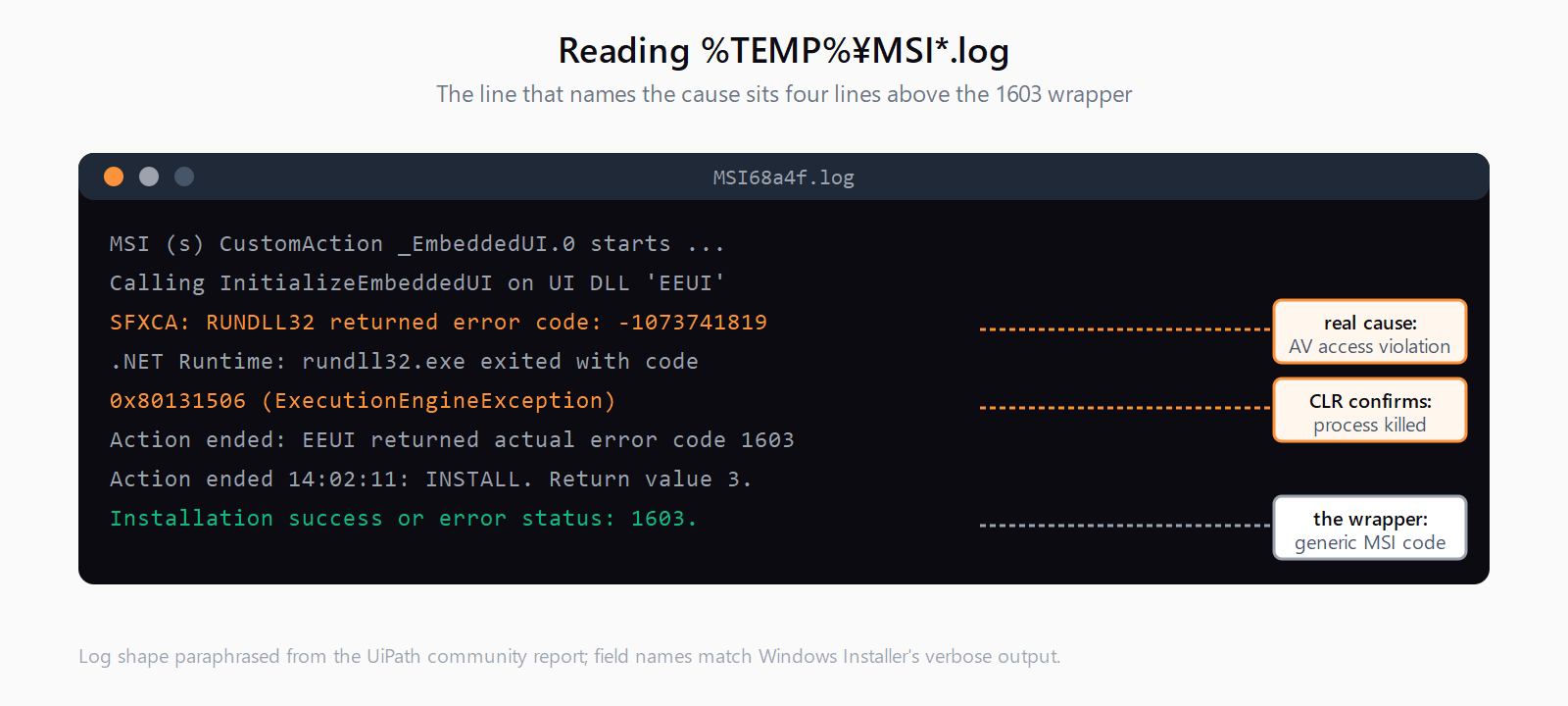
How do you verify the fix worked?
A clean install writes Installation success or error status: 0. as the final line of the MSI log, UiPath.Studio.exe appears under %ProgramFiles%\UiPath\Studio\, and the Studio shortcut launches without a license prompt on first run if the build was registered. Re-open the log and grep for SFXCA; every line should now end returned error code: 0.
What if the fix did not work?
A small number of cases survive the AV whitelist. Upgrading the installer is the next move: UiPath shipped fixes in the 24.10.5+ branch that harden the embedded-UI custom action against this specific load failure, so pulling the latest 2024.10.x MSI (or the 24.10.8 build referenced in the original thread) often clears the error without further work. If you must stay on 2024.10.1 and the log still shows 0xC0000005 after the whitelist, also enable TLS 1.2 in Internet Options and temporarily fully disable the AV (not just whitelist) to confirm the AV is still in scope, then escalate to the security vendor. The same diagnostic shape shows up across Power Automate authentication errors and other Windows-specific installer issues - "generic error wraps a security-agent intercept" is a recurring pattern on enterprise Windows endpoints.
FAQ
What does "EEUI - Call to InitializeEmbeddedUI on a UI DLL failed" actually mean?
EEUI stands for External Embedded UI - a WiX feature that lets the installer render its own UI from a managed DLL packed inside the MSI. The error fires when the framework cannot complete the call into that DLL, almost always because rundll32.exe was killed by something on the host before the DLL finished initializing.
Why does the MSI return 1603 when nothing in the visible UI explains why?
1603 is Windows Installer's generic "fatal error during installation" code - a wrapper, not a cause. The real failure is logged but only in the verbose MSI log, which is why opening %TEMP%\MSI*.log is the first step in UiPath's official 1603 guidance.
Is UiPath Studio 2024.10.1 production-ready?
Community reports flagged enough installer and runtime regressions that most teams moved to 2024.10.5 or later before rolling Studio out at scale. If you have any flexibility on version, install the latest 2024.10.x build instead of pinning 2024.10.1.
Where are the MSI installation logs?
For an msiexec-driven install they live in %TEMP%\MSI*.log (the filename includes random characters). For per-user automatic updates, check %LOCALAPPDATA%\UiPath\UpdateService\Logs\; for per-machine updates, %PROGRAMDATA%\UiPath\UpdateService\Logs\. Pass /L*V "%TEMP%\UiPathStudio.log" on the command line if you want a single predictable filename.
What is the .NET exit code 80131506?
It is a CLR ExecutionEngineException - the runtime crashed in a way it could not recover from. In Windows Event Viewer it shows up as Application Error / .NET Runtime event 1023 against rundll32.exe. On a UiPath install this almost always means the embedded-UI managed DLL was loaded into rundll32.exe and then the process was terminated externally (the AV) before the CLR could complete initialization.
Does upgrading to 24.10.5 fix this without an AV whitelist?
It often does, because the installer's custom-action hardening reduces the surface that AV agents flag. It is not a guarantee - if your endpoint protection is aggressive enough to quarantine the UiPath installer binary itself, you will still need the whitelist. If you also work in the Studio compiler stack, the diagnostic mindset of "read the verbose log, ignore the wrapper code" carries over to UiPath Studio publish errors like CS0246.
Hit a different error? Browse the Automation Error Index for a searchable catalog of UiPath errors, each with a verified fix.