
Fix LangChain create_react_agent 'unexpected keyword argument prompt'
The TypeError comes from a kwarg rename between langgraph versions - or the wrong create_react_agent import entirely. Here's how to tell which and fix it.
TL;DR: create_react_agent() got an unexpected keyword argument 'prompt' means your installed langgraph predates the state_modifier-to-prompt rename, so upgrade langgraph and langgraph-prebuilt, or pass state_modifier as a stopgap.
This bug shows up the moment a tutorial written against a current LangGraph release meets a project pinned to an older one. The error is real and reproducible - tracked in issue #31256 - but most answers stop at "pass a different kwarg" without explaining which of three near-identical functions is actually running, which is why the fix keeps not sticking.
Why does create_react_agent reject the prompt argument?
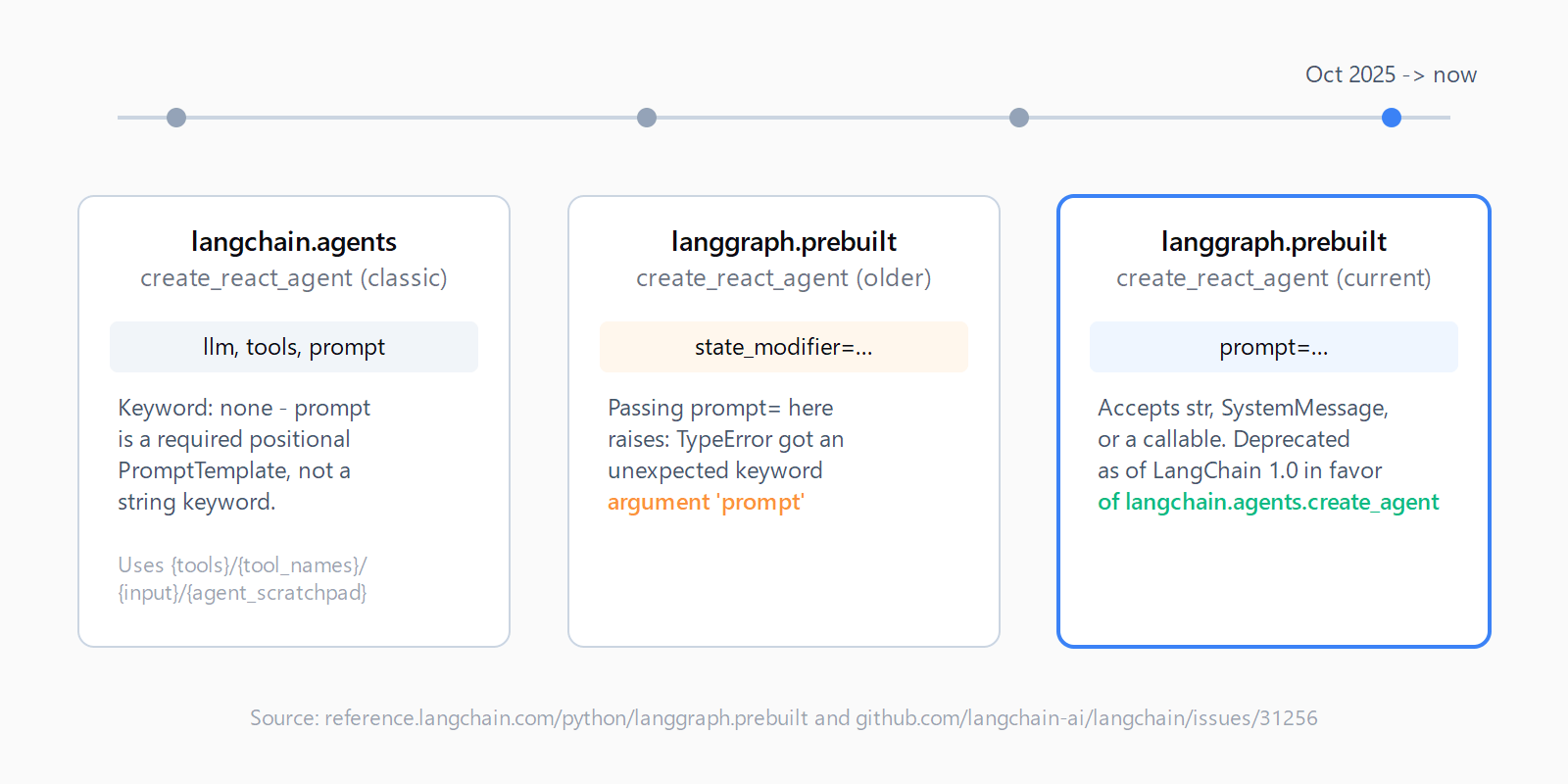
There are two functions named create_react_agent in the LangChain ecosystem, and they don't share a signature. langchain.agents.create_react_agent is the classic ReAct constructor - it takes a PromptTemplate as a required positional argument, built around the {tools}/{tool_names}/{input}/{agent_scratchpad} placeholder pattern. langgraph.prebuilt.create_react_agent is the newer, LangGraph-native constructor - it takes a prompt keyword that accepts a plain string, a SystemMessage, or a callable over graph state.
The TypeError in issue #31256 comes from a third wrinkle: earlier releases of langgraph.prebuilt.create_react_agent named that same keyword state_modifier, not prompt. The reporter was running langchain 0.3.25 with an out-of-date langgraph-prebuilt dependency, followed a current tutorial that used prompt=system_prompt, and hit a function that didn't recognize the name yet. Their own diagnosis in the thread - "the prompt can't be passed to parameter prompt but it can be passed to parameter state_modifier" - is exactly this version skew, not a bug in their code.
How do you fix the unexpected keyword argument error?
- Confirm which create_react_agent you imported. Check the top of the file -
from langchain.agents import create_react_agentis the classic constructor;from langgraph.prebuilt import create_react_agentis the LangGraph-native one. Theprompt=keyword only exists on the second. - Or use the old kwarg as a stopgap. If you can't upgrade immediately (a pinned lockfile, a shared environment), swap
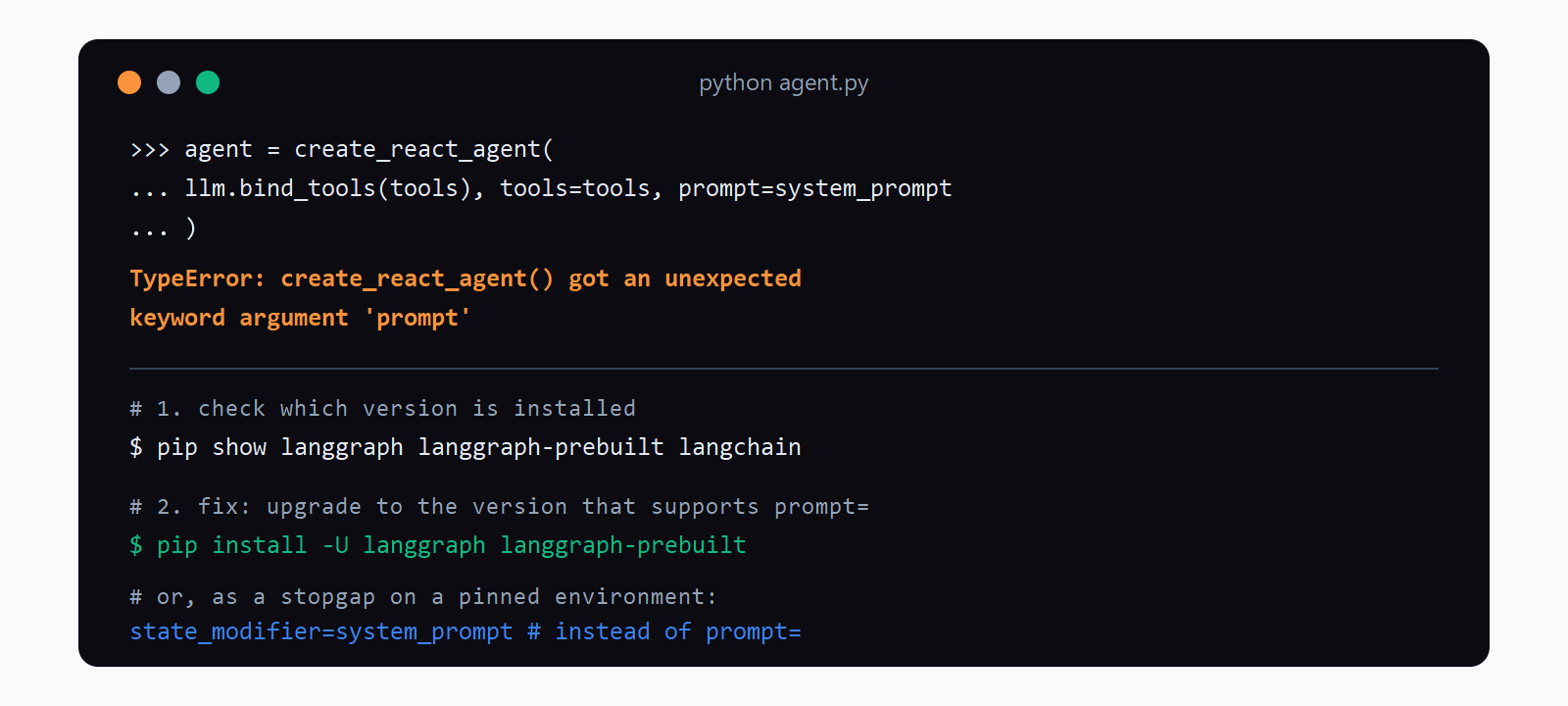
prompt=system_promptback tostate_modifier=system_prompt. The current release still accepts it through a deprecated-kwargs shim, so this unblocks you without touching the rest of the environment.
If you actually meant the classic constructor, build a real PromptTemplate instead of passing a bare string:
from langchain.agents import create_react_agent
from langchain_core.prompts import PromptTemplate

prompt = PromptTemplate.from_template(react_template_string)
agent = create_react_agent(llm, tools, prompt)
Passing a string where this function expects a PromptTemplate raises a different error (an attribute error on .format), so if that's what you're seeing, you're on the classic import.
Upgrade, if you're behind.
pip install -U langgraph langgraph-prebuiltThis is the durable fix - it also picks up bug fixes to the tool-calling loop itself.
Check your installed version.
pip show langgraph langgraph-prebuilt langchainCompare against the current signature reference, which lists prompt: Prompt | None = None as a supported keyword-only argument.
state_modifier if you can't upgrade right away.How do you verify the fix worked?
Run the agent construction call in isolation before wiring it into the rest of the app. If it returns a compiled graph (LangGraph path) or an agent runnable (classic path) with no traceback, the signature mismatch is resolved. Then invoke it once with a trivial prompt and confirm the system message actually shows up in the model's context - state_modifier and prompt are functionally equivalent, but a copy-pasted example that mixes both silently drops the one that isn't recognized instead of erroring, which is a worse failure mode than the TypeError.
What's the durable fix, not just the stopgap?
Since LangChain 1.0 shipped in October 2025, langgraph.prebuilt.create_react_agent itself is deprecated in favor of langchain.agents.create_agent, which takes system_prompt instead of prompt and drops some of the state-rewriting hooks the prebuilt version had. If you're starting a new project, building on create_agent directly skips this whole class of kwarg drift - see LangChain vs LangGraph decision criteria for when the underlying orchestration model still calls for LangGraph directly instead of the wrapped agent constructor. For an existing project on langgraph.prebuilt, patching the kwarg and upgrading is still the right near-term move - a full migration to create_agent is worth planning, not worth doing under deadline pressure to fix a one-line error.
This error sits in the same family as other agent-construction signature mismatches - if you're also seeing agent stopped due to iteration limit or an output parsing error on the same project, all three trace back to which generation of agent constructor the code is actually calling. The Automation Error Index catalogs the LangChain and LangGraph errors we've documented so far if the fix above doesn't match what you're seeing.
FAQ
What's the difference between langchain.agents.create_react_agent and langgraph.prebuilt.create_react_agent?
The classic version in langchain.agents takes a required PromptTemplate positional argument and drives a free-text ReAct loop with a custom output parser. The LangGraph-native version in langgraph.prebuilt takes an optional prompt keyword and runs on native tool calling instead of text parsing.
How do I check which langgraph version is installed?
Run pip show langgraph langgraph-prebuilt in the active environment and compare the version against the current API reference.
Is state_modifier still supported?
Yes, as a deprecated keyword accepted through a compatibility shim in current releases. It still works, but new code should use prompt instead - or migrate to langchain.agents.create_agent's system_prompt.
What replaced create_react_agent in LangChain 1.0?
langchain.agents.create_agent, released alongside LangChain 1.0 in October 2025, is now the recommended constructor. It uses system_prompt rather than prompt and drops some of the state-rewriting hooks (like pre_model_hook) that langgraph.prebuilt.create_react_agent exposed.
Why does my prompt get silently ignored instead of throwing an error?
If your code passes both state_modifier and prompt - for example while copy-pasting between two tutorials - only one is applied and the other is ignored without a warning. Pass exactly one of the two, matched to your installed version.
Does this happen in LangChain.js too?
The JavaScript equivalent renamed the same keyword to systemPrompt rather than prompt, so a Python tutorial's prompt= example doesn't translate directly - check the LangGraph.js reference for the current parameter name before porting code.